A PR nightmare for Yahoo

This is why you don’t give in to foreign governments with abysmal human rights records.  You just don’t. 

Moments later, government agents swarm through the front door — 10 of them, some in uniform, some not. They take Wang away. They take his computers and disks. They shove an official notice into Yu’s hands, tell her to keep quiet, and leave. This is how it’s done in China. This is how the internet police grab you

Five years later, Yu, 55, sits in the dining room of a small house in Fairfax and weeps softly. She is a slight woman — 100 pounds and barely 5 feet tall in slippers. Her eyes betray her exhaustion; but she is determined, too. She carries a thick stack of notes with her, and she has scrawled more on her left hand.

“Yahoo betrayed my husband and deprived him of freedom,” Yu says through a translator, her voice trembling. “Yahoo must learn its lesson.”

Link here, much more at BoingBoing.

Yahoo was in an ackward position, where the law of the land required them to turn over the data.  But what if you know that turning over this data may result in someone losing their life, or facing years in prison

I know for a fact that Yahoo people aren’t evil.  In fact, it is a group largely made of really good, well-meaning people who are actually sickened by this whole situation. So don’t blame the whole company. 

But sometimes, decisions are made by individuals in organizations that result in this type of action.  It’s a lesson in organizational ethics:  Set the standard, and then lose the damn business, fire the MBA moron who is harping about the opportunity, walk away.  Just don’t bother with it.

Alex Eckelberry

A conversation between development and product management

If you’re in the software development space, you’ll get this little humorous exchange that someone here at Sunbelt wrote:

Development: “You want answers?”
Product Management: “I think we are entitled to them!”

Development: “You want answers?!”
Product Management: “I want the truth!”

Development: “You can’t handle the truth!!!

Son, we live in a world that requires software. And that software must be built by people with elite skills. Who’s going to build it? You, Mr. Marketing? You, Mr. Sales? You, Mr. Finance? You, Mr. Human Resources? I don’t think so.

We have a greater responsibility than you can possibly fathom. You scoff at our open work areas and you curse our big screen monitors. You have that luxury. You have the luxury of not knowing what we know — that while the cost of delivering software may be excessive, it drives revenue and saves money. And my very existence, while grotesque and incomprehensible to you, drives BUSINESS!

You don’t want to know the truth because deep down in places you don’t talk about at staff meetings… you want me managing the project. You NEED me managing the project!
We use words like refactoring, test-driven development, continuous integration, sprint, velocity, and release planning. We use these words as the backbone of a life spent delivering something. You use them as a punch line!

I have neither the time nor inclination to explain myself to people who rise and sleep under the very blanket of software I provide and then question the manner in which I provide it. I would rather you just said “thank you” and went on your way. Otherwise I suggest you log in to a computer and write some code. Either way, I don’t give a damn what you think you’re entitled to!”

Product Management: “Did you cut the monthly scheduler feature?”
Development: “I did the job I was hired to do.”

Product Management: “Did you cut the monthly scheduler feature?”
Development: “I delivered the release on time.”

Product Management: “Did you cut the monthly scheduler feature?”
Development: “You’re g%$#@*& right I did!”

Alex Eckelberry

Update: My mistake, this was actually from the Agile chronicles site.

Ninja upgrade shipped

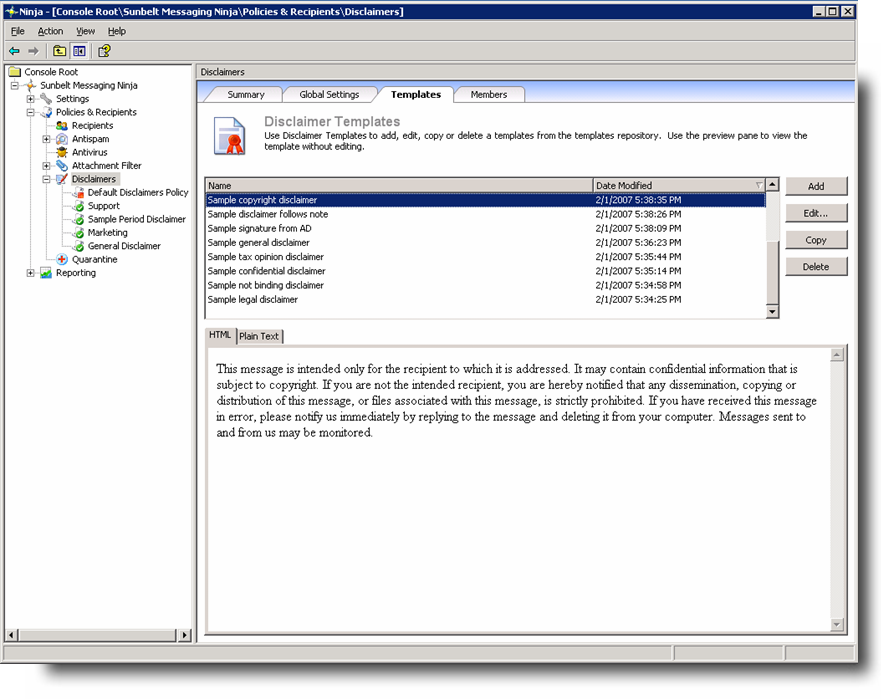
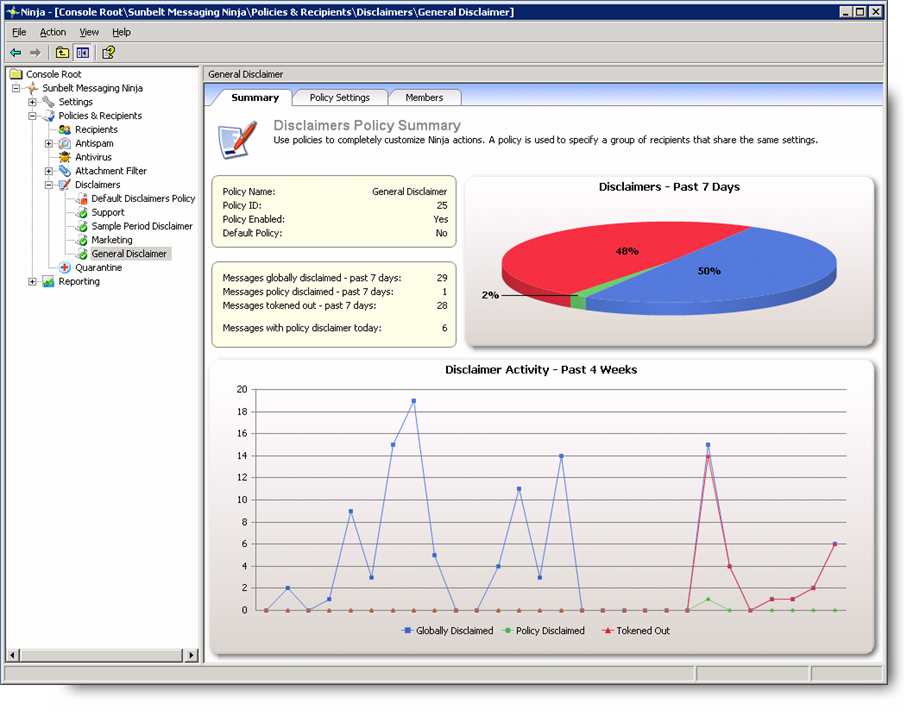
We just did a nice upgrade to our Ninja email security product — it now includes disclaimer functionality built-in. This makes Ninja a ridiculous bargain in email security — dual-engine antispam, dual-engine AV, attachment filtering and disclaimers — all integrated.

New features in Ninja 2.1 include disclaimer functionality, an improved antispam engine for better spam detection, and console management enhancements.

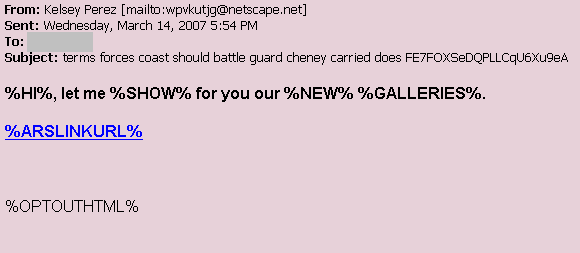
Disclaim1239888123

Disclaim1239888124
You can view the webcast I did yesterday on it here, and our company propoganda here.

Alex Eckelberry

Sunbelt Weekly TechTips #35

OEM Vista upgrade frustration
If you bought a new Dell prior to the release of Vista, you had the option of selecting a Vista upgrade when the OS became available. I installed Vista from scratch on my Dell and avoided all that, but I’m hearing that some of the folks who opted for the upgrade have had long waits to get their software and that some of them are finding that Dell doesn’t have Vista drivers available for all of their hardware components. A quick web search finds that some people have recorded their experiences. We wonder if the same thing is happening with those who ordered upgrades with other brands. Let us know if you’ve experienced any problems with a hardware manufacturer’s Vista upgrade option.

Vista deactivation blues
Joe Wilcox blogged last week about a friend’s scramble to get his Vista computer working because he had failed to activate it when he installed Vista and the 30 day period ran out right at the time he suddenly decided he needed the laptop for a business trip. Sounds to me like all the drama was self- inflicted, but you can read and decide for yourself.

Vista: Improved Remote Desktop Connection
Like Windows XP Pro, Vista Business, Ultimate and Enterprise editions includes the Remote Desktop Connection service that allows you to connect to your computer and control its desktop, run its applications, etc. from another system on the network. RDC is based on Windows Terminal Services. The RDC client is included in all versions of Vista and can be used to connect to a Vista Business, Ultimate or Enterprise machine’s desktop or to a Windows Terminal Server. The new RDC client built into Vista makes RDC more secure, by using a new technology called Network Layer Authentication. You don’t have to upgrade to Vista to use the new RDC client, though. You can download a version of RDC 6.0 for XP here.

How to change the time stamp on a group of files
Here’s a by-product of Daylight Saving Time you might not have thought about: a colleague mentioned to me that whenever the time changes, his synchronization software thinks all the files have been updated on the USB flash drive he carries to transfer data between home and office, and wants to sync them all. He asked if there’s a way to change the time stamps on those files.

I use PowerDesk to do that: just open the PowerDesk Explorer, navigate to the location of the files you want to change, highlight them all, click File and select Set File or Folder Date/Time. Then type in the date or time you want to change it to and it’s done. You can use the free version of PowerDesk, or a little freeware utility called Time Stamp 1.1 that does the same thing. (On the subject of PowerDesk, the original developer, Mike Kronenberg, is rumored to be coming out with his own version of the product in several weeks. So if you’re thinking of buying a copy, I would hold off for a bit and contact his company, Novatix, to see what the plans are).

Additional Tip: If you just want to change the date stamp on a group of graphics files, but not the time, you can do it by right clicking the group of highlighted files in Vista Explorer, selecting Properties, clicking the Details tab and clicking the Date Taken field. This will drop down a calendar that lets you pick a new date.

How to change the name of the registered owner in XP
To change the name of the registered owner in XP, do the following:

  1. Click Start Run and type regedit to open the registry editor.
  2. Browse to the following key: HKEY_LOCAL_MACHINESOFTWAREMicrosoftWindows NTCurrentVersion
  3. In the right details pane, double click the value RegisteredOwner.
  4. In the value data field, type in the name you want to use and click OK.

You can change the company name, if any, in the same way by editing the value RegisteredOrganization.

If you’d prefer not to edit the registry directly, there is an automated script you can download from the Kelly’s Korner web site that will do it for you.

Can’t download files to XP computer with IE 7
If you’ve installed Internet Explorer 7 on your Windows XP computer and find that you are unable to save files to your computer from the File Download dialog box, it may be because you have the Japanese Input Method Editor set as the default keyboard layout. What’s up with that? You can get a hotfix for the problem. To find out how, see KB article 932823.

How to change column settings in Windows Explorer
You can configure Explorer to display the columns that you want to see, or change the order in which the columns are displayed, by following the instructions in KB article 310297.

XP computer restarts unexpectedly or you get a stop error
If your computer suddenly decides to reboot itself without your permission and you get an error message saying the system has recovered from a serious error, or you receive a Stop error message that references “Driver_IRQL_Not_Less_Or_Equal,” this may be caused by a problem with the TCP/IP stack on a network running the IP Security (IPsec) protocols. There is a hotfix available. For more info, see KB article 925922.

Deb Shinder, MVP

Seen in the wild: Advertising in a trojan

As a brief follow-up to my previous blog today about advertising in spyware:  The Zlob trojan comes through fake codecs.  It’s nasty and not something you want on your system, and one thing you may get is ads.  In this case we found today, ads are spawned through entertainclicks(dot)com/cu/index.html, which you can see for yourself (in a vmware, please), the ads that the site shows on infected machines.  The ads feed top10–offers(dot)com.

Offer10099123

Offer10099123a

Offer10099123b

Offer112934810808

Alex Eckelberry
(Thanks Patrick)

Supporting spyware

The practice of advertising in spyware directly supports spyware itself. It’s something that’s garnered some attention, with the New York AG’s office coming to a settlement in January with three major online advertisers over the matter.

However, Ben Edelman shows how this practice is continuing.

“…despite their duties to the NYAG, both Cingular and Travelocity have failed to sever their ties with spyware vendors. As shown in the six examples below, Cingular and Travelocity continue to receive spyware-originating traffic, including traffic from some of the web’s most notorious and most widespread spyware, in direct violation of their respective Assurances of Discontinuance. That said, Priceline seems to have succeeded in substantially reducing these relationships — suggesting that Cingular and Travelocity could do better if they put forth appropriate effort.”

It’s worth noting that advertisements are typically placed through third party advertising networks (to see how this works, read my earlier blog entry here). Because they are using an intermediary, some advertisers may claim that they can’t control where their ads are placed, which is a crock. Just because you buy ads through a third-party ad network does not mean you can’t control it. For example, when one major security software company found its products being advertised inadvertently in spyware, they found the source and clamped down — and this is a company that advertisers a lot online. The same goes for a number of other companies.

To avoid getting ads placed in spyware, an advertiser can, at the least, a) choose third party ad networks that have a demonstrated track record of not placing ads in spyware and b) make the third party ad network attest in writing that they will not place your ads in spyware.

Things have gotten better in the third party ad network side. When AOL bought Advertising.com, they immediately dumped $100 million in business that was being done through spyware. And a number of other third party ad networks are clamping down, refusing to advertise through spyware programs.

But as Ben writes, it’s still happening. And that money spent by advertisers directly supports the makers of spyware.

Alex Eckelberry

Heads-up: Congress to debate spyware bills this Thursday

Evidently the House Commerce Committee will be holding a hearing on the various spyware bills this Thursday at 11 am EDT. Scheduled to testify are: the CDT, NAI, Zango, and one other group, among others. The FTC will not be testifying.

The house.gov may offer a live feed of the hearing somewhere on the house.gov web site. As soon as I find out more, I’ll post this to the blog.

Alex Eckelberry
(Thanks Eric H.)

Ready for Redmond and Windows Home Server

I’m getting ready to spend next week in Seattle and in Redmond at the Microsoft main campus. It’s that time of the year again, when Microsoft hosts the annual MVP Summit, and it’s a time when I not only get to meet in person some of my fellow MVPs from around the world, but also get some great “inside information” on upcoming Microsoft products, some of which I’ll be able to share with readers.

It’s always interesting being inside the belly of the beast, and this year – for the first time in several years due to scheduling conflicts – Bill Gates will once again be with us for the festivities (not that I didn’t enjoy Steve Ballmer’s dynamic speeches). We leave early Monday morning and come back Thursday night, and we have a very full schedule – from 8:00 a.m. to 11:00 p.m. every day (that includes the official dinners and parties, which provide great opportunities for networking and finding out what’s going on “under the hood”).

There are different tracks for different specialties, and mine is security so I’m hoping to learn more about how Microsoft plans to make future products even more secure, but I’m also hoping to find out a little bit about some of the features that will be included in those products. Everything that doesn’t fall under the non-disclosure agreement, I’ll be writing about in the next few weeks, here and on my blog. While on the road, I’m planning to take advantage of T-Mobile’s offer of free HotSpot wireless for Vista users, and I’ll be reporting back to you on that.

Meanwhile, last week I was invited to partake of the Windows Home Server private beta. WHS is an interesting concept and we got a first look at it at the Consumer Electronics Show (CES) in January. This is an operating system that’s based on Windows Server 2003 R2, Microsoft’s enterprise-level server OS – but it’s designed for home use and is supposed to be so simple your grandmother can administer it.

Why would anyone need a server at home? Remember that only a few decades ago, the idea of home computers was dismissed by many as a flight of fancy. Now, according to recent statistics there are at least 40 million households all over the world that have high speed Internet access and at least two computers in their homes. Where there are two or more computers, sooner or later there’s likely to be a home network. And once there’s a network, a server can’t be far behind.

The main purpose of a server is to provide a centralized place for storing files so multiple users can access them easily. This also makes it much easier to back them up, since they’re all in one place, and that makes it less likely that you’ll lose important data.

Of course, you can share files on a home network without having a server. All you need to do is set up a peer to peer network and make your computers members of the same workgroup. The problem with this scenario is that the shared files stay on individual workstations. That means they may not always be available when you need them. If mom turns off her PC at night, or dad disconnects his laptop and takes it to the office with him, or Junior’s system crashes, others on the home network lose access to any shared files on those computers.

That’s the reason many families are already using de facto servers. They designate one computer, often an old desktop PC that’s left over after someone gets a new one, put it in a central location, leave it on all the time and have everyone save the files they want to share to a shared folder on that system. This works, in a crude fashion. What Microsoft aims to do with WHS is take the idea a step or two further.

WHS uses a brand new technology to aggregate all the files that are stored on the server into a single “storage pool” so you don’t have to worry about drive letters and which drive you saved something to. It also mirrors the data to two different disks, so that you have fault tolerance similar to what businesses and techies get with RAID, but it’s set up automatically and much easier to work with – no advanced technical knowledge is required. And when you outgrow the disks in the system, you can swap out your 200 GB drive for a 500 using a wizard that preserves your files and keeps them accessible.

The Windows Home Server also automatically backs up not just everything on the server, but files on all the other PCs on the home network, too. There’s a full PC image of each computer so that if any computer has to be restored, it’s easy to do. And WHS monitors security related settings on all the PCs so that you can know whether all the computers have their anti-virus software turned on, for example.

One great use for a home server is to share media files such as music and recorded TV programs. And it’s not just other computers that can access these files on WHS. Media Center PCs and Xbox 360s can also play songs and shows from the server. And if you’re at the office or out there on the road, you can access the information on WHS remotely over the Internet.

Note that the server doesn’t function as a regular computer in that you can’t sit down at it and work at it. It doesn’t have a monitor or keyboard or even a place to plug them in. The hardware connections are as simple as it gets: other than the power cord there’s only one jack, an RJ45 Ethernet port. You plug the server into your network’s hub or router and set it up through another PC on the network.

I’ll be reporting more on WHS in the future. Meanwhile, tell us what you think about the idea. Is it another solution in search of a problem, or a great idea? Do you run a server on your home network now? Would you if it were easier to do? Or are servers just for businesses? What’s your “wish list” for a home server (what do you want it to do for you)?

Deb Shinder, MVP
I’m doing a Web preso tomorrow on Ninja

Greg Kras and I are a web presentation tomorrow on our Ninja email security product. Feel free to join in for the fun:

Live Web Demo Of New Ninja V2.1
Join us for a preview of Next-Generation Email Security from Sunbelt Messaging Ninja with Alex Eckelberry, President and Greg Kras, VP of Product Management for Sunbelt Software on Tuesday March 13th at 2:00pm EDT for a live web demo introducing the new Version 2.1 of Sunbelt Messaging Ninja for Microsoft Exchange. Learn about the features of this robust email security product including:

  • Policy-based plug-in management for antispam, AV, and attachment filtering
  • New policy-based and global disclaimers
  • Fast deployment in Exchange environments
  • Superior spam detection using two antispam engines
  • Aggressive virus detection and elimination using two AV engines
  • Custom rules for content inspection and attachment filtering
  • Powerful reporting options for all plug-ins
  • And more…

When: Tuesday, March 13, 2007 2:00 PM (EDT)
To join the day of the event please visit:
http://www.wservernews.com/070312-Ninja-Web-Demo
Meeting ID: 92SSQC
Attendee Meeting Key: XR*mw9Z
Audio: Toll free: +1 (800) 416-4956
Toll: +1 (978) 964-0050

Alex Eckelberry

Fun with HDR

Over the holidays, I bought myself a Canon Rebel XTi as a Christmas present.  It’s my first digital SLR (I have an analog 35 mm SLR and plenty of digital point and shoots, but never made the leap to digital SLR) and I’ve been learning slowly but surely, with a bit of help from Robert LaFollette, Sunbelt’s creative director (and an uber-guru on photography). 

One area I’ve been playing with is HDR (High Dynamic Range), using PhotoMatix.  I love the effect but there are tricks to learn to do it well.  Of course Robert’s done plenty of HDR and he sent me this incredible HDR photo he took in Miami a few weeks ago.

Hdr0000123

You can see more of Robert’s pics here.  And if you want to see lots of HDR flicks, there’s also a HDR section on Flickr.

Alex Eckelberry

Is the Direct Revenue settlement fair?

Byebye123123123123

The FTC is proposing a $1.5 million settlement with Direct Revenue.

Do you agree? You can voice your opinion by sending an email here.

If you want a great source of documents about how Direct Revenue practiced their business in the past, you can go to Ben Edelman’s page here. This is a company that made a lot of money during their heydey and caused a lot of pain.

I will note that we have been trying to get Direct Revenue’s software to load, and their installers all look dead. The company looks DOA.

Alex Eckelberry

You don’t have to buy guns, ammo and non-perishable food products, but…

DST is this Sunday. Be prepared for some potential problems. 

For example, a number of us are seeing our calendar entries in Outlook all off an hour for three weeks in March.

Remember, the world runs on Windows now… for better or for worse.

Alex Eckelberry

OneCare deletes Outlook and Outlook Express files?

I’m never going to nag a competitor having false positives, because all antispyware and antivirus companies have problems from time-to-time with FPs.  But the key is how fast they are corrected.

I was a bit surprised by a story in ComputerWorld where OneCare is deleting Outlook and Outlook Express files.  There’s two problems here:  Apparently in some cases, OneCare removing the entire PST or DBX file if a virus is found in one message (gulp) but more importantly, this was first reported six weeks ago by a Microsoft MVP.  And the bug is not being fixed until next Tuesday.

Alex Eckelberry

Bill O’Reilly under DDoS

I guess someone wants to make a point.

We apologize for the difficulties you may have had in connecting to the site over the past 48 hours. BillOReilly.com was attacked repeatedly by a malicious technology called a “botnet.” This means that the site was bombarded by data that overloaded our firewalls. We had to take the site down in order to protect it, and so we could make sure that every possible countermeasure was being taken.

We will do our best to keep the site up and running, and will keep you informed of new developments. Thank you for your patience and your understanding.
Billor00091233

Alex Eckelberry

And here’s where I completely agree with Bill Gates

If lawmakers had any idea as to how difficult it is to find top talent anywhere in the US these day, they would never continue to consider this immigration policy — all in the name of anti-terrorism.

Bill Gates, the chairman of Micro­soft, on Wednesday warned that restrictions on the number of skilled workers allowed to enter the US put the country’s competitiveness at risk. (Link here.)

Al-Qaeda did a repulsive thing on 9/11 which cost precious lives and for a short period of time, had catastrophic effects on our economy. But they didn’t win — at least then.

But let’s not forget the real cost of 9/11: Fear and paranoia, increasing suppression of our civil liberties, restrictive travel policies that are affecting our tourism industry, and more of these laws which will directly hamper our ability to be a competitive world leader.

If we continue in this manner, Al-Qaeda can only be pleased —– to take a strong, free, proud and open country and turn it into what it’s rapidly becoming: self-destructively phobic.

Alex