Jim Allchin clarifies

Over the whole AV thing:

When the articles and blogs started appearing, I asked the PR folks to send me a copy of the transcript of the call so I could read it over and see if I said something I didn’t mean. After reading the transcript, I could certainly see that what I said wasn’t as clear as it could have been, and I’m sorry for that. However, it is also clear from the transcript that I didn’t say that users shouldn’t run antivirus software with Windows Vista! In fact, later in the call, I explicitly made this point again, because I had realized I wasn’t as clear as I should have been. It’s important for me that our customers are using the appropriate security solutions for the right situations, whether that’s security functionality integrated in the operating systems, or add-on products.

Link here, with more at Betanews.

Alex Eckelberry

Allchin on AV in Vista

I have no beef with Allchin, but this seems optimistic:

During a telephone conference with reporters yesterday, outgoing Microsoft co-president Jim Allchin, while touting the new security features of Windows Vista, which was released to manufacturing yesterday, told a reporter that the system’s new lockdown features are so capable and thorough that he was comfortable with his own seven-year-old son using Vista without antivirus software installed.

Link here (via realtech and Jeff Nolan).

Ok, Vista is a vastly improved security model, but what about the fact that probably well over 90% of all viruses come through email?   You get an email that says “Please reset your password, open the attached file”, you open it and it’s a virus.  It’s the user executing a virus.  How will Vista protect against that?  Furthermore, what about downloading a trojan?

Alex


Reminder: Watch that metadata

Yesterday, the American Bar Association gave the green light for lawyers to view metadata (extraneous information in a file such as who created it, what changes have been made, etc.).  . 

Lawyers who receive electronic documents are free to look for and use information hidden in metadata –  information embedded in electronically produced documents –  even if the documents were provided by an opposing lawyer, according to a new ethics opinion from the American Bar Association.

The opinion is contrary to the view of some legal ethics authorities, which have found it ethically impermissible as a matter of honesty for lawyers to search documents they receive from other lawyers for metadata or to use what they find, according to the ABA Standing Committee on Ethics and Professional Responsibility. 

Link here (via beSpacific).

You can also see go to my previous posting on metadata, which included a link to the free Remove Hidden Data tool.

Alex Eckelberry

More ridiculous scare tactics

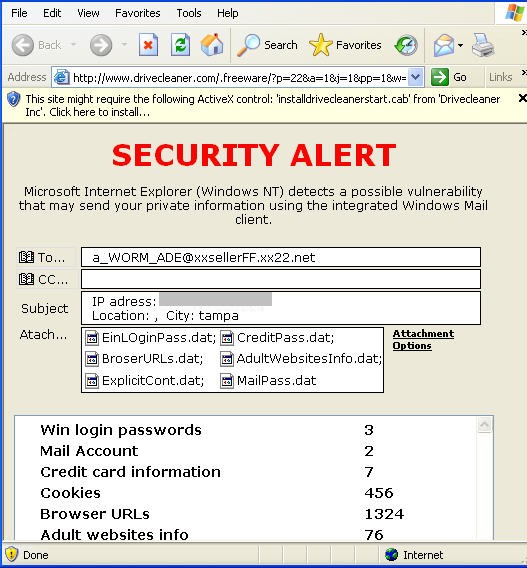
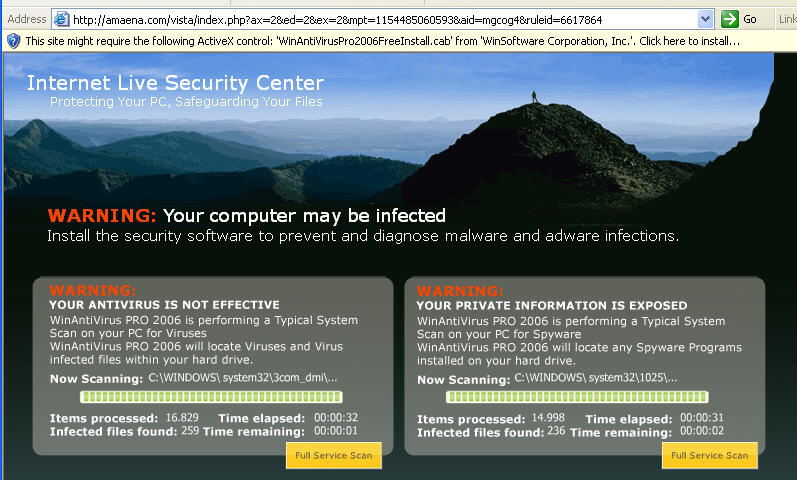
Courtesy of Innovative Marketing… 

Dirvecleawner1908123

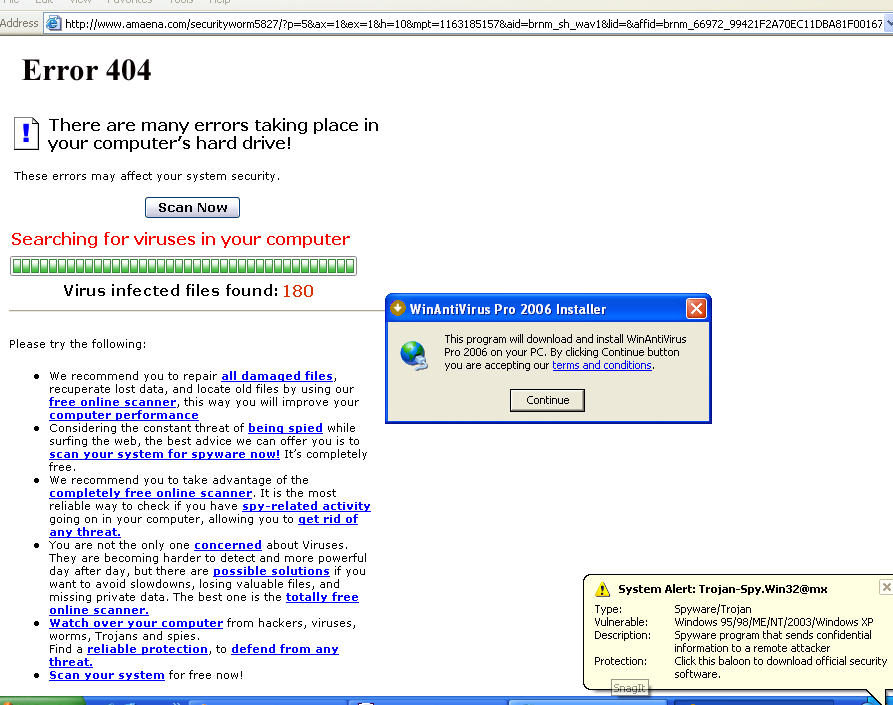
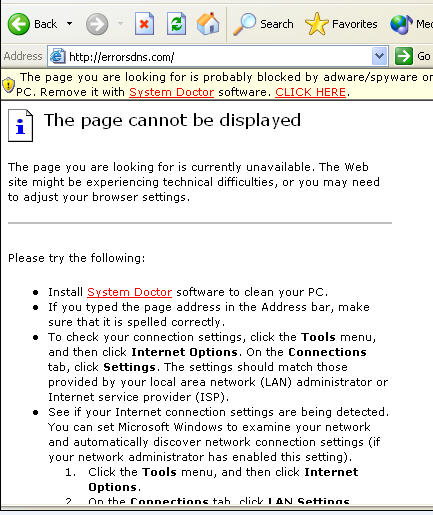
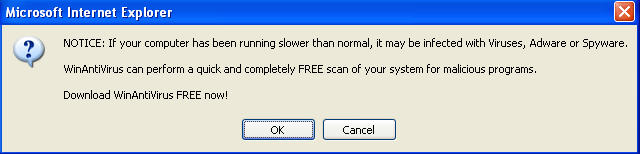
And while we’re at it, this is the group who first started with Internetantispy(dot)com (which opened the CDRom door to scare you into buying their application).  Now we see amaena(dot)com using popup scare messages.

Amaena.com_winantiviruspro11102006

This is their latest URL:  amaena(dot)com/vista, so it looks like they are getting ready to use the name Vista when Microsoft releases it. 

Amaena2

Patrick Jordan

New draft guidlines for extended validation SSL certs

Ie71209123123123
(From the CA/B forum, the green chrome that would be in IE 7 for EV SSL)

Help for phishing?  The CA/Browser forum has published a draft guidelin for Extended Validation SSL:

EV SSL is a “’voluntary ‘standard’ that would impose rigorous authentication policies via participating certificate authorities, who will be independently audited for compliance.  In return, websites with EV SSL would get special treatment in the browsers, including a “green chrome” in IE7 and an expanded security report showing the owner of the website.  (Existing domain validation and organisation validation certificates would retain the simple ‘padlock’ display).”

Link here.

Alex Eckelberry 

Getting your health insurance records

Not many people know this, but you have the right and abiltiy to get certain insurance records — and correct the information if it’s wrong.  If you’re interested in getting a copy of your health insurance records, you can go to the Medical Insurance Bureau and request a copy.   It’s not much fun going through the firm’s voice response system, but you’ll get your file with a bit of patience.  (Note that if you have not applied for individually underwritten life, health, or disability insurance over the last seven years, MIB will not have a record on you.)

You can also listen to an interview with Michael Ravnitzky on the subject here.  

Alex Eckelberry

1 in 10 fall to phishing?

I don’t buy this study. This would indicate that out of a billion users, over 100 million have fallen for a phishing scam.  While plenty of people fall victim to phishing attacks, it’s nowhere near that number.

One in 10 internet users may be lured into handing over sensitive personal information such as a credit card number, by fraudulent “phishing” emails, research suggests…

Previous studies, including a telephone survey conducted by US research company Gartner in 2004, have indicated that about 5% of all internet users have fallen for phishing messages.

But Markus Jakobsson and Jacob Ratkiewicz at Indiana University, US, suspected this was an underestimation. The reasoned that some survey participants may not have realised that they have been stung by a phishing scam, or may simply be too embarrassed to admit to it.

The research methodology is interesting:  This team actually created a fake phishing site to see who would respond.

New Scientist article, link here.  More at beSpacific, including a study on ethical phishing experiments.

Alex Eckelberry

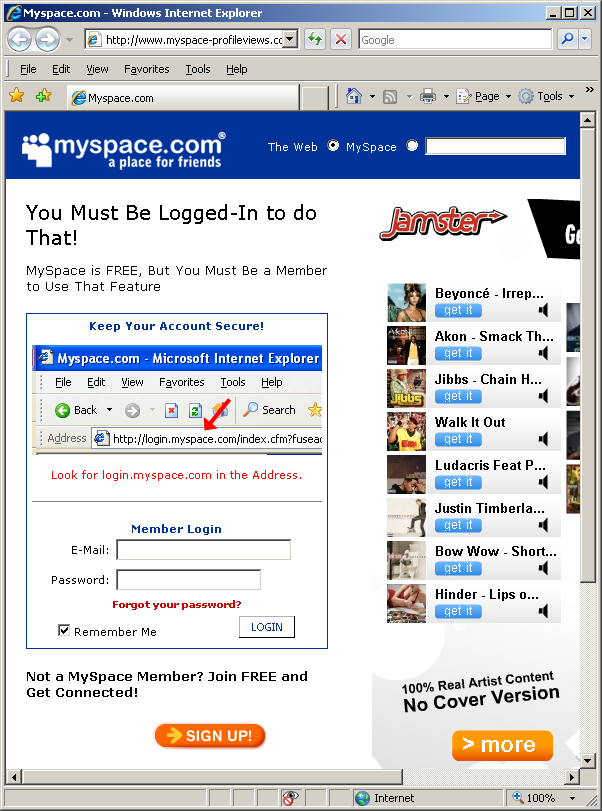
Example Myspace phish

Devious.

We start with a link in a post:

Bulletin123123123

The link points to www(dot)logins-myspace-profiles(dot)n3t.nl, which opens an IFrame and loads the following site (www(dot)myspace-profileviews(dot)com/login/).  This is a very realistic phishing site, complete with the same ads served on myspace.   
 
Mspace10912310712312

More at Todd Towles’ site (thanks Todd for sending this to me).

Alex Eckelberry

Another zero day: WMIObjectBroker

This one has been out for a while but now it’s reported in the wild.

From SANS:

Rohit from Tippingpoint adviced us that he is seeing a large number of attacks from Russia using an un-patched vulnerability in the WMIObjectBroker ActiveX control (CVE-2006-4704). He is seeing it used as part of a drive-by download. Typically, the Trojan “Galopoper.A” is load.

There is no patch available at this point. Tippingpoint and the Bleedingthreats projects have signatures available to detect this attack. Rohit mentioned that there is a metasploit module for this vulnerability.

Microsoft link here, with workarounds.

Secunia here.

CERT here.

I’ll have more news as it comes out.

Alex Eckelberry

Sunbelt weekly TechTips

Virtual PC is free
I’ve had a number of inquiries recently about virtual machine software. It seems that a lot of folks either want to run Vista in a VM instead of installing it outright on their computers, or they have upgraded to Vista and want to run XP in a VM so they’ll have access to some old applications that don’t work with Vista. You’ll be happy to know that Microsoft’s Virtual PC (VPC) VM application is now a free download. You can install VPC 2004 on XP and run Vista in the VM, or you can install VPC 2007 (beta) on Vista and then install XP in the VM. Find out more here.  There are also various free options at Vmware, here

Vista: Hail the new Reliability and Performance Monitor
A new and useful feature in Windows Vista is the Reliability and Performance Monitor, which is a more sophisticated version of the Performance tool in XP Professional. You can open it in the same way: in the Run box, type perfmon, or you can click the Resource Monitor button on the Performance tab in Task Manager.

124eb591-5c79-40b6-81a7-ea39ad7df36c

The top level node (Reliability and Performance) provides a nice resource overview, with graphs showing CPU, disk, network and memory usage. The Performance monitor is similar to XP’s; you can add counters for various performance objects (for instance, your processor) and measure performance in real time on a graph or output the performance information to a report. The “new guy on the block” is the Reliability Monitor, which shows software installs and uninstalls, application failures, hardware failures and Windows and miscellaneous failures. For example, the Monitor on my Vista machine shows that Outlook had a failure on October 21.  A more technical overview is available here. (Thanks to Microsoft for the screencap above).

How to keep tabs on the mouse pointer
Sometimes it’s difficult to find the pointer arrow on certain desktop backgrounds, especially if you have vision problems. You can make it easier to keep up with the pesky pointer by following these steps:

  1. Click Start | Control Panel.
  2. In Classic View, click the Mouse applet. In Category view, click Printers and Other Hardware, then click Mouse.
  3. Click the Pointer Options tab.
  4. Check the box that says “Show location of pointer when I press the CTRL key.”
  5. Click OK.
  6. Now when you hit the Control key, an animated circle will show you the location of your pointer.

Is Anti-Virus Software Ineffective?
Joanna Rutkowska, the same researcher whose BlackHat presentation last summer resulted in all the headlines alleging a security flaw in Vista (the vulnerability turned out to be in AMD’s virtualization technology) now is making headlines again. According to Rutkowska, she’s “not impressed” with any of today’s existing anti-virus solutions and wants to see a solution based on integrity checking of all system components. Read more here.

How to turn off the “New Programs Installed” notice
Whenever you install a new program in XP, the operating system may pop up a balloon saying that a new program has been installed and then the program itself is highlighted on the Start | All Programs menu. If you’re annoyed by this feature, it’s easy enough to turn it off.  Just follow these steps:

  1. Right click the Start button.
  2. Select Properties.
  3. On the Start Menu tab, click the Customize button.
  4. Click the Advanced tab.
  5. Under “Start Menu Settings,” uncheck the box that says “Highlight newly installed programs.”
  6. Click OK.

You’ll also find a number of other Start menu items that you can configure here, such as how to display the Control Panel, My Documents, My Computer, and which items to include or not include on the Start menu.

Windows Media Player has encountered a problem and needs to close
If you get an error when you try to start Windows Media Player in XP, it may be because a third party application has installed an incorrect version of the Wmpui.dll file. Luckily you can fix the problem by registering the dll. For step by step instructions on how to do so, see KB article 555494.

Access denied when you delete folders from a mounted drive
If you try to delete folders that are stored on a mounted drive and send them to the Recycle Bin, you may receive an error message that says “Cannot delete : Access is denied. The source file may be in use.”

There are a couple of workarounds you can use to solve this problem. Read about them in KB article 243514.

You get an “access denied” message if you try to move files at the MS-DOS prompt
If you try to copy or move files to a CD-R or CD-RW drive using a command at the MS-DOS prompt, you may get a message that access is denied. Instead, you’ll have to use a different method to copy or move files for staging. You can find out what your options are by reading KB article 279118.

Deb Shinder, MVP

No More Pencils, No More Books

Remember the old kids’ mantra celebrating the arrival of summer? “No more pencils, no more books, no more teacher’s dirty looks.” Well, students may be stuck with that last one for a while longer, but the first two are about to become obsolete year ’round, at least in some school districts.

My local newspaper ran a story last weekend titled “Schools toss aside texts for e-books”. It seems several districts in our area are doing away with traditional textbooks altogether. And who can argue with the fact that electronic books offer several advantages? They’re a lot easier to keep up to date, and they certainly weigh a lot less than those fat hardbacks that students are used to lugging around. Kids can carry dozens of books with them in the same space and weight that one “real” book occupies.  Link.

On the other hand, the digital nature of e-books also makes it easier to manipulate the content (a little rewriting of history, anyone?), and in order to use them, each student needs a computer. Asking parents to buy a laptop along with the rest of the list of first day school supplies seems a bit much, so the schools themselves are buying them and issuing them to students (at a cost of almost $900 each, according to the article). So, while students and teachers may be happy about this new way of doing things, already overburdened taxpayers may be less so (my property taxes for the public school district this year are well over $4000 – more than the taxes for the city, county, hospital district and community college district combined – and my district hasn’t even started buying laptops yet).

I’m a big advocate of teaching everyone to use new technology, but it seems to me there are some practical problems with this approach that haven’t been considered (or at least, haven’t been mentioned by reporters enamored with the “cool factor” of what the schools are doing). For instance, administrators expect to have to replace the laptops every four years. I wonder if that’s realistic, considering the fragile nature of portable computers combined with the rambunctious nature of school children.

What happens if a child drops his computer on the concrete and demolishes it a week after he gets it? Do the taxpayers get to pay for the repairs or replacement? Or do you require the parents to pony up, like when a child loses or damages a library book? What if they can’t afford it? Does the kid go without a computer (and thus without any of his textbooks) for the rest of the year? Will there be kiosks where kids who’ve lost their computers can stay after school to study?

And as we all know, physical damage isn’t the only thing that can render a computer unusable. Kids love to experiment; when they inevitably delete the wrong files, install some sort of malware, or otherwise mess up the operating system so that their programs won’t run, who’s going to fix it? Will the schools also have to hire on-call tech support personnel to spend all their time troubleshooting software? Or will they teach each child how to format and reimage the hard drive whenever anything goes wrong?

If the children will be doing all or part of their work on the computers (which seems logical and is implied in the article), where will they save their documents? On removable media so that when/if the OS gets corrupted as described above, the data won’t be lost? Will the school issue flash memory cards or USB drives, too, for that purpose? What if a child labors for hours or weeks to complete a paper, and then the file gets corrupted (will “my computer ate my homework” fly any better than the old dog excuse?)? Or will they be required to print everything out? Maybe the school will buy everybody a printer, too?

The article stated that some teachers still order “back up” textbooks to keep in the classroom, but many don’t. Suppose there’s a power outage. Does all learning come to a halt? Or what if the power goes down for the evening in a particular neighborhood? Will the students in that neighborhood be excused for not doing their homework? No more studying by candlelight these days.

How locked down will the student laptops be? Will students be able to get online with them, or will they be configured to use as standalone machines only? If the former, how do you keep kids from using them to chat with friends, surf the web (perhaps to inappropriate sites), play computer games, etc. Or should you even try to restrict their use to learning only?

Of course, the student laptop programs are being pushed by computer vendors (what a surprise) and some educators. But what do you think? Will giving every student a computer better prepare them for life in the 21st century and bridge the digital divide? Or will such initiatives turn into budgetary monsters that will devour taxpayers with far too little return on the investment? Is there a better way to provide access to technology, such as installing the computers in the classrooms instead, or helping to subsidize home computers for students whose families can’t afford them, rather than giving a portable to every child?

Deb Shinder, MVP
Setting killbits against zero days through group policy

Randy Franklin Smith at ultimatewindowssecurity.com wrote us yesterday about some tips for using adminstrative template files (adm) to rapidly roll-out killbits against various zero days.

We continue to get nailed by ActiveX vulnerabilities including advisories on the XMLHTTP 4.0 and WMI Object Broker ActiveX controls. 

This nasty trend of zero-day vulnerabilities leaves you defenseless until Microsoft releases a patch unless you take the time to set the kill bit. 

[I recently] pointed out that a custom administrative template would help you to  push out kill bits via group policy and subsequently roll them back after associated patches are released and deployed.  

Well, don’t bother trying to write the custom ADM template, I’ve already done it for you and shot a video, Death of an ActiveX Control, demonstrating how to install it in about 5 minutes. 

It’s free and there’s no forms to fill out.  To watch the video and download the ADM template browse over to http://www.ultimatewindowssecurity.com/killbit.asp.   I can’t say the video is as dramatic as its title but I think you’ll find the content valuable.

Thanks Randy!

Alex Eckelberry

Update on XMLHTTP zero day

On the XMLHTTP vulnerability: So far, we have only one confirmed sighting of this exploit, and it’s on an obscure website. If you ask me, this is a pretty crappy exploit (in that it doesn’t work all that well).  We downloaded the page and according to Virustotal, only McAfee detected it. 

Meanwhile, we are seeing the daxtcle.ocx exploit on a couple of sites, but it also is not widespread.

Just be careful out there.

Alex Eckelberry
(Thanks to Roger Thompson)

New codecs on the way, now from Vxgames

Looks like the Vxgames crew (nasty malware distributors) is getting into fake codecs. These sites do not have links to files… yet.  

IP: 66.235.181.40   
video3x-codec(dot)com       

IP: 66.235.181.40   
3xcash(dotbiz       

3xcash.biz_cactus1162006

Video3x-codec.com_cactus1162006

And the lies from the Video3x-codec site:

Q: What is a Video3X-codec?
A: Video3X-codec is a special next generation video codec for ADULT movies only.

Q: How is it work?
A: While processing adult movies, all the peculiarities of them are taken into consideration. So, on the base of that the quality of image and sound is greatly improved and they become more real than an ordinary movie.

Q: What’s the difference between free and paid versions?
A: Paid version does not contain any loadable advertising modules. Movie and codec updates are made automatically and absolutely free.

Q: What do I get if I use the codec? What is it for?
A: You get access to a huge collection of porn movies. Everyday’s update of movies, multinisheness and structered, convenient list.

Q: How often are the movies updated?
A: Practically every day.

Q: Cool! Will it run on my computer?
A: If you computer’s operating system is Windiws 95 – Windows XP, then you can use the codec. It integrates to Windows drivers and you can watch movies by any player, compatible with Microsoft Windows.

Obviously, do not download these codecs.  They are bad news.

Patrick Jordan

New zero day exploit: XMLHTTP

There is a new vulnerability out there, and SANS has reported it in the wild.  

We are on the lookout for sites and I will update as we get more information.

For now, here are your references:

Microsoft Security Advisory #927892 “Vulnerability in Microsoft XML Core Services Could Allow Remote Code Execution”

Secunia “Microsoft XMLHTTP ActiveX Control Code Execution Vulnerability”

Securiteam “ActiveX – reason of the newest Windows 0-day, again”

CERT advisory.

Alex Eckelberry
(And thanks to Juha-Matti Laurio)