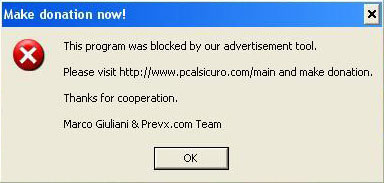
Gromozon blowback

Gromozon is a vicious piece of malware which installs on a user’s PC and does almost every crafty trick available to avoid detection and removal, including creating its own user account, using rootkit technology, renaming its files, and a whole host of other nasty things. And it’s certainly popping up on the radar out there in the security community.

But now these Gromozon jerks have gone a step further — making the program itself seem like it’s authored by someone else — a legitimate security researcher.

Of all things, the authors of this malware have inserted code in Gromozon which implicates Marco Giuliani of authoring it! Marco is a perfectly upstanding security researcher who, in fact, created a Gromozon removal tool for PrevX.

Marco1200123123

It’s absolutely incredible. Marco has the whole story here.

Alex Eckelberry

A note on fake codecs

Ever since the BBC did an article on fake codecs, there’s been a flurry of press on the issue.  We’ve been talking about these for over a year and it’s good they’re getting attention. These fake codecs are certainly out there, and while they are currently mostly used on porn sites, there is certainly the opportunity for them to move to more mainstream venues (no surprise, since porn is often the leading indicator of technology on the Internet.  [I might, however, question seeing these fake codecs on sites like YouTube (baring being promoted through banner advertisements and the like), due to the way these fake codecs work and how videos are uploaded.] 

Now, some of the articles infer that downloading videos themselves is potentially dangerous.  Just to clarify for everyone, these fake codecs need to be installed, which requires a direct user action.  The way they typically work is that you click on a video, and get a fake dialog box which says something like “you need to install this in order to view this video”. 

For example, here’s a sample from today:

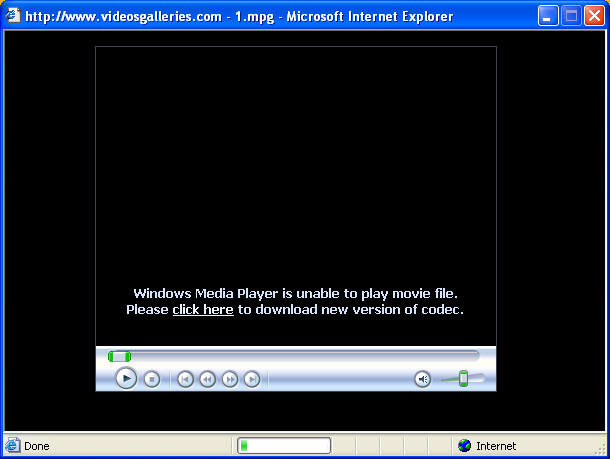
First, you get a message in the Windows Media player

Freecodec012312312

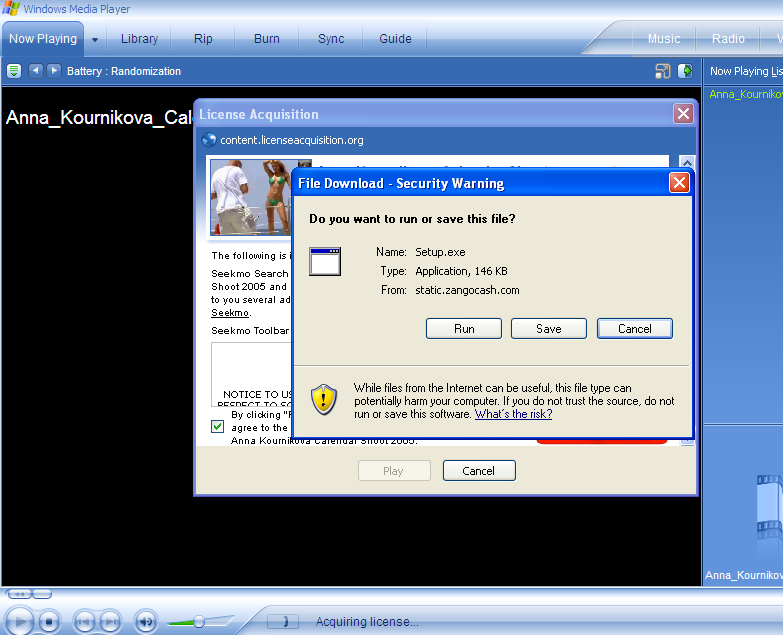
Clicking on “click here” brings up the XP security dialog:

Fakecodec012312

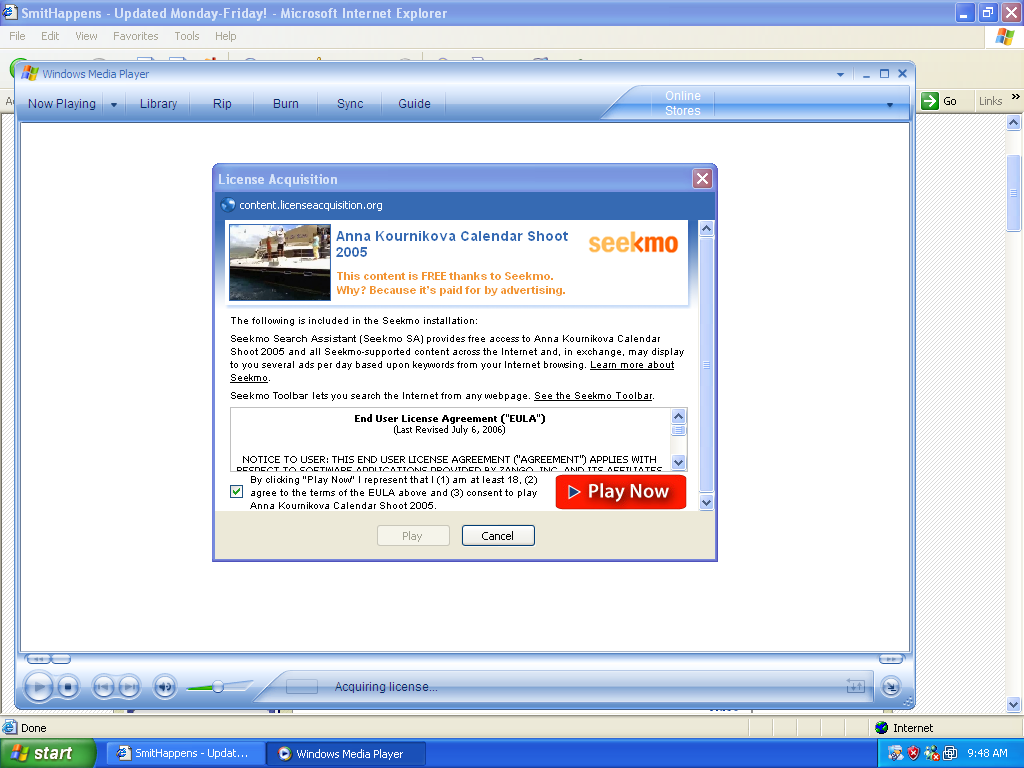
That’s a bad codec.  But here’s an example of Zango (180Solutions) doing the same type of thing for the adware Seekmo, isntalled from a video site called smithhappens(dot)com:

Smithhappens011231231

Smithhappens19123000

In the case of Seekmo, you’ll get popup ads from 180solutions. 

If you don’t allow the codec to be installed, you’re very likely going to be ok (of course, there is always the chance of an exploit being used to install a codec, but I’m giving you the general picture here).

So if you go to a website to view a video and it asks you to install something, be very careful.  Even legitimate codecs like DivX have the chance to be abused.   In the case of DivX, for example, I would go to the DivX site and install it directly.

Alex Eckelberry

Sunbelt Weekly TechTips

Vista: Only the Shadow Folder Knows
One of the most potentially useful new features in (some editions of) Vista is the concept of “shadow folders,” which uses the shadow copy technology to allow you to revert back to previous versions of your files. The shadow copies are created automatically each day, and whenever you install an application or driver. To find a previous version of a file, you just open its Properties and click the Previous Versions tab — but note that this feature only comes with the Business, Enterprise and Ultimate editions of Vista. See how it works here.  

How to Reinstall System Restore
The System Restore feature in Windows XP is a great one – but sometimes it quits working properly (or at all). In this case, you may need to reinstall it. Here’s how:

  1. Click Start | Run.
  2. In the Run box, type %Windir%INF. This should open your WINDOWS directory to the INF folder.
  3. Find a file named SR.INF (if you have Explorer configured to hide common file extensions, it may display as SR).
  4. Right click the SR.INF file and select Install. Windows may prompt you for your Windows installation source path. If you have service packs installed, point it to the %Windir%ServicePackFiles folder.

After the System Restore files are reinstalled, restart Windows.

Important note: this process will remove any existing system restore points.

How to Find Out if your Processor is Overheating
Here’s a handy little free utility that will read the sensors built into your motherboard and warn you if your processor is overheating. It works on all Windows operating systems from 9.x to XP (we haven’t tried it on Vista yet). Link here.

Download: Outlook Junk E-Mail Reporting Tool
Unlike anti-virus programs, multiple spam filters can play nicely together and provide you with better protection against unwanted email. If you use Microsoft Office, you can add another layer of spam catching with the built-in junk mail filters. And now you can make those filters more efficient by reporting any spam that still gets through to Microsoft. Doing so is a one-click operation when you download and install the Junk E-mail Reporting Tool here.  (If you’re not happy with the Junk Mail filters in Outlook, you might consider doing a free trial run of our antispam tool, iHateSpam.)

Can’t configure automatic updates?
If you are having trouble configuring automatic updates (going into the Automatic Updates dialog box in Control Panel and all the options are grayed out), there are a couple of solutions.

The simplest and most common solution is that you aren’t logged on as an administrator. So first try logging on with an admin account.

If that doesn’t work, it may be that a policy has been enabled in the registry. To fix this, in your registry editor go to HKEY_LOCAL_MACHINE SOFTWARE Policies Microsoft Windows WindowsUpdate AU. In the right pane, delete two values: AUOptions and NoAutoUpdate.

Now go to this location: HKEY_CURRENT_USER SOFTWARE Microsoft Windows CurrentVersion Policies WindowsUpdate. In the right pane, delete this value: DisableWindowsUpdateAccess.

The above assumes you’re using a standalone (non-domain) Windows XP computer. If your computer is a member of a Windows domain, a Group Policy applied by your domain administrator may be preventing you from changing the auto update settings.

Error 1068 when you try to turn on ICS
If you attempt to enable Internet Connection Sharing in XP by running the ICS wizard, you might get an error message that says the dependency service or group failed to start. This means there is some service that’s needed by ICS, which is not turned on. To address the problem, you need to check out the status of the relevant services and turn on any that are disabled. For a list of the dependency services and instructions on how to turn them on, see KB article 827328 here.

Can’t log onto XP after removing spyware
If you use Ad-Aware by Lavasoft and it removes the spyware program wsaupdate.exe, you may not be able to log onto your XP computer because the spyware also makes a change to the registry that is not fixed by removing it. You can use the Recovery Console to fix the problem. For complete instructions, see KB article 892893 here.

Deb Shinder, MVP

Some new scam sites

Fake sites which lure you into either a fake codec or a security scam program.  Stay clear of these.

Iesecuritybar1203123

Iesecuritybar1203125

85.255.118.242 
iesafepage(dot)com

These were created yesterday, on Halloween:

85.255.118.210 
iesecuritybar(dot)com         

85.255.118.197 
ivideocodec(dot)com           

85.255.118.198 
ns2.ivideocodec(dot)com     

85.255.118.197 
ns1.ivideocodec(dot)com     

Patrick Jordan, Sr. Researcher

Lucha Libre — Sunbelt style

Halloween06_000lucha

Yesterday during Halloween, we held our first-ever (and hopefully last) Lucha Libre fight, right here at Sunbelt Software.

The fight, between El Perro Grande and Senor del Dolor was refereed by Eduardo Rapido and took place in our building lobby and outside.

If you really want to completely waste time, you can view the footage for yourself.

Part 1 (indoors):

Luchalibre10123123

Windows Media High res

Windows Media Lo res

Part 2, outdoors, which shows El Perro Grande being unmasked

Luchalibre10123123out

Windows Media High res

Windows Media Lo res

Bonus footage — more of the same

Credits:

El Perro Grande: Sunbelt’s IT Manager, John Jacobson
Senor del Dolor: Sunbelt’s VP of Product Management, Greg Kras
Eduardo Rapido (Spanish for “Fast Eddie”): Martin Hine, sales account manager

As a final note, I want to assure everyone that yes, we do actually perform work at this company.   It’s just that we also take our time to have a bit of fun!


Alex Eckelberry

Which phone is the best?

My friend Song Z. Huang, co-founder of Soonr (a startup in the mobile data space), shared his insight with me today as to “what’s the best phone”.

Which phone do I recommend? This is a question that I get ALL THE TIME… we are always testing on many different phones. Also, I get to do a lot of demos. Often times certain carriers work better in a particular location than others. So what’s the solution? Multiple phones of course! So recently I took all the phones out of my bag an took a picture of them all.

Here’s a little picture and a quick overview of every phone in my bag.
Whichphone123129

Left to Right, top to bottom:
 
LG Fusic – Sprint EVDO service. Great for demo of a consumer phone. Unique feature is the iPod like front control with a built in FM transmitter to send music to the radio. Problem is that the FM transmitter is super weak.
 
Nokia N93 – Cingular (unlocked World Phone). This phone has a 3.2megapixel camera that does a good job on pictures. It also has a video recording mode which is quite good for a camera phone. The unique feature is that it has real optics and a video outcapability for projected demonstrations. It also has wifi, which can make for a snappy demo.
 
Sony Ericsson K800i – Cingular (unlocked World phone). This is the undisputed champ of camera phones. It has a 3.2megapixel camera that doesn’t suck! The flash is a real xenon flash instead of a sorry LED that does nothing useful. The unique feature is the excellent camera.
 
Palm Treo 700P – Sprint EVDO. The elegance of the Palm OS is still prevalent. This phone is fast and works flawlessly. The 320 x 320 screen is stunning and the Bluetooth profles are not restricted in anyway. All this, and it does mobile TV. If only I could get an Ajax browser on this, life would be perfect.
 
Motorola Q – Verizon Wireless EVDO. This is my 3rd Q. The first one just died one day and started flashing weird bars on the screen. The second one I got wouldn’t hold a charge for a day and kept shutting itself off. When I was just about ready to crush the crap phone, they sent me a third. This one is delivering on the promise. This stylish form factor and nice feature set makes it a phone I can live with….until it probably dies again.
 
HTC PPC6700 – Sprint EVDO. The keyboard on this phone and the wifi make it very useful. The surprise is that it’s sluggish a hell even though it has a 400mHz processor. We’ve all passed this phone around the office and it doesn’t stick anywhere. I think it’s Windows Mobile 5 that is slowing things up and making it hard to use. There’s promise here, but for now, there are better phones out there. Unique feature is the slide out keyboard and the built in wifi.
 
BlackBerry 8700c – Cingular. The undisputed champ when it comes to email. That’s what you buy a Blackberry for. These guys have still done the best job of creating the ultimate email machine. The browser is sub-par, the phone is only passable, and there’s no multimedia features at all. Still, the stellar screen and email capability makes this the one to take when you absolutely must do email.
 
Which phone is the best? It all depends on the location, situation, and need. There is no one best phone… sorry, but that’s the truth.

Personally, I’ve had my share of PDAs and Blackberries, but I’ve settled on a simple Nokia GSM phone with no bells and whistles.  But that’s because I like something that fits small in my pocket and really don’t need all the advanced features. I’ve even gotten to the point where I don’t bother to bring a laptop with me when I travel — it’s a hassle in airports, and technology is so ubiquitous these days that I just grab any old machine while on the road or borrow a co-workers laptop and remotely access my office email when I need it. Now that I have a car with Bluetooth capability, I’m thinking of upgrading to a Bluetooth compatible phone, but I still won’t bother with a smart phone.  Of course, that’s just me — I’ve become fairly ascetic when it comes to technology.

What do you think?  What’s your favorite, bestest phone ever?

Alex Eckelberry


Halloween Sunbelt style

Since the early days of the company, Halloween has been a major event here at Sunbelt.  It’s evolved into a highly elaborate ritual which includes a parade down our main drag to the local coffee shop (replete with the locals gawking), a contest for best costume, and then a feast of pizza at lunch.

With so many employees, it’s hard to get all the pictures in here, but here are some choice ones.

Halloween06_003
A friendly fellow in tech support.  Really, it’s ok — you can call us anytime, toll-free.

Halloween06_007
Allen McDaniel, lead programmer on our iHateSpam consumer product.  I think he’s been reading too much spam.

Halloween06_021
No software company is complete without its complement of witches. 

Halloween06_027
Lucha Libre, Sunbelt style.  More on that later…

Halloween06_046
People in marketing… never trust them, bloody pirates.

Halloween06_052

Yes, it’s true.  The clones have arrived.

Halloween06_055
Taking over the local coffee shop.

Halloween06_056

That’s Ruthanne in sales.  I guess we need to pay more to our sales people.

Halloween06_180

The leaning tower of Sunbelt pizza.  

Last year’s Halloween blog post here.

Alex Eckelberry

Follow-up on my earlier post on the ICS exploit

Earlier today, I blogged about an exploit that has been getting some attention, that I felt really wasn’t worth getting too worried about.

As part of the piece, I questioned turning off ICS, because I felt it would disable the Windows firewall. 

However, Corey Nachreiner at WatchGuard made the following point to me:

…I too think this very low risk vulnerability has been over hyped in the media’s headlines. However, …as far as I can see, properly disabling ICS does not kill or disable the Windows XP firewall.

If you have a multi-homed XP machine, just go into the advanced properties of any network adapter and you can clearly see that you can uncheck the ICS component ( the “Allow other network users to connect through this computer’s network connection” box) while still keeping the XP firewall enabled.

So I don’t see why …disabling ICS kills the XP firewall. On the other hand, disabling ICS does obviously prevent any other client computers that were using ICS before from reaching the Internet. But it doesn’t kill the Firewall.
 
I understand that ICS relies on some of the Firewall’s functionality to work. Because of this, if ICS dies improperly it will take the Firewall with it. However, I don’t know of the Firewall relying on ICS to work (as far as I can tell). So you can disable ICS without disabling the Firewall.

I think that Corey may be right here, but will continue to research this.  At any rate, the real point of my blog post stands — a potential vulnerability in ICS is just not that big of a deal. 

Alex Eckelberry

UPDATE:   nCircle has lots more posted to clarify the whole “disable ICS” issue.  You do not have to disable the ICS/Firewall service to mitigate this exploit, thus shutting down your Windows firewall.  More here.

Perhaps sadly for some, it’s not really the end of the world

A bit of flurry about an exploit available in Internet Connection Sharing (ICS).  Basically, this exploit allows an attacker to shut down the Windows Firewall.

While any exploit is something to be concerned about, this one is not a big deal and is not worthy of mass panic.  George Ou writes on this issue here, worth reading.  

To distill the problem, first ask yourself:  Do you even use Internet Connection Sharing?  

If you’re like most people, you don’t.  In fact, Internet Connection Sharing is something most people don’t even know about — it’s a little-used feature that Microsoft has been shipping since Windows 98 that allows one computer’s internet connection to be shared by others.

Maybe it’s used in third world countries, where one dial up connection is shared by others (while some poor fellow gets the job of having to bicycle to keep the generator going). But ICS is just not part of any current network topology.  And for those who share a DSL or cable modem through ICS — let me give you a word of advice.  If you can afford the $50 per month for your service, then pay even half that amount for a cheap firewall/router.  Really.

Second, if you do use Internet Connection Sharing, realize that this exploit only affects you from the inside of your LAN.  Yes, folks, this is not something where you have to go to a website and get hacked.  It is exploited from within. 

Reguly at nCircle, the fellow who is chatty about this particular exploit, has recommended a solution that might not be the best course of action — disabling ICS (which will kill the Windows firewall, not the approach I would be the most sanguine about) and blocking port 53.  [Update — I have to correct myself — it’s true that if you kill the Firewall/ICS service, you kill your Windows firewall.  But as the nCircle folks point out, you can simply disable ICS and keep the firewall going, mitigating this exploit. More here.]

You want the solution?  Follow Secunia’s advice: “Use another way of sharing the Internet connection”.  Yup, like a cheap router/firewall (unless you’re still stuck on the bicycle generator).

Alex Eckelberry
(Hat tip to George Ou.)

UPDATE:  More here at nCircle on disabling ICS.

We got another rock star

Chad Loeven joins us as VP International and Business Development.

Before joining Sunbelt, Loeven served as vice president of business development for Montreal-based email security vendor Vircom, where he held international channel and business development responsibility, signing the largest OEM deal for Vircom during his tenure. Prior to Vircom, Loeven held various executive management positions at The Messaging Architects, overseeing the daily operations and international channel networks, and IndustryHub where he was responsible for technology direction, product strategy, and sales and marketing.

Corporate propoganda here.

Alex

Are disclaimers a security risk?

Analyst says disclaimers are bad becuase:

Any standardized, boilerplate text is a godsend for a malicious network sniffer who’s hell-bent on stealing your secrets. Imagine you are trying to commit corporate espionage by tapping into an ISP’s network and watching all the network packets go by. It would be like drinking from a fire hose: very difficult to select the packets containing email text from the organization you’re targeting. However, if you knew that organization used a standard disclaimer, you could have your packet sniffer search for packets containing that text. It’s likely it would pick up a very large proportion of the messages you’re interested in.

Link here.

I disagree and admit to being somewhat baffled by this article.  A bad guy can just as easily sniff for source IP, the From address, domain, etc.

And even if the message is encrypted,  that data won’t be because it needs to be cleartext in order to be sent — then you would get some of the details regardless of what is done to the message.    

Alex Eckelberry

Spam. Yeah, it’s up

SecurityFocus writes about the situation. We helped a small bit on this article.

Estimates of the magnitude of the increase in junk e-mail vary, but experts agree that an uncommon surge in spam is occurring. On the low side, Symantec, the owner of SecurityFocus, has found that average spam volume has increased almost 30 percent for its 35,000 clients in the last two months. Others have seen much more significant jumps: Spam black list maintainer Total Quality Management Cubed has seen a 450 percent increase in spam in two months, and the amount of spam filtered out every week by security software maker Sunbelt Software has more than tripled compared to six months ago.

Link here.

Alex Eckelberry

Google’s responsible disclosure

Google spells out their security philosophy and recognizes people and companies in the security industry.  

Google Thanks You
People and organizations with an interest in security issues have made a tremendous contribution to the quality of the online experience.  We are grateful for the responsible disclosure of security vulnerabilities in our software. On behalf of our millions of users, would like to thank the following individuals and organizations for going out of their way to improve the Google experience for everyone:

  • Alex Shipp, Messagelabs
  • Bryan Jeffries
  • Castlecops
  • H D Moore
  • Jeremiah Grossman
  • Johannes Fahrenkrug
  • Martin Straka
  • Team Cymru
  • Yahoo! Paranoids
  • Wayne Porter & Chris Boyd, FaceTime Communications
  • Alex Eckelberry, Sunbelt Software
  • Richard Forand

Seeing my company on this list is a rather pleasant surprise.  I must also recognize all the people in my company who help me in my efforts.  You know who you are, and I thank you.

And my hearty congratulations to my good friends CastleCops (Paul and Robin Laudanski), Wayne Porter, Chris Boyd (aka PaperGhost) and all the rest on Google’s list.   You rock.

Alex Eckelberry
DoTheGoogle


First review of Sunbelt’s CWSandbox

Tyler Reguly tries out the Sandbox.

Lately, I’ve been more and more interested in malware analysis… I’ve been gathering viruses I receive and watching how they operate inside VMs. Due to this interest I’ve added more blogs to my seemingly never-ending list of RSS Feeds… Today a very interesting one came across the wire. Sunbelt Software had a blog posting announcing the official launch of CWSandbox. I must say, the software looks pretty damn cool.

Blog link here.

Alex Eckelberry

In case you were wondering, there really has been a big increase in spam

I’ve seen a number of posts on a couple of different groups speculating that there has been a big increase in spam.

The answer is yes, there has been a dramatic increase.

Spamtrend123197123

You can see this chart yourself at TQMcubed.

Just as a general side note, we were doing some analysis the other day, and found that about 95% of the email that Sunbelt receives is spam.  That’s a lot of junk.

Alex Eckelberry
(Thanks Jeff)

Will PatchGuard be Vista’s Maginot Line?

Maginot_Line_1944
The Maginot Line in 1944

“If you entrench yourself behind strong fortifications, you compel the enemy to seek a solution elsewhere.” — von Clausewitz

“Fixed fortifications are monuments to the stupidity of man.” — Patton

Before I start on one of my typical diatribes, I think it’s worthy to note that one of the problems facing the security industry is entrenched user resentment.

I see this all the time: When I write about the larger security vendors, there is almost an angry mob mentality about how they deserve it because “antivirus companies have been soaking us for years”, etc. Ok, so there may be validity to some of that entrenched resentment, but the PatchGuard issue affects all security vendors.

Yesterday, Sophos tapped into that angry mob user resentment in a brilliant PR move — after having drunk the Microsoft KoolAid from a fire hydrant, they openly embraced PatchGuard. In one fell swoop, they positionoing themselves as Microsoft-friendly, happy-dancing, API-loving people. At the same time, they positioned the rest of the industry as a bunch of moronic crybabies. Beautiful.

Now, the Sophos folks are very smart both PR-wise and technically, and so one must give pause to consider their statements. However, I suggest we dig a little deeper.

It is an evolved theory of both security and warfare that one cannot create one defense that is all-encompassing. A infamous object lesson in this thinking is the French, with their Maginot Line: Created to stop a German invasion by land, the German’s merely flew over it — quite a wake-up call for the Frenchies. Now, military planners rely on flexibility as the ultimate defense.

The security industry has had several such lessons, the Code Red Worm being one of them. A network-based worm that utilized a vulnerability in Microsoft’s IIS, it never hit the disk. Instead, it ran solely in memory. A system based on file-based protection would not have been able to stop it.

The lesson? We cannot predict how malware authors will work in the future, and that is one reason why PatchGuard is such a potentially dangerous technology.

PatchGuard creates a barrier to the kernel, against which security vendors (the major defensive bulwark for Microsoft) can’t get in to to help the operating system against an attack, at least without permission through APIs.

Mikhail Penkovsky at Agnitum also points out that the API model itself opens up the kernel to attack anyway.

Why is it so risky to use KPP [PatchGuard] to provide kernel security for computers running Vista x64 rather than a third-party security solution?

Here’s an analogy. Today, every house has a different lock on its front door; in the same way, you can use any security product you want to protect your computer. Now imagine if every house in your city were required to use the exact same lock on its front door. As soon as a burglar figures out how to crack that lock, he can freely enter and steal from any house. This is what 64-bit Windows security will look like with PatchGuard.

His point is valid, because PatchGuard will get hacked in a number of ways: a) through good old-fashioned hacking (like we saw at BlackHat recently), b) or even possibly bundling themselves with a component of a product that does have access to the APIs.

But there’s another key issue: The ability of security companies to fully support the 64–bit Windows platform itself, a fact that Gartner’s Neil McDonald recently highlighted in his warning that if enterprises use HIPS technology, they should postpone deployment of Vista. After all, the APIs won’t even be available until 2008!

And it’s interesting that Neil used HIPS as an example.

HIPS (which stands for Host Intrusion Prevention System), uses methods at the kernel to prevent certain types of attacks. HIPS is part of our Kerio line and it’s also part of other products out in the market. For example, our HIPS functionality helps protect against buffer overflow attacks, by watching for system functions being called from memory locations where they shouldn’t be called. As another example, our Kerio Server Firewall uses HIPS to provide application lockdown.

Sophos and Kaspersky have gone on the record that they don’t really care much about PatchGuard, but that is ostensibly because a) they don’t have HIPS or b) they are not using the kernel in such a way that PatchGuard poses a problem for them. Is this just whistling past the graveyard?

McAfee, Symantec and other companies, like Sunbelt, need this access. For Symantec, it’s around a number of technologies they’ve implemented at the kernel, including Tamper Protection, which prevents hackers from attacking Symantec products themselves. For us, it’s around HIPS, but it could also affect other technologies that we are developing.

Could we use the existing APIs to do what we need to do? Yes, and Microsoft has publicly stated that they will release APIs to PatchGuard to security developers, but a) these will not be for some time (2008) and b) if we need a new API or some enhancement to an existing API, we have to ask for it. It puts security providers in a tenuous position, waiting for possibly up to a year to get the legal APIs to fix a threat that may be in the wild. And waiting for the PatchGuard APIs will delay our ability to ship a 64–bit version of our Kerio firewall and possibly other technologies.

Getting back to the Maginot Line example, however, if some type of new threat comes out that requires a security vendor to access the kernel to protect against it, we’ll all be in trouble, and so will the customer. Because we’ll have to ask Microsoft for an API to the kernel and hope they provide it, instead of just quickly adding some extra functionality to our products by directly accessing the kernel.

Alex Eckelberry
Sunbelt Weekly TechTips

How to change the picture on the Start menu
Note: this doesn’t apply to XP computers that belong to a Windows domain. On non-domain systems, XP displays a photo on the Start menu that’s associated with the logged on user account. You can set this photo through the User Accounts applet in Control Panel, but there’s also another, faster way:

  1. Click Start to open the Start menu.
  2. Click on the picture itself. This opens the User Account settings option.
  3. Choose a new picture from the ones displayed, or click Browse to use a picture located anywhere on your computer.
  4. After you’ve changed the picture, close the User Accounts dialog box.

How to Start the Shared Folder Wizard
The XP Shared Folder Wizard lets you create one or multiple shared folders. The quickest way to start it is to click Start | Run and type shrpubw.exe.

Vista: Using check boxes to select items
It’s a small thing, but it can make a big difference to users who have to type with one hand. Now instead of holding down the CTRL key to select multiple items, you have the option of enabling checkboxes.

By default, files in Explorer don’t have the checkboxes, but it’s easy to enable it: just click Tools | Folder Options and click the View tab. Scroll down in the Advanced Settings list to “Use check boxes to select items” and select it. Now in Explorer you can just check the boxes to select multiple items without holding down CTRL.

What happened to the option to make pictures smaller?
QUESTION:
Once upon a time, when I would attach a picture to email in Outlook Express, a dialog box would pop up, offering to make them smaller. I almost always said “no” – but somewhere along the way I stopped getting asked and recently I did have some photos taken at very high resolution that I wanted to make smaller before sending. Do you know how I can get this option back? – Judy D.

ANSWER: The lack of the “make pictures smaller” dialog box usually means a DLL has become corrupted or unregistered. To fix the problem, try registering the DDL. Here’s how:

  1. Click Start | Run
  2. Type regsvr32 shimgvw.dll

Let us know if this doesn’t work.

Current folder settings are not applied to other open folders
You can set all the folders in Windows Explorer to display in the same View (List, Details, Thumbnails, etc.) as the one you have currently selected. However, if you have other folders open when you apply the setting, those folders may not get the new setting applied. For the solution, see KB article 307116.

Access Denied error message
If you try to open a folder and receive a message that says “ is not accessible. Access is denied,” it may be because the folder was created prior to upgrading to Windows XP, on an NTFS partition. Upgrading to XP changed the security ID (SID) for your user account, so that it doesn’t match the one on the folder. Luckily, if you can log on with an administrative account, you can take ownership of the folder so you can access it. For instructions on how to do so, see KB article 810881.

System Restore is suspended
If you try to start System Restore, you might get an error message that says “System Restore is suspended because there is not enough disk space available on the system drive.” This can happen even when you do have plenty of available disk space on that drive. There are two workarounds for this problem; to find out how to fix it, see KB article 299904.

TechTool: The psTools list of sysinternals command line tools are very handy in some occasions. Here is an overview of all these gems.

TechTool #2:  ShortKeys is a utility that allows you to set up replacement text or paragraphs for any given number of user defined keystrokes. A free version is available.

Deb Shinder, MVP