If you’re there or going to Defcon, say hi to the Sunbelters that are there — Eric Sites, Joe Wells and Casey Sheehan.
Alex Eckelberry
The Great Years: 2004-2010
You may notice that Google is getting a bit more proactive about protecting surfers. For example, we ran across this site today, with a warning from Google:
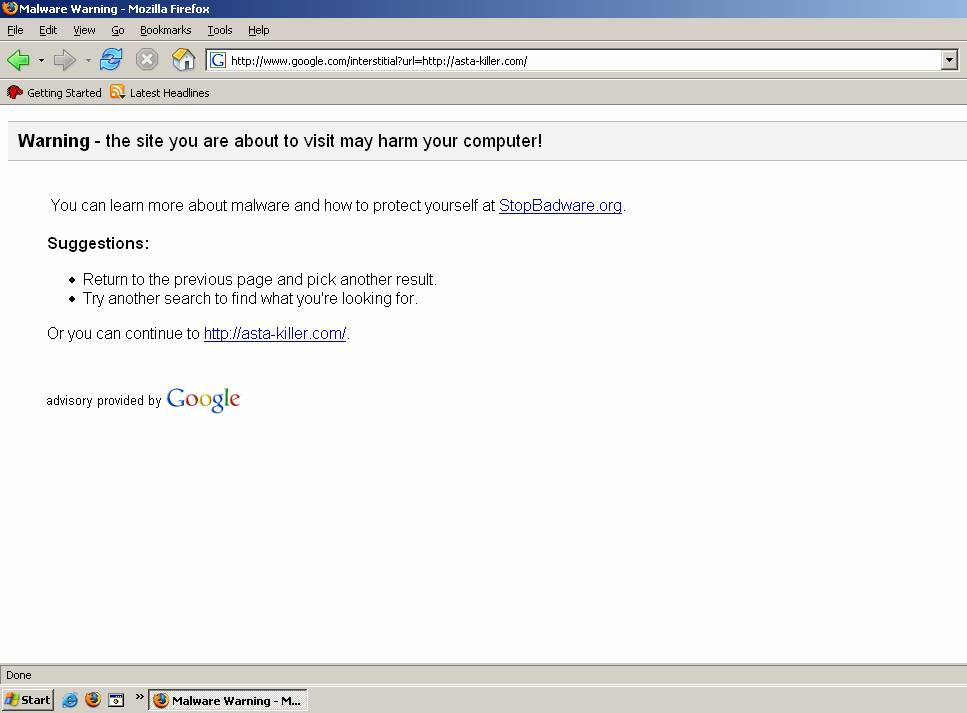
Users are referred to StopBadware.org, which the Harvard-based organization with corporate sponsorship from Google and Sun (and which Sunbelt’s Eric Howes is on the working group).
Alex Eckelberry
(Thanks Adam Thomas)
I’m a bit confused. Network World, a worthy and highly respected IT publication , ran a story this morning with the headline: “Juniper researcher Michael Lynn crashes Cisco party at Black Hat”.
The article goes on to say:
“…Michael Lynn, who now works for Cisco rival Juniper Networks, evaded the security checks Cisco had put in place for the party, which included a name check and legal identification. Lynn and his friends, declaring “Cisco owes us a drink,” gleefully posed in front of a Cisco sign inside the Pure Nightclub.”
Not true, according to Gadi Evron, who was actually went to the party with Michael Lynn.
We went to the party, registered, said hello to a couple of Cisco employees who knew who each and every one of us was (bouncers), a club bouncer, and entered the party. One of many community fun after-parties that come with these conferences.
So far so good. Cisco was fun and the party was great. Mike spoke with many Cisco guys (no hard feelings on either side, it seems, we’re all in the same industry) and we even got our pictures taken together.
Link here.
Alex Eckelberry
if you’re still worried that you’re having too much fun reading it, just view it in WorkFriendly.
Alex Eckelberry
(Thanks Mercen4ry)
Anyone who has half a head in the sand right now has heard about Jon “Johnny Cache” Ellch and David Maynor hacking a Mac in 60 seconds at Blackhat.
It’s important to realize that this is not a Mac vulnerability. It’s in a 3rd party wireless card.
Classic is what Maynor said, also quoted today by John Paczkowski:
“We’re not picking specifically on Macs here, but if you watch those ‘Get a Mac’ commercials enough, it eventually makes you want to stab one of those users in the eye with a lit cigarette or something,” Maynor said. “The main problem here is that device drivers are a funny mix of stuff put together by hardware and software developers, and these guys are often under the gun to produce the code that will power products that the manufacturer is often in a hurry to get to market.”
Of course, those who actually read this blog know that you don’t have to watch the “Get a Mac” commercials. You can always watch the Lost Mac Ads instead.
And yes, for the three Macheads who read this blog, I know, I know: Windows is still less secure, Macs are more secure, they are bitchin machines, etc. But it’s just the holier-than-though thing that kind of tires the UnRest of Us.
Alex Eckelberry
David Matoušek is running a poll on his site and has over 6,000 votes. Feel free to vote on your favorite firewall (even if it’s not ours!). Link here, on the front page.
Alex Eckelberry
Latest corp blog: Yahoo.
Great name — yodel.yahoo.com
First post, entitled “Yet another self-serving corporate blog!”. Warms my heart. Shows some character!
Link here via beSpacific.
Alex Eckelberry
I don’t usually post (or forward) the usual YouTube crap, but this is short and hilarious. Link here via John Paczkowski.
Alex
Ok, this service is getting very cool. Meebo, the universal IM client that works through the web, just released a widget. I’m testing it on the blog for a brief time — feel free to try it — it’s on the right side of the page (don’t be insulted if I don’t respond, I’m a wee bit busy, but you can always email me).
Those concerned about security on Meebo should be, as with any use of IM. I admit that for me, IM is a throway type of activity. I’m not an active IMer and I don’t use it for anything sensitive — I use it primarily to find out if people are in, or to ping someone quickly. So I’m not as sensitive about this as others may be.
But if you’re curious, Meebo encrypts all passwords with 1024-bit RSA keys (except on IE 7, which they still don’t support…).
IMs on the main Meebo servers are sent in the clear. For those wanting end-to-end encryption, however, they do have several SSL-enabled servers (accessed at https://www.meebo.com) which offer increased security. They have more details here. (IT managers can really groan—there’s a Meebo repeater which bypasses blocking).
(Thanks for this tip to security guy Xavier Ashe, who put one up as well.)
Alex
Big reorg at Microsoft.
And this is interesting: Dave Cutler, the father of NT (and arguably one of the greatest operating systems geniuses of all time) is now going off to work with Ray Ozzie on Live. From Paul Thurrott:
David Cutler…will be reassigned outside of Windows to work directly with Microsoft Chief Software Architect Ray Ozzie on “initiatives focused on Live products and services.”
(This is the same Cutler who said to Gates “I won’t pollute it [NT] with crap!”.)
Crusty Dave Cutler, working with Ozzie, the hyperkinetic web services visionary? Is this a marriage made in hell or is it something that will really get Cutler excited?
Link here.
Alex Eckelberry
Well, this is embarrassing — feb.gov has been hacked. By an Islamic hacker who even adds the nice touch of playing the call of a muezzin.
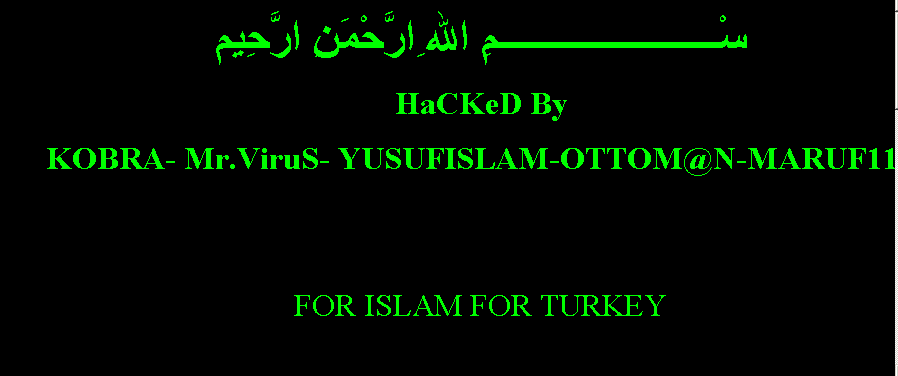
What is the Federal Executive Board? From SecuriTeam:
The Federal Executive Boards (FEB’s) were established in 1961 by a Presidential Directive to improve coordination among Federal activities and programs outside Washington. The need for effective coordination among the field activities of Federal departments and agencies was then, and is still, very clear.
Link here via SecuriTeam.
Alex Eckelberry
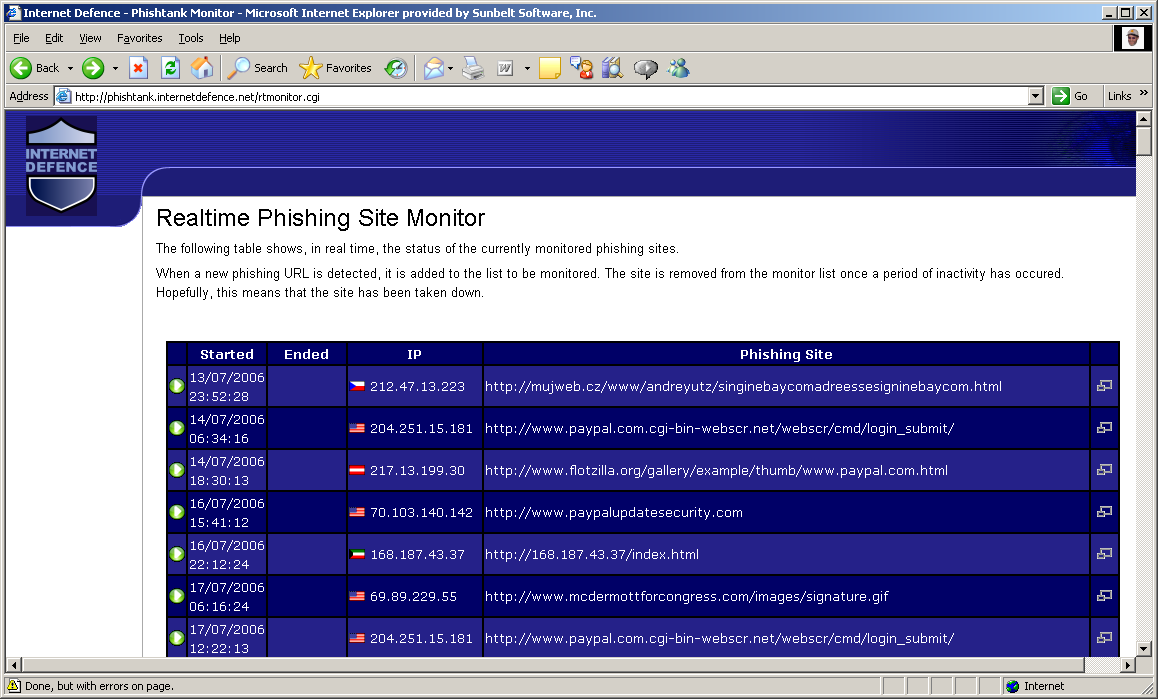
This is a cool site with a repository of phishes, as well as a list of realtime fake sites.
Link here.
Alex Eckelberry
(Hat tip to Nicolas Woirhaye)
Incredibly, the State Department has just released a comprehensive primer on journalism. You can read it here. This is a concise but very useful overview of the field.
Today, the line between traditional journalism and blogging has become blurred. Blog sites provide news. And traditional journalism sites are adopting blogging styles.
It’s a trend that requires readers to be wary: Blogs are not journalistic sites. They are journals. Getting your news as fact from a blog is not the best idea, unless you take it as one opinion out of many. And, of course, outright belief in much of the news you read is also dangerous. You need to make up your own mind about what you read and see — not through the filter of someone else.
Alex Eckelberry
(Hat tip)

How to get to the web if your browser is blocked or broken
Web browser software is blocked by administrative policy, or not working? You may still be able to get to web sites. This is a case where Help can actually be helpful!
Important tip: you must type the full URL, with http://, not the shortened version that starts with www.
You may be updating to IE 7 soon — whether you want to or not
I’ve been using IE 7 for so long, I forget it’s still a beta. But we’re getting close to a final release of the software, and now Microsoft has announced that they’ll be distributing it via Automatic Updates as a high priority update. Read about it here.
Because of all the improved security features, upgrading to IE 7 is considered a “must.” And I agree that, for most people, the upgrade is just good sense. But some folks may not want to have it forced on them. Enterprise customers can download a blocker tool that will prevent IE 7 from installing automatically. The easiest way for home users to accomplish this is to set your Auto Update settings to download updates automatically but NOT install them until you approve of them. For info on how to change your Windows Updates settings, click here.
“Day After” Attacks
On the second Tuesday of each month, Microsoft releases a set of security patches to fix vulnerabilities that have been discovered. The once-a-month system has a lot of advantages; users and system administrators know when to expect the fixes and can apply several at once, rather than doing it as they trickle in one by one. By hackers are taking advantage of the routine to release their exploits a day or two after Patch Tuesday so it’ll be a whole month before the patch comes out.
Read more about this sneaky practice and its most recent implementation here.
ActiveX control is downloaded twice
Sometimes you may find that when you visit a web site containing an Active X control with IE SP2, the control gets downloaded two times because of the way the Active X auto-blocking feature works. Find out how to prevent this from happening by reading KB article 922659.
Troubleshoot error messages in Outlook and Outlook Express
Email is, for many people, the most used Internet application – but there’s plenty that can go wrong. If you use Microsoft Outlook or Outlook Express as your mail client, you may sometimes receive error messages that are difficult to figure out. KB article 813514 covers some of the most common error messages and provides tips on how to resolve or work around the problems.
Pictures or other objects don’t appear in your Word document
If you’ve inserted a picture, autoshape, diagram or other object into a Word document and it’s not showing up, it may be because of the way the object is formatted and the view option that you’re using to display the document. Luckily, it’s easy to modify the view or change the formatting to solve this problem. For instructions on how to use both methods, see KB article 285957.

Doing flips over Vista’s new window switcher
One of the “cool factor” features in Vista is the new way of switching through windows, called Flip 3D. We’re all familiar with the program switcher tool in XP; when you press ALT+TAB you get a bar containing icons for your open windows that you can tab through quickly to get to the program you want. Vista has the same thing, but it actually displays a thumbnail of each window instead of an icon. However, if you want to get really fancy, instead pressing the Windows key with the TAB key. Here’s a video of what it looks like.
Want to get the same functionality on XP without upgrading to Vista? TopDesk 1.4.2 does that. Check it out here.
Deb Shinder
Well, I’d been running Vista Beta 2 on one of my two primary desktop computers ever since it was released, almost two months ago. I’ve been generally thrilled with its features, performance and reliability. But the life of a beta tester is one always fraught with new dangers. Just about the time you get everything exactly the way you want it, it’s time to install a new version and risk messing it all up.
Vista Build 5472 isn’t available to the general public, and it’s probably a good thing. As Microsoft warns, although it’s designed to fix some of the bugs in Beta 2 and speed up performance, it hasn’t undergone nearly as extensive testing as did the public beta. I put off installing it for a while after it was made available to me, simply because I was so pleased with the Beta 2 installation I had and hated to mess with success. But last week, I decided to bite the bullet and go ahead with it. Who knew? Maybe I’d be pleasantly surprised.
The build number probably should have been my first clue. As a long-time Star Trek fan, I should have noticed that except for the first digit, it was identical to the designation for Species 8472 – an evil alien race so powerful that they were able to leave Borg cubes in shreds.
A build with a number so similar was destined to do damage to my perfect little Vista world. Ah, hindsight.
I thought seriously about installing the new build to a new partition, but I was already dual booting Vista and XP on the machine, so I ended up throwing caution to the wind and going for the upgrade. The upgrade process itself went relatively smoothly, although it took a long time. The first time it booted into Vista, though, the desktop was empty. And I mean completely empty – my custom wallpaper was still there but that’s it. No taskbar, no sidebar, no icons. The cursor moved freely, but right clicking the desktop failed to bring up a context menu. That was one of those “Oh, no, what have I done?” moments.
Luckily, another reboot restored my missing desktop items and functionality. However, one thing that I noticed right off was that not all of my settings had been retained – despite the fact that the upgrade instructions implied that they would be saved. Probably the most annoying was the multi-monitor setting, which had reverted back to mirroring (where both monitors show the same thing, instead of extending the desktop across the monitors). In fact, I soon discovered that the option to extend the desktop wasn’t even present in the display properties – because the upgrade had rolled back my video card drivers to a generic driver. After reinstalling the proper ATI Radeon drivers, I had extended desktop functionality back.
Temporary inconveniences like that are to be expected, and if that had been the extent of the problem, I wouldn’t complain. Unfortunately, after using the new build for almost a week, I’m very disappointed in overall system stability. I never had a program crash in Beta 2 (although there were a couple of small third party utilities that wouldn’t install). With Species 5472, crashes occur several times per day. Most disheartening, the main victim of this new-found OS instability is Office 2007, which ran without a flaw on Beta 2. And most maddening of all, it’s Outlook – my most-used and relied-up program – that was hit the hardest. I found myself getting a message that “Outlook has stopped working” every few hours. The program would close and then try to restart, going through the long process of checking the profile folder for corruption because it had been closed improperly. Canceling the checking process just closed the program again.
I decided maybe the profile itself had been corrupted, and made a new one. Of course, this resulted in Outlook losing my autocomplete entries, and within minutes it was crashing again with the new profile. At that point, I tried turning off Exchange caching. That seemed to do the trick; I’m no longer getting Outlook shutdowns all the time. But I’m also not able to reap the benefits of cached Exchange mode. Exchange caching caused no problems when Outlook 2007 was running on the old Beta 2.
After several days and a lot of tweaking, I have a useable Vista system again. There are still some remaining stability issues, and I’m not noticing any performance improvements (although, to be fair, there’s no performance degradation either). I feel as if I wasted several days, but hey, at least I got a column out of it. And I can tell any of you MSDN members, official beta testers or others who have access to 5472 and haven’t tried it yet to think twice before upgrading Beta 2. If I had it to do over, I’d install it in a different partition and leave my previous Vista installation intact.
Meanwhile, I’ve heard from a number of public beta testers who are unhappy that the interim builds aren’t available to them.
Tell us what you think. Once Microsoft has released a beta OS to the public, should they make all the interim upgrades available too? Or does it make more sense to only release the most thoroughly tested versions to the general public?
If you’ve upgraded to 5472, was your experience similar to mine? Better? Worse? Next time a new build comes out, will you do an upgrade or protect your current installation and do a separate new install?
Let us know your experiences and opinions.
Deb Shinder
Kids are a great source of spyware infestations. They click on things. And spyware vendors may not always care…
Case in point: Mark Arruda, who specializes in marketing stuff to MySpace junkies.
Average age of visitors to his website: Between 13 and 18.
From Chris Boyd:
Mark, you may remember, is the guy who advises people with Myspace accounts to add Zango videos (complete with Adware) to their profiles. He doesn’t mention Zango will be served to visitors in return for them hosting the clips on their profiles, and all of these antics also completely break Myspace Terms and Conditions.
More here.
Alex Eckelberry
PR people do funny things, especially when it comes to computers, email and the Internet in general.
Take this one PR person, who spammed the world for an antispam company:
In this instance, however, the mass mailing was readily apparent to all because the “To:” field of the e-mail was populated by 116 clearly visible names — our 11 staffers, the three exes, and 102 other journalists.
And if that wasn’t enough to convince every targeted scribe that he or she was getting a less-than-exclusive interview opportunity, there was this personalized method of address:
“Hello [RecipientFirstName]:”
Remember: This is an antispam product being promoted. Link here via /.
Then another one, who made misspellings in a press release, that was for a company that, umm, corrects typos and mispellings.
A company that sells software to correct irritating Internet spelling mistakes has reissued its latest news release to correct a minor snafu.
TextTrust, which says it focuses on “eliminating the negative text impressions on Web sites,” re-released a Tuesday news release to correct a mistake that listed the most common spelling errors on “the 16 million we (sic) pages it has spell checked over the past year.”
To which the company rep responded bravely (and contritely):
It’s very embarrassing,” said Pat Brink, PR consultant for the Toronto-based company. “I made the mistake, not TextTrust — they do a much better job, It’s certainly egg on the face of this public relations person.”
Link here (thanks Catherine).
(Of course, I’ve never made mistakes like this).
Alex Eckelberry
As we’ve said before, Warner Brothers is in business with Zango.
Now, a Warner Brothers kids site is directly promoting Zango.
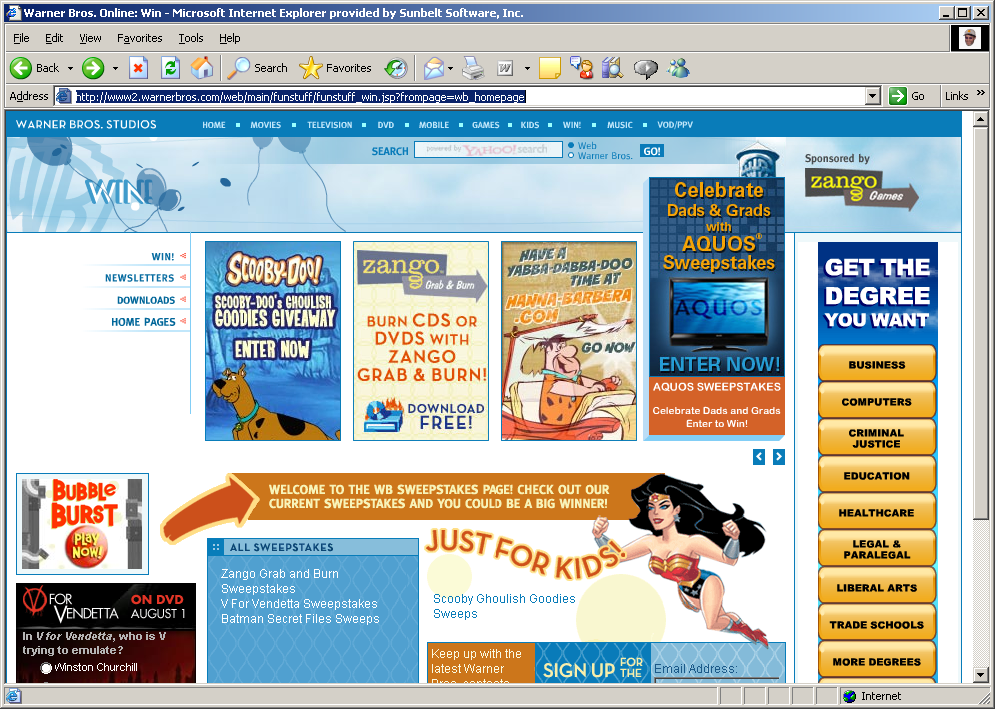
Blog post here at Do Not Reply (and no, this doesn’t mean that kids are going to now get kiddie porn, which this one post on Digg claims). There’s also another post here by Jimmy Daniels (thanks Wayne).
Alex Eckelberry
Interesting post by the ubercoders at Agnitum on Kernel Patch Protection (a new security feature introduced by Microsoft for 64–bit systems):
New security measures introduced by Microsoft under the name “Kernel Patch Protection” are being presented to the world as bringing a new level of security to users. This security will be provided by a combination of Microsoft security software and Windows operating system kernel design.
Agnitum security experts have analyzed these new measures, and it is their informed opinion that these measures will actually cause more harm than good, for two primary reasons:
It will be more complicated for third-party security software companies to install and maintain their software on Windows PCs. In some circumstances, kernel patch protection may even block the installation of third-party security software.
It will be easier for hackers to share and use this new technology than for legitimate software developers.
Link here.
Alex Eckelberry