Japanese teen phisher

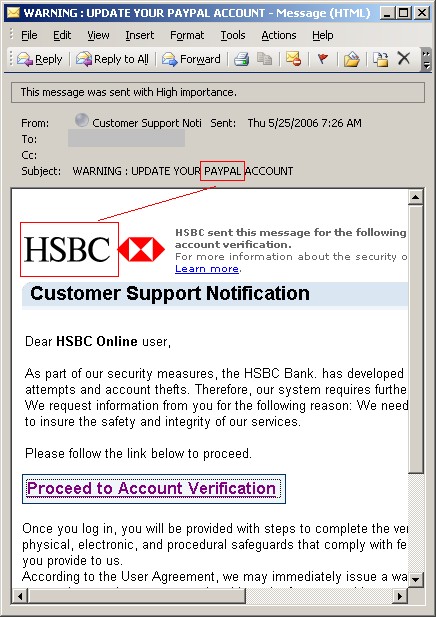
This pubescent Japanese voyeur scammed young girls to get naked pictures of them.  He’s in big trouble now.

Japanese police said they had arrested a 14-year-old boy on suspicion of fraud after he allegedly used the Internet to steal personal details in Japan’s first case of phishing involving a minor.

The boy allegedly threatened people, mainly young girls, so they would send him naked photos of themselves after he had already obtained their identification details and other personal information, local media said.

Link here via Ferg.


Symantec releases patches

In case you didn’t catch the news: All was doom and gloom until Symantec developers shined the light.

Of course, not everyone is on the same page.  ZDNet UK posted a story only hours ago that it’s still not patched.  They are incorrect in this case.  It is patched (at least the non-localized versions), and I have confirmed this directly with Symantec.

Symantec page here.

Alex Eckelberry


Sunbelt TechTips for the week of May 29

How can I get rid of ActiveSync?
If you can’t seem to remove ActiveSync using the the Add/Remove Programs tool, for older versions of ActiveSync (3.6 and prior), you may need to manually remove the software by following these steps:

  1. Delete the ActiveSync icon from the desktop (right click and click Delete or drag the icon to the Recycle Bin).
  2. Delete the Microsoft ActiveSync folder in Windows Explorer (by default, it’s located in c:Program Files).
  3. Edit the registry to uninstall the program: navigate to the following keys and delete them: HKEY_LOCAL_MACHINESoftwareMicrosoftWindowsCurrent VersionUninstallWindows CE Services HKEY_LOCAL_MACHINESoftwareMicrosoftWindows CE Services HKEY_USERSDefaultSoftwareMicrosoftWindows CE Services
  4. Restart the computer.

Battery drains too quickly on SP2 laptops
If you’ve installed Windows XP Service Pack 2 on your portable computer, you may find that the battery goes down more quickly than you expected after you unplug the AC power. This can happen because the computer isn’t able to go into the ACPI processor idle state because of a component of the USB 2.0 driver. There’s an update that you can download and apply to fix the problem. To find out more and get the update, see KB article 918005.

How to configure a VPN connection in XP
If you need to connect to your office network from home or when you’re on the road, one of the most secure ways to do so is via a virtual private network (VPN) connection. There must be a VPN server on the company network and you’ll need the proper credentials to log on, but once you have that, XP makes it easy to set up your VPN connection from your laptop or home desktop system. For instructions on how to do it and tips for troubleshooting common VPN problems, see KB article 314076.

Troubleshoot Internet connection problems
If you’re having problems getting your Windows XP computer to connect to the Internet or browse the Web, there are numerous possible causes. The best way to determine what your problem is (and fix it) is to take a methodical approach. KB article 314095 walks you through the steps to help diagnose what’s interfering with your connection, whether it’s a configuration on your computer or a problem with the server.  Link here.

Deb Shinder

Copy Protection Technology: Defective by Design?

It’s been a while since I discussed digital rights management (DRM) here, but technologies to restrict the use of digital content are still out there, and increase in both sophistication and popularity – among content providers, that is. DRM is anything but popular among the consumers of that content, and this isn’t because all consumers have a raging desire to illegally distribute their copyrighted music and movies. The problem is that DRM doesn’t just keep you from making illegal copies, in many cases it keeps you from making legitimate copies for your own use after you’ve paid for the content. That’s one of the primary complaints that has consumers up in arms.

And some of them are fighting mad about it. At last week’s WinHEC conference in Seattle, Bill Gates’ keynote speech was interrupted by protestors from a group called the Free Software Foundation, currently engaged in a campaign called “Defective by Design” that’s aimed at the way DRM technologies limit the usability of digital media (including not just software but songs, movies, electronic books, etc.).

Of course, a few months back Sony saw the wrath of consumers when it was revealed that some of their music CDs contained “rootkit” software that installed itself on users’ computers without permission as part of their copy protection technology. The company found itself the subject of several class action lawsuits that ended up in a settlement that required them to reimburse consumers and remove the rootkits. That hasn’t stopped content providers from developing new copy protection technologies, but perhaps it’s made them a bit more cautious as to how they go about it.

People have always shared their music, books, recorded movies, computer programs and such with friends. Ever since the advent of recordable media, they’ve made copies and swapped them with others. This dates all the way back to reel-to-reel tape recorders, but that technology was expensive and not many people had it, so record producers didn’t consider it much of an issue. When cassette recorders came along and making recordings got much cheaper and more widespread, there was some worry that people would record songs off the radio, for instance, instead of buying record albums. But the quality of the tapes was lower than the originals, so once again it never became a big problem.

Video recording equipment added a whole new layer to the issue. Movie studios were selling VHS and Betamax movie tapes for around $50 each (in 1970s money, at that) and saw a potential goldmine going down the drain if people were able to record their own copies. A court fight ensued, in which the big companies tried to have the video recorders banned completely, but consumer rights prevailed when justices ruled that the legitimate uses of the technology outweighed the risk of their being used to violate copyright. It was, after all, a little like trying to ban the selling of cars because they could be used by criminals for fast getaways from crime scenes.

Another saving grace was that, as with the cassette recordings of music, “home grown” video tapes that were second or third generation copies just weren’t as good as the originals, so folks still had an incentive to shell out for the commercial product.

Then digital recording came along. As home computers grew ubiquitous, any and everyone could make copies of digital music and other content with no discernible difference in quality from the original. They could burn them to CD or DVD easily and cheaply, and give them away to all their friends – but this still would have presented only a limited threat to the content providers except for one thing: the Internet.

With most computers in the world connected to a common network, computer users could not only share copies of their songs and movies with the limited number of people around them, they could also share them with hundreds or thousands of strangers all over the world. At first, uploading and downloading the large files involved was time consuming and required a certain amount of technical savvy since dialup Internet connections were slow and the content was often divided into many separate files that had to be decompressed and reassembled. But technology, as technology often does, got better.

High speed broadband and new file formats combined with file sharing software made it a “no brainer” for even pre-teens to quickly grab a large number of digital songs, movies, TV shows, etc. Now it seems that those who make and market digital media and the consumers of that media are caught in a vicious cycle. When they see a lot of people getting their content for free, content companies believe (rightly or wrongly) that they’re losing money. That causes them to develop the technologies to try to keep it from happening. Those technologies, though, anger the consumers who DO pay for the content because it keeps them from making copies for themselves. That leads more of those to feel justified in downloading content illegally. Which leads to more panic and reaction on the parts of the content companies, who also raise prices for those consumers who do pay, alienating them even more, and so forth.

The question is: how do we stop the cycle and come up with a solution that’s fair to everyone? Certainly software makers, artists and production companies deserve to be compensated for their products. But many consumers who want to do the right thing feel that they’re being taken advantage of when they pay higher and higher prices for more and more dysfunctional products.

Tell us what you think. Do protests like the one at WinHEC do any good? If consumers stop buying the products, will that send a message to the providers or will they just conclude the low sales mean more people are making illegal copies and cause them to raise prices higher and step up the copy protection technology? Do more laws help or hurt?

Deb Shinder

Ballmer does support

And gets religion? 

…Ballmer spent the better part of the next two days trying to rid this PC of worms, viruses, spyware, malware, severe fragmentation, and well, you name it. Picture it: the world’s 24th wealthiest person, a man worth $13.6 billion according to Forbes magazine, sitting at a table for two days, playing tech support. It was, Allchin says, a humbling experience.

Allchin says Ballmer eventually gave up and instead lugged the machine back to Microsoft’s Redmond, Wash. campus. There, several engineers spent several days, burrowing deep into the system to figure out the problem. Imagine, CSI: Redmond.

It turns out there were more than a hundred pieces of malware of various types. Things that these engineers using Microsoft’s own private tools could not ferret out and fix. Some of these threats hooked themselves deeply into the core operating system and essentially lied about their existence. Other malware scoured the hard drive for anything containing the string “virus,” and, in Allchin’s words, would “shoot them dead.” The result was disabling any installed antivirus software.

It took a team of engineers to restore this system to health. And it was a real wake-up call.

Link here.

Alex Eckelberry
(Thanks Stu)

WinHEC 2006

Sunbelt developer Peter LePage (he works on Kerio here) went to WinHec2006 last week and offered this brief roundup of the conference:

Technology Summary
Although WinHEC is billed as a hardware and technical conference, Microsoft’s emphasis was largely marketing hype, pushing their new Vista and Longhorn offerings. Microsoft’s marketing research into industry trends does provide valuable insight into the next year’s computing marketplace.

• The majority of computer sales have been laptops rather than desktops and they see this trend continuing and increasing into next year.
• Processor vendors Intel and AMD are investing heavily into 64 bit, multi-core processor offerings tailored toward consumer laptops.
• Microsoft is rapidly embracing 64-bit processing, and rapidly deprecating 32 bit support.

Vista & Longhorn
Vista and Longhorn, the code names for Microsoft’s next consumer and server operating systems are rapidly approaching. All WinHEC2006 attendees were sent home with Beta 2 of both operating systems.
Microsoft is now indicating that Vista (32 and 64 bit versions) consumer operating system will be released to manufacturing in early 2007. Windows Longhorn server will be ready for manufacturing in early 2008.

64 Bit Processing Is Here
Microsoft, AMD and Intel made it clear that 64 bit, multi-core compute power will be available to consumers at years end. AMD has already released their Mobile Turion dual core 64-bit processor and Intel is not far behind.

Microsoft has stated that there will be no further 32 bit server offerings, only 64 bit. Additionally, they stated that Vista and Longhorn are built using the multi-processor kernel, with the Uni-processor kernel being retired. Microsoft also claimed that Exchange 2007 would be a 64 bit only offering.
 
Server Virtualization
Microsoft and Intel are investing heavily in this space with Intel providing hardware assistance with the processor for virtualization and Microsoft capitalizing on that hardware advancement.

As the name implies, Server Virtualization provides the ability for multiple versions of a 32-bit or 64-bit OS to run in parallel on a single physical server machine. Additionally each virtual OS can be a multi-core virtualization. Microsoft’s virtualization allows for dynamic addition of virtual partitions to a physical server or migration of physical servers to virtual partitions dynamically. The virtualization environment provides for fail over or dynamic load balancing of server work loads, increasing physical server utilization while reducing cost. All WinHEC2006 attendees were sent home with Windows Virtualization Server.

Hardware Advances
As alluded to above, there are many hardware advances hitting the streets near term that will dramatically change the way software is developed. There are 64-bit dual core offerings available today. (Dual or multi core refers to two or more separate processor elements within a single piece of silicon.) Vista 64-bit available by years end, will revolutionize the desktop and laptop marketplace, as major hardware manufacturers (HP/Compaq, IBM, Dell, Gateway to name a few) provide 64 bit offerings bundled with Windows Vista 64-bit.

Intel’s vPro architecture adds the ability to run a “Service” OS in parallel with the “User” OS in order to provide increased security and asset management is forecast to be invaluable to corporate desktops. Symantec is one company already working with Intel to enter the “Service” OS space.

10 Gigabit Ethernet cards are available today. The sheer data rates of these cards cripple a standard 2000 or XP OS due to the number of I/O operations (interrupts) the OS needs to handle. So, vendors are implementing “Chimney Offload” ability into these cards to offload the processors required activity. Chimney Offload refers the cards ability to directly DMA data into memory without needing the processor to intervene.

Microsoft is looking forward (with probable input from Intel, AMD) to multi-core (more than two) processors per silicon die. Some of Microsoft’s presentations indicated four, eight and sixteen way cores.

Software Advances
64-Bit Multi-core support
As noted above, both Vista (64-bit) and Longhorn support 64 bit processors and multi-core support. The Uni-processor kernel has been deprecated. All 64-bit drivers for Longhorn (and perhaps Vista 64) MUST be signed, or the OS will not load them. Driver developers will need to pay much more attention to synchronization as multi-core becomes the norm rather than the exception.

New, Rewritten Network Stack
The network stack (NDIS 6.0) has been completely rewritten for Vista and Longhorn making what is standard practice today (hooking) obsolete in these OS offerings.  Microsoft representatives stated that the new stack would not be back ported to XP or 2000 environments.

Native Support for Wireless Devices
The new network stack provides native support for wireless devices rather being an after thought as with current 2000 or XP offerings.

Windows Filter Platform (WFP)
Microsoft has presented a new API set for monitoring, filtering and modifying network traffic. WFP is available on Vista and Longhorn to provide enhanced network security. The majority of a firewall’s functionality has been built-in to WFP, making it easer than ever for third parties (such as Sunbelt) to provide enhanced solutions. The down side of this is that Panda and Symantec are among the many already working with this technology. Microsoft representatives stated that WFP would not be back ported to XP or 2000 environments.

PatchGuard
PatchGuard represents kernel thread that watches kernel structures (the ones that most 3rd parties “hook” today) and bug check (BSOD) the machine if a modification has been detected. Such modifications are deemed unsafe and will not be tolerated by the new OS offerings. I’m sure that PatchGuard is present in Longhorn; however, its unclear if it’s present in Vista.

Windows Sockets Kernel (WSK)
Windows Sockets Kernel, as the name implies provides Winsock Like support in kernel space that REPLACES TDI drivers. Basically all of Winsock’s capabilities are now available in kernel mode, which includes Connection, Connectionless, raw sockets, SetSockOpt and asynchronous support. Additionally, WSK is capable of handling both Ipv4 and Ipv6 traffic over a single socket.
Microsoft representatives stated that WSK would not be back ported to XP or 2000 environments.

iSCSI support
Vista and Longhorn support iSCSI  (SCSI protocol over IP) devices, which are network attached storage devices. Given that Gigabit is available at low cost and 10 Gigabit is available, we should see a proliferation of Network attached storage (NAS) within the next year or so. The network stack will “see” all of this iSCSI traffic, intermixed with other network traffic, effecting how one monitors and filters overall network traffic.

Microsoft Windows Hardware Development Central link here.

Alex Eckelberry 



UK Trekkies: You are warned

The UK is bent on getting knives out of the hands of potentially dangerous citizens.   There’s a big knife amnesty in the works.

Well, pity the fellow who dares to have a Klingon Batleth.  One was found in some poor Trekkie’s house, resulting in a massive PR announcement by the UK police. 

Batleth

(My apologies to those in fear of dangerous Trekkies and machete wielding gardeners.)


Alex Eckelberry

Ok, if you run an exchange server

Take me up on my free attachment filtering.   This is the best attachment filter in the business:  It checks inbound, outbound and internal attachments; and looks beyond many types of file extensions, delving into the actual file headers so it’s much harder to fool (in other words, you can’t rename a .exe file to a .txt file to bypass the attachment filter).

Ok, I’ll go back to normal stuff now.

Alex Eckelberry

BlueFrog back, sort of.

Okio_0000000001

Winning the award for one of the odder names I’ve heard in while, Okopipi promises to carry the BlueSecurity flag onward (Cnet article here).

Security expert Gadi Evron has serious doubts. From an IRC session with one Okopipi person (it’s worth noting that this person Gadi was talking to does not represent the core organizers of Okopipi)):

“what you do, in simple terms..and without trying to hurt you, as you guys are trying to also fight the good fight…is stupid and proven wrong”

And he continues in a blog posting:

Thing is, a P2P network is just as easy to DDoS. It has centralized points.

It is, indeed, a botnet.

Gadi also discusses what I consider the major glaring problem with this system:  It will use an opt-out registry (a “Do Not Email”) registry.  I asked someone with the Okopipi project about this and got this answer:

The the answer is yes, we currently believe the best solution would be to have a way for Spammers to cleanse their list with an Opt-out registry. Yes it will be possible for spammers to compare a cleaned and non-cleaned list to find out which E-mails were on the list but remember this will only give the spammer a list of addresses he already had. The encryption of the list would prevent them from using it to add previously unknown addresses to their list. 
 
Remember the idea is to get spammers to remove those people from their lists who do not wish to receive spam. We have no intention of stopping anyone who sends Bulk E-mail from sending to people who wish to receive it or putting them out of business.

Look, I really respect this group for the effort, time and attention required to launch such a project.  I think their heart is in the right place.  But I think it’s an awful idea to have this registry. 

The logic that a spammer can compare a list he has against Okopipi as “this will only give the spammer a list of addresses he already had” is flawed.  This assumes that that spammers only have certain lists.  Well, it’s not hard for a spammer to get a massive list that they could then compare against the Okopipi database and then start the war…again.  

One thing I can guarantee:  I won’t be giving them my email address. 

However, to their credit, they are open to new ideas and changes and have invited others in the security community to join the discussion. If you feel strongly about the issue, go to their website and start yacking on their forums.


Alex Eckelberry

The future of medicine: We are pwned

We will have RFID implants!  Life will be good!

Trust me.

Professor Colin Blakemore
Chief exec, Medical Research Council; Waynflete professor of physiology, Oxford University said:
“In 20 or 30 years, people will have an implanted chip that will monitor a wide range of indicators of their state of health, coupled remotely to an internet-based personal prevention diagnostic system.”
Link here.
 
Alex Eckelberry

Vista still, well, beta

No big surprise, Gary Krakow at MSNBC wrote today about his experiences testing Vista:

The stuff that works on Vista seems to work well. But getting the Beta on to a computer was another matter. Installing Vista Beta 2, for me was one of the worst operating system experiences that I’ve ever encountered.

Link here.

Of course, it’s beta and a bit of hell is to be expected.

Experiences generally are mixed. We’re running Vista on various test systems here and I’ve personally been running it on in a Vmware.  Eric Sites, our head of R&D, has been putting it on his home machine and his experience has been a mixed bag:

I installed beta 2 last night with very few issues.

I had to download new Vista beta drivers for my new ATI (512mb) video card, purchased specifically because my not-so-old video card had only 128mb of RAM and would not support some of the nicer features of the new Vista graphics system. I got these from the ATI website, but it took about 3 reboot after disabling the motherboard video card driver in the control panel, which I had already disabled in the BIOS but Vista wanted to use it anyway. It was causing the ATI to not load which was strange because Vista did not have a proper driver for the motherboard video card either — it was using a generic driver so the screen looked like crap.

I also had to download drivers from the Creative websites for my Sounds Blaster Audigy 2 high end sound card. I rebooted and everything worked, I did not have any issues with the motherboard sound chip.

I did not try to upgrade my XP installation, I installed an old harddrive I had laying around and deleted the old partitions before starting the install.

Luckily Vista did have support for my motherboard network card, to download the other drivers.

After getting the system running with sounds and video, I installed MS Office 12 and set up my VPN back to the office to check email. The VPN setup was smooth but when I started download my email it was glacially slow. I took a look at task manager and the networking tab, it showed my VPN link speed at only 26 kbps. This was a little odd, it should have been 100 Mbps. After about 30 mins, the link speed started increasing, but only to 760 kbps. The Outlook 12 UI was very unresponsive while downloading email, I was able to read about 5 emails but it just got too frustrating to continue and it was getting late (2:20 AM).

More to follow later, I still need to install my dev tools and the new DDK now renamed to WDK (Windows Driver Kit) and KMDF (Kernel Mode Driver Framework) which is a component of the WDK.

One aggravating aspect of Vista is UAC (User Account Control, previously referred to as User Account Protection, UAP), where you get incessant dialog boxes asking permission to do some inane thing or another.  Paul Thurrott (who has railed against this feature in the past) claims that this feature has gotten better in Beta 2, so we’ll have to take a look. 

Anyone else out there running Beta 2?  Any other feedback?


Alex Eckelberry

When a spam filter can cost you money

Georgia school implements strict spam filter, and a low-bid is marked as spam… Whoops.

A Georgia school, eager to avoid a large volume of junk e-mail, recently installed an aggressive anti-spam system. Unfortunately, the filter stopped a message from a contractor who was submitting a low bid to do work for the school, and the spam filter error may have cost the school thousands of dollars.

Link here.

Alex Eckelberry
(Thanks Ferg

Oh, and while we’re on the subject of SiteAdvisor

This was a company that had been in business for less than a year with a relatively small staff, but had a great idea.

The (rumored) back story on the deal is that a fairly short time after they went live with the service, there were approached by two interested acquirers.  A (rumured) sort of bidding war ensued, resulting in a sale that has now been confirmed at over $70 million.

From McAfee’s recent 10–Q:

On April 3, 2006, we acquired 100% of the outstanding capital shares of SiteAdvisor Inc., a web safety consumer software company that tests and rates internet sites on an ongoing basis. We believe the technology and business model that SiteAdvisor has developed is not currently available in the marketplace and it will allow us to enhance our existing product offerings and add value to the McAfee brand. The purchase price of the acquisition included approximately $60.8 million of cash payments made to the former SiteAdvisor shareholders and approximately $0.3 million of direct acquisition costs. We have also agreed to make $9.3 million of cash payments to certain SiteAdvisor employees and advisors over the next two years that will be contingent upon their fulfillment of future service obligations. These payments will be recorded as an expense during the periods in which they are earned. The financial results of SiteAdvisor will be included in our results of operations from the date of acquisition. We have not received a final independent appraisal of the acquired assets and liabilities. Accordingly, we cannot provide the purchase price allocation or the valuation of acquired intangible assets at this time.

Of course, with a deal of this size that happens so quickly, it must be causing short-term capital gains problems for the company’s backers (Bessemer Ventures).

I’m sure no one is feeling sorry for them.

Alex Eckelberry


Well, perhaps Scandoo needs some work

Earlier today I wrote about Scandoo.  But based on a user’s report, the product is perhaps not ready for prime time.

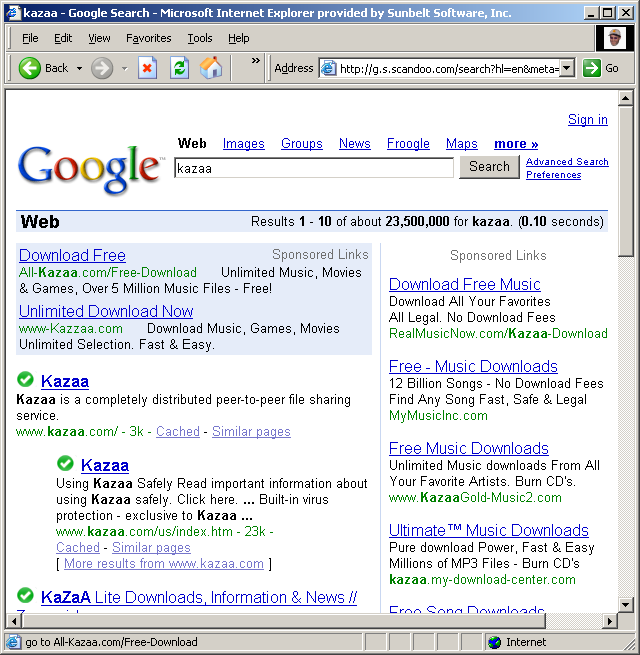
For example, a search for Kazaa yields this result:

Scandoo_000001

Since Kazaa bundles Direct Revenue, one would think that it would not be rated “green”.

Similarly, Bearshare.com bundles adware, but is rated green by Scandoo. Ibisit.com (fifth Google result for “Ibis llc”), makers of the notorious IBIS WebSearch toolbar, is rated green by Scandoo.  And Duble.com (seventh Google result for “ringtones”) distributes Zango, but is rated green by Scandoo

In addition, Scandoo doesn’t rate search engines’ ads.  We know from a past study by SiteAdvisor that ads are where the dangers lies: 2-3x as many dangerous sites are in ads as in organic results.  

It looks like a promising service but it does needs a bit of work.    (Note that SiteAdvisor isn’t perfect either and is still a work in progress.)

Alex Eckelberry

SiteAdvisor competitor

Scandoo_11111

SiteAdvisor, a service which rated sites based on a number of criteria, was recently bought by McAfee (for about $70 million).

Now there’s a competitor, Scandoo, which promises similar results as SiteAdvisor, but with no software needed on your system. It’s a division of ScanSafe and is based off of ScanSafe technology.

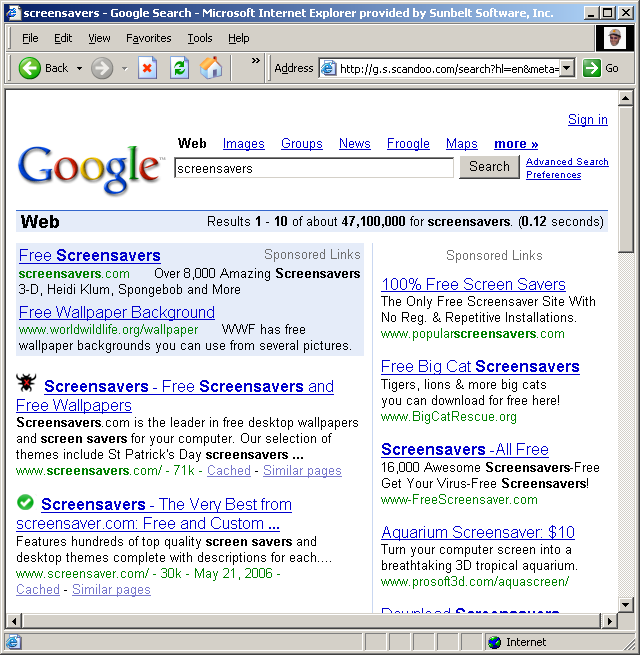
Simply go to the Scandoo website, enter a term, and something like the following shows up, with rating marks next to each result:

Screensavers_000001

Link here via TG Daily.


Alex Eckelberry

Internet Addiction: Real Problem or Much Ado about Nothing?

Last week, Reuters ran a story about the “growing problem of Internet addiction” that was picked up by CCN and other major news outlets. You can read that article here.

It quickly spawned follow-ups, such as AP’s survey the next day showing that half of workers who use the Internet at work would rather give up their morning coffee than lose their Web surfing privileges. That one’s here.

It’s not a new issue; concerns over “Internet addiction” have been in the news intermittently since the early 90s, when commercial ISPs started offering access to the public at affordable prices. The spector of a generation hooked on getting their computer “fix” has been the subject of a few sci-fi books and movies.

“Addiction” is a popular buzzword these days: in addition to drug and alcohol addicts, we now have gambling addicts and sex addicts. Those who overeat are food addicts; those who spend too much money are shopping addicts, those who lose their tempers are anger addicts. Back in the olden days, before newspeak took over the language, addiction was a very real medical condition. People who are addicted to opiates or alcohol or nicotine or even caffeine go through measurable, painful, sometimes life-threatening physical withdrawal symptoms.

Obsessive or compulsive behavior does not equal addiction. Simply engaging in an activity “too much” does not make one an addict. Yet we have doctors like the one quoted in the Reuters article – people who are supposed to be trained in the difference between physiological and psychological manifestations – saying that the Internet may promote “addictive behaviors.”

Why the rush to label all undesirable behavior as a disease? My theory is that doing so benefits both doctor and “patient.” If the person engaging in the behavior can pass it off as a disease or addiction, that relieves him/her of the responsibility for changing that behavior. The addict can’t just quit cold turkey; that’s too hard. He/she needs help. Enter the doctors who cater to these pseudo addicts. If it’s a disease, their services are required – at a hefty price, of course. We all expect “healthcare” services to cost a bundle. And of course, if we can get it official recognized as a disease, maybe the insurance companies will pay for it.

I guess you can tell I’m not too impressed with the whole “Internet addiction” crisis. Sure, some people spend way too much time online. Some folks might say I’m one of them. I make my living writing, mostly for online publications, so I’m at the computer between six and ten hours a day. I have dozens of friends with whom I’ve been communicating online on a daily or weekly basis for over a decade, some of whom I still haven’t ever met in person. Even for keeping in touch with my “real world” friends and family, most of the time I prefer to zap off an email rather than picking up the phone (and thus risking bothering someone in the middle of something).

But am I “addicted?” I don’t think so. If I have to be in a place where there’s no Internet access, I miss the convenience of being “connected” but I don’t break out in sweats or get excruciating headaches or start to shake uncontrollably. Far from interfering with my “real life,” the Internet has enabled me to participate more fully in it – I find out about community events and neighborhood meetings that I probably wouldn’t attend otherwise, I obtain consulting gigs and speaking engagements. My cousins and I had drifted out of touch for years until everyone got Internet access; now we keep each other apprised of what’s going on in our lives and coordinate, via email, monthly lunch get-togethers.

Sure, the Internet can be used for nefarious purposes, too. There are predators who hang out in chatrooms to look for victims. There are also predators who hang out in parks for that purpose. The CNN article implies that the Internet causes divorces. Doesn’t it seem more likely that the people who engage in “online sexually compulsive behaviors” probably aren’t/weren’t models of marital fidelity offline, either? Ah, but it’s so much more convenient to be able to protest that “the Internet made me do it.”

The article paints a dire picture: sleep deprived addicts suffering from dry eyes and carpal tunnel syndrome who get “cybershakes,” characterized by typing motions of the fingers when not at the computer. It’s enough to make you want to go out and pass a Constitutional amendment enacting a new Prohibition, this one on Internet Service Providers. I can just imagine the black market that would spring up, with shifty-eyed techies standing on street corners, offering surreptitious connections to underground wireless networks for cash.

What the addiction proponents seem to ignore is the difference between addiction and habituation. Hanging out on the ‘Net can become a habit that’s hard to break. So can watching TV, playing the guitar, or talking on the phone. Are those addictions, too? Will we soon be seeing meetings of Unlimited Minutes Anonymous? Hmmm … one might even those who feel compelled to label any and everything an addiction are Addiction addicts.

Tell me what you think. Am I way off base here? Am I just an Internet addict who’s deep in denial?

Or is the issue being hyped by both misguided helper types and those who stand to profit from turning excessive ‘Net surfing into a dire disease?

Do you know anyone who suffers from “cybershakes”? Do you get withdrawal symptoms if you’re deprived of your monitor and keyboard? Is the Internet damaging your real world relationships, destroying your marriage, turning you into a compulsive cybersex fiend? 

Deb Shinder