Forensic analysis of the Registry

There is a new paper out by Lih Wern Wong that I would recommend that dissects the Registry.  While the viewpoint is primarily forensics-based, it’s a worthwhile read for general security researchers who want to learn more about the subject.

Windows registry contains lots of information that are of potential evidential value or helpful in aiding forensic examiners on other aspects of forensic analysis. This paper discusses the basics of Windows XP registry and its structure, data hiding techniques in registry, and analysis on potential Windows XP registry entries that are of forensic values.

Link here, with a hat tip to Jamie Morris

Update: From Jamie Morris at ForensicFocus:

One of our list members, David, has very kindly created and supplied me with a PDF
version of the paper. It can be downloaded here.  Thanks David!

Alex Eckelberry


Direct Revenue uses a PI to hunt down antispyware researcher

Ben Edelman has been posting new documents from the New York Attny General’s lawsuit as fast as he can.  There’s much more that’s been posted, including a couple of emails from one of the VC firms that invested in them (here and here).

There’s also a number of references to “WebHelper”, who is actually now our spyware researcher Patrick Jordan (he joined us in July of last year but had been doing consulting work for us several months prior to his coming on board), and we now find he was being researched by a private investigator, as this email from Gary Kibel at Direct Revenue’s law firm shows:

Jordan10238434

But there’s so much more.

Sit back this weekend, grab a big cup of coffee and read these documents.  They are just unbelievable.  And to those adware “apologists” who read my blog and occasionally post, these exhibits are your homework. 

You’ll understand why we’re all such “zealots”.

Alex Eckelberry

New IE exploit

We have not seen any cases of this exploit in the wild, but there’s a proof of concept at the Secunia site and it’s something to be aware of.

There is a new exploit which allows hackers to obfuscate the real URL being shown, useful for phishing attacks. This is a practice called address bar spoofing, and enables the hacker to make an address bar show a different URL than what is actually loading.  This particular exploit creates a race condition between a Macromedia Flash file and web content being loaded.

In a test available at Secunia, Google is showing, but the page is different:

Spooftst982034j

The way to mitigate this exploit is to turn off active scripting, which is also a valid mitigator for the currently active “createTextRange()” vulnerability (in fact, turning off Active Scripting in general is a very good idea, if you can handle the hassle). 

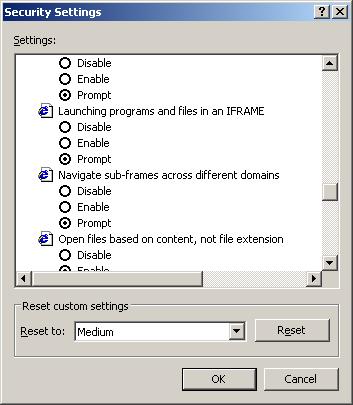
Suzi over at Spywarewarrior told me that she had success mitigating the exploit by simply setting “Allow sub-frames to navigate across different domains”  to Disable (or Prompt).  Screen shot below:

Prompt1298123899sdf

I tested this fix and it works on this test case, but there are no guarantees.   Disabling Active Scripting is your best bet.

Secunia advisory here via CNET.

Alex Eckelberry

WhenU lauds its own practices

Well, nothing like the Direct Revenue documents just exposed on Ben Edelman’s site.  We have obtained, from an anonymous source in the advertising industry, an email that Bill Day, CEO of WhenU, sent out today to advertisers who have a relationship with WhenU. 


From: Bill Day
Sent: Wednesday, April 05, 2006 11:24 AM
To: Bill Day
Subject: WhenU, “adware” and you

Hi,


Many of you know me from my days as CEO and founder of About.com, and you may also know what I’ve done at WhenU – not just talked about doing, but actually done – to demonstrate that “adware” can show respect for consumers’ right to control the desktop and be a valued part of the behavioral targeting mix.

You also probably know that NY’s Attorney General just sued Direct Revenue, that the Center for Democracy and Technology recently “outed” advertisers who work with 180solutions, and that Claria is trying to unload its desktop advertising assets.  


Looks like the other  players are mortally wounded or limping away – all except WhenU. 


WhenU is growing. Why?  And what does it mean to you and the rest of the online advertising industry?

When I took over as CEO in late 2004, WhenU was already better than the other guys, and ready to take innovative new steps to provide even greater transparency in getting and keeping permisson from consumers to deliver targeted advertising.  We eliminated affiliate distribution, put our toll-free number on every ad served, capped frequency to an average of 1-3 ads per day, and made it even easier for people to opt-out than to opt-in.  As a result, we have a better business than the other players . Our click-through and conversion rates are rising; our revenue and reach are growing.  Last week, we even got a nice nod in the New York Times and a great write up in this month’s Inc. Magazine.


The moral of the story is: good business practices equal good business


Leaders lead.  Count on us to continue to be a leader here.  WhenU’s goal isn’t to be the last man standing in the “adware” space.  Our goal is to change the space – so that truly permission-based desktop advertising earns its place in the behavioral targeting mix and the Internet becomes a safer place for users and marketers alike.


All of us at WhenU look forward to continuing to treat our twin masters – consumers and advertisers – with the utmost respect and transparency.  I encourage you to contact me directly if you have any questions or comments.


Best, 


Bill


Alex Eckelberry 


So much smoke, the gun is beyond smoking

Ben Edelman has been putting up additional documents from Elliot Spitzer’s suite against Direct Revenue as fast as he can.  These are the exhibits referenced in the highly damning affirmation and petition written by NY AG attorney Justin Brookman. There’s more being put up regularly, so check back.

Here is the documentation of a completely corrupt organization.  Solely for personal gain, officers of Direct Revenue lived, ate and breathed to rape the machines of unknowing Internet users.  

Some tasty snippets:

Exhibit 2 -146-page compilation of December 1, 2005 interrogatory responses and attachments. Includes the following:

Discusses Direct Revenue’s installation counts. (2)

Discloses revenues ($6.9 million in 2003, $39 million in 2004, $33 million in January-October 2005). (4) Discloses revenues from installing other vendors’ software ($4 million for January-October 2005). (4)

Discusses the role and effects of Insight Venture Partners’ 2004 purchase of 25% of Direct Revenue for $12 million, and Direct Revenue’s borrowing from Insight and Technology Investment Capital Corp (TICC), $21.7 million total in 2004. (4-5) Shows specific 2004-2005 distributions to Direct Revenue’s senior staff, totaling more than $27 million. (6)

Discusses the ad networks used to track advertising display, including Aquantive’s Atlas and DoubleClick. (8) Discusses other sources from which Direct Revenue receives ads, including LinkShare and eBay Shopping.com .(8)

Exhibit 4 – Direct Revenue LLC agreement. Reports Joshua Abram as 36% owner, Daniel Kaufman as 32% owner, Alan Murray as 27% owner, and Rodney Hook as 5% owner.

Exhibit 5 – User complaints and threats, and Direct Revenue’s responses (including jokes)….

Exhibit 6 – 122-page compilation of January 17, 2006 interrogatory responses and attachments….

Discusses the limited circumstances in which Direct Revenue elected to automatically remove its software from users’ computers after concluding that installations were nonconsensual. Argues that such automated removal constitutes “throw[ing] the baby out with the bathwater” because it would (purportedly) not be “in the best interests of the many users who had accepted [Direct Revenue’s] value proposition.” (2-6)

Discusses disclosures shown to Lycos users as to “the search panel feature of your Internet Explorer program” being “under new ownership.” (11-13)

…Discusses a “KZ Torpedo” to remove unknown other software. (23-34)

…Presents Direct Revenue’s records of specific users, including users’ IP addresses. (36)

Exhibit 18 – Discussion with Holistyc of distribution methods. Discusses possible use of “tricks” to improve installation rates, as well as methods of “dogting SP2 and anti-virus programs ”

Exhibit 19 – Discussion of a Microsoft invitation to a September 2004 “Microsoft VC Roundtable.” Admits that Direct Revenue “takes advantage of their [Microsoft’s] vulnerability and poor design.”

Two words: Treasure trove.

Link here.

Alex Eckelberry


Actually, this is a very smart move

McAfee just bought SiteAdvisor.  I think this is a smart move, although to be honest, I’m surprised that one of the large search engines didn’t buy the company.  It would have been an ideal way to assure safer surfing.

While terms were not disclosed, I would venture to guess that the deal was probably in the range of $15–$20 million (that is pure speculation on my part).  

I like SiteAdvisor and recommend it.  McAfee made a good move here.

Link here.


Alex Eckelberry


The ongoing problem of third party ad networks placing ads inappropriately

I’ve written about this subject before, and today there was an article in the WSJ yesterday on the same thing:  Ads showing up in places the advertisers really don’t want them: 

Glitches have occurred for mundane reasons. The Christian Children’s Fund bought ads on the largest online ad network, Advertising.com, which is owned by AOL, and specified that the ads not appear near any provocative content. But Advertising.com says it mistakenly turned off its content filters for an unspecified period of time last month, and the Christian Children’s Fund ad ended up next to an article about a sexual position in the sex section of About.com, which is owned by New York Times Co. The Disney ads were also placed by Advertising.com on About.com’s sex section during that time.

More here via MediaPost.

Alex Eckelberry

“At least we’re not Ebola”

The Attorney General of New York, Eliot Spitzer, today announced that it had sued Direct Revenue, perhaps the most notorious and hated adware/spyware distributor of them all.

Press release:
http://www.oag.state.ny.us/press/2006/apr/apr04a_06.html

Affirmation of Justin Brookman:
http://www.oag.state.ny.us/press/2006/apr/Direct%20Revenue%20Affirmation%20of%20Justin%20Brookman.pdf

Petition:
http://www.oag.state.ny.us/press/2006/apr/Direct%20Revenue%20Verified%20Petition.pdf

The Brookman Affirmation (76 pages) is a hair-raising read in which OAG investigators document the reprehensible software installation and pop-up advertising practices of Direct Revenue. Still more damning, though, is the avalanche of internal email that OAG investigators quote, revealing that DR execs were not only well aware of the fact that most users did not meaningfully consent to the installation of their software and had no clue as to how to remove the software from their systems, but that they knew full well that DR’s distributors and sub-distributors were engaged in illegal installation practices and yet took no actions to stop those practices or police the distributors (at least not until OAG investigators were on the case).

Also of interest is the fact that DR execs obsessively monitored anti-spyware web sites, organizations, and companies for any sign of criticism and were not shy about issuing legal threats and, in one case, hiring a private investigator to bully critics into silence. The Brookman Affirmation acidly remarks:

Yet the individual respondents became blase even about the shame of operating one
of the most reviled companies in America. Forwarding a critical Information Week
article, one of the company’s venture capital partners cavalierly noted, “At
least we’re not Ebola.”

To those of us who have followed the outrageous practices of this company over the years, there is little here that is completely new. What is remarkable, though, is that we now have an account of these practices all under one cover and thoroughly documented using internal company sources.

Highly recommended reading.

Eric L. Howes
Director of Malware Research
Sunbelt Software

Sunbelt TechTips for the week of April 3

“Internet Explorer has encountered a problem and needs to close”
If you get a message that says IE has encountered a problem and needs to close, it may be because you need to update the Pdm.dll file. Or you can work around the problem by disabling script debugging. For information on both solutions, see KB article 293623 here.  

How to Enable Audible Caps Lock Warning
It’s easy to hit the Caps Lock key by mistake and find yourself typing in capital letters. Worse, if you don’t know Caps Lock is on, your password may be rejected for no apparent (to you) reason. You can use the built-in ToggleKeys feature to sound an audible warning when you hit Caps Lock, Num Lock or Scroll Lock. Here’s how:

  1. In Control Panel, click Accessibility Options.
  2. Click the Keyboard tab.
  3. Check the Use ToggleKeys checkbox.
  4. Click OK.

How to Manually Start the Process to Remove XP
If you want to remove Windows XP from your computer but you can’t start the operating system in Normal or Safe mode, you can manually start the removal process by using a startup disk for an earlier operating system such as Windows 98 or Me. For step by step instructions on how to do so, see KB article 312569 here.   

Use Group Policy Editor to Manage Local Computer Policy
You can use Group Policies in Windows XP to create configuration settings for specific user accounts or for the computer by editing or creating Group Policy Objects. These include registry-based policies, security options, software installation, scripts options and folder redirection configurations. To do this, you use the Group Policy Editor tool while logged on with an administrative account. To find out how to use the Group Policy Editor, see KB article 307882 here.

Computer Doesn’t Shut Down Properly if Selective Suspend is Enabled
If your computer no longer shuts down correctly (for example, it hangs after you select Restart or Turn Off) when you’ve attached a USB mouse, keyboard or other input device, this may be because selective suspend is enabled and the device doesn’t support this feature. There are a couple of workarounds for this problem. To find out more about them, see KB article 315664 here.

How to Change the Windows Logon Screensaver
When you start Windows, if you don’t click a user name on the Welcome screen or press CTRL+ALT+DEL to log on if prompted, after ten minutes the default Windows logon screensaver will start. You can change this logon screensaver by editing the registry. Here’s how:

  1. Click Start | Run.
  2. In the Open box, type: regedt32 or regedit.
  3. Click OK.
  4. In the registry editor, navigate to this key: HKEY_USERS.DEFAULTControl PanelDesktop
  5. In the right pane, double click SCRNSAVE.EXE.
  6. Type the filename of the screensaver you want to use as the logon screensaver in the Value Data field of the Edit String dialog box.
  7. Click OK.
  8. Close the registry editor.

Note that if the screensaver file is stored in a location other than the System32 folder, you must type the entire path in the Value Data field.

How to View and Remove Installed Updates
Want to see which updates have been installed on your system? Suspect a recent update is causing your crashes or other problems and want to remove it? Here’s how:

  1. Click Start | Control Panel and then click the Add | Remove Programs icon.
  2. With Change or Remove Programs selected in the left pane, click the checkbox “Show updates” at the top. This box is not checked by default.
  3. Scroll down to Windows XP – Software Updates in the currently installed programs and updates list.
  4. To remove an update, click it to highlight it, then click the Remove button.

How to recover from a corrupted registry
If your Windows XP computer won’t boot because of corruption in the registry, you may get an error message that says XP can’t start because a specified file is missing or corrupt, or you may get a Registry File Failure stop message (c0000218). You can use the recovery console to back up your registry files, delete the existing registry and use the repair folder files to boot into XP with a clean set of registry files. The step-by-step process is described in KB article 307545 here.   

Can’t access CD-ROM after removing Easy CD Creator
Some folks have discovered that after they remove the Easy CD Creator software from their computers, they can no longer access the CD-ROM drive and get various error code messages. To fix the problem, you may need to modify the registry. For instructions, see KB article 314060 here.   

And a final bonus: Transl8 Txt Msgs
Befuddled by the seemingly foreign language in which your kids communicate on their cell phone SMS service? Wanting to get started with text messaging yourself but don’t know all those abbreviations that everyone uses? Here’s a web site that will help you to “make sense of txt lingo.” You can either type in the SMS message and the site will translate it to plain English, or type in your message in English and the site will spit out its SMS equivalent. Link here.

Deb Shinder

Light blogging

I’ve been a wee bit light on the blogging lately. Truth is, I took my family out of town on a vacation last week and tomorrow I’m going to InfoSec with a number of other Sunbelters.

In the meantime, Eric Howes and Eric Sites here at Sunbelt have been holding down the Blogging Fort, and occasionally, others jump in here as well to post a quick note.

I hope to be back in the swing of things toward the end of the week.

Alex Eckelberry

The most watched country in the world

A story in the Guardian today brings up some very interesting tidbits about the widespread use of CCTV in England, whose citizens are the most watched in the world.

The complete ubiquity of these cameras has signaled the end of any sense of privacy for British citizens.

From the article:

“But what if this impeccably liberal Observer journalist wanted to sneak out and buy a copy of the Sun or Nuts magazine so I could look at pictures of girls in their pants without anyone knowing? Or slack off to KFC to load up on the Colonel’s fat-and-carb combo, as a little light relief from the prissy platefuls I have to swallow as a restaurant critic? These aren’t criminal acts, but they are things I might not wish anybody to know about. And yet I probably couldn’t get away with them today because somewhere there will be a camera watching me. I suddenly feel like my private space has shrunk and that the Great British Public has allowed it to happen. And I want to know why.”

But at what cost? Doesn’t even seem to stop crime:

“…a major survey of 14 CCTV schemes published last year showed their impact on local crime rates was either negligible or that crime rates actually went up. At the same time fear of crime has also gone up. Meanwhile, clear-up rates – the number of crimes that the police solve – have gone down.”

There’s even a a program to allow everyday people to subscribe to a special CCTV channel, for only a few pounds a week.

“To see the future of CCTV we need to go to Spitalfields in east London, where the Shoreditch Trust, a local regeneration agency, is piloting a new initiative: CCTV for the masses. Instead of the images only being seen by the likes of Norman Whalley and his team, local residents will be able to watch them, too, on a broadband connection.”

It’s justified as you won’t be able to do all the fun stuff the local cops can do (like pan, tilt, zoom, etc.). According to the article, it’s not “big brother”, it’s described as “little brother”.

Except that little brothers grow up.

Article link here.

Alex Eckelberry
(Thanks Chris)

An Interview with former 180solutions employee

Jimmy Daniels has done an interview with a former 180solutions employee. Everyone should check it out. click here

    Jimmy: Being on the technical side of it, I would imagine you’ve had to uninstall 180 many times from family and friends pc’s, as I have. Got any good stories there?

    ex180: Uninstalls? Yeah. I’ve taken it off my neighbors computer a couple times He has three girls and it finally got so bad that I rebuilt his laptop and installed vmware, then decreed that he was the only person in the house allowed to use the computer without starting vmware first and surfing from it. He backed it up and has been happy ever since. I remember my first embarrassing experience was my fifth day at the company… I got a call from a non-technical co-worker at my previous job to help her uninstall n-case. She knew who I went to work for and it was before the uninstallation stuff was so widely available on the web. That was humiliating… I was like, “wow… people warned me about this place before I came and here’s so-and-so needing help to get this crap off her machine”. Ouch.

Eric Sites
VP of Research & Development
Sunbelt Software

What do the bad guys know about your bank?

Here at Sunbelt we come across a lot of personal information stolen by keyloggers, trojans that go after your protected storage data, and phishing scams. So what do the bad guys do and know about your bank account when they have that information?

Here is a conversation we came across while doing malware research that everyone should know about:

Barclays Question

I have some questions regarding Barclays bank drop cashing, hope everyone can help.

1. Is it true that it requires one business day(next day)to complete the transfer if I do online transfer to another Barclays drop? Or will it do instantly like Boa and Wells Fargo?

2. Is it ok if I use a personal Barclays drop and cashout 10k+ balance from a business login? Or do I need business Barclays drop in this case?

3. In term of risk, is there any different between cashing 2k and 10k from the bank? I mean is there any requirement if I cash large sum of money compare with small amount cashing?

Thanks in advance.

Yep it takes 1 Working Day for the Transfer to be Cleared. if you do it befor 6pm on a working day it will be in the account nextday. if you do the transfer after 6pm it will take 2days to clear. hope that helps

You need to know barclays limit is xxxxxxx[amount removed] pounds.

if you go over this amount the bank will phone and u must have full info of login to cash it and answer the bank.

xxxxxx[amount removed] limit is for personal account if I’m not mistaken, what if I use business account and transfer more than xxxxxx[amount removed], will they still call for verification?

yes they will call even if its business and if you go over the limit.

you need a full info login

yes they will call even if its business and if you go over the limit.

U mean xxxxxx[amount removed] limit? Even I use business and transfer more than xxxxxx[amount removed] they still call? Do I need to change the phone number since they’ll call the phone number registered on the file?

Of course, we wouldn’t want the account holder verifying shit now do we

xxxxxx[amount removed] is limit do about xxxxxx[amount removed] change the phone on the login what i do is change the mobile to my mobile and the house or landline i delete 2 number and add 2 so the number is invalid so bank calls mobile.

thanks

I think what u’re trying to say is that cash it b4 12.00pm second day so even they call later and the money has already been cashout. But aren’t that they won’t add the transfer to your drop before the any verification is confirmed?

——————-

Eric Sites
VP of Research & Development
Sunbelt Software

eEye issues temporary fix for IE Exploit

eEye has released a patch for the active IE zero day exploit:

Organizations that choose to employ this workaround should take the steps required to uninstall it once the official Microsoft patch is released. This workaround is not meant to replace the forthcoming Microsoft patch, rather it is intended as a temporary protection against this flaw. Organizations should only install this patch if they are not able to disable Active Scripting as a means of mitigation [my emphasis].

Link here.

Yup, I agree. Don’t bother using this patch — turning off Active Scripting in IE is a valid mitigator. Microsoft will have this patched on (or possibly before) April 11.

Alex Eckelberry
(Hat tip to Andreas)

Become a phishing terminator

Pirt2312312312

CastleCops and Sunbelt Software are announcing a new anti-phishing community, the Phishing Incident Reporting and Termination (PIRT) Squad. This will be a community at CastleCops solely dedicated to taking down phishing sites. It’s the first public takedown community that I know of, and we are going to start nailing these sites. You can read the press release here. Zdnet article here. You can register to help us here.

The PIRT Squad works as a complement to existing organizations such as the Anti-Phishing Working Group (APWG). The primary difference between PIRT and other organizations is that PIRT is focused solely on aggressively terminating phishing sites. PIRT will work with other security organizations and, if necessary, law enforcement, to provide information for security and forensic analysis.

With this new service, you can report a phish via email or through a web tool. And we’re recruting volunteers to help, too.

But here’s a little background: A while back, Paul Laudanski and I worked together to shut down a phishing site on a financial services company. What did we do? We called them aggressively by phone. We contacted their ISP. We contacted the brokerage firm they used to clear their orders. In just a few hours, the thing was shut down.

This got us talking about the problem of phishing. Very few people report these phishing sites immediately and get them shut down. There’s a lot of experts involved in phish fighting, but they’re primarily dealing with the important security research and forensics angle of the business.

There are companies like Cyota, who contract with financial institutions to protect them from phishing, and they do takedown. Maybe their clients’ sites get taken down. But those who aren’t their clients? What happens?

This situation brings to mind those old TV shows, where a camera crew would have someone pretend to break into a car on a busy street, and no one around would call the cops. It’s not because no one cared, it’s because all the neighbors assumed someone else must be calling. So, no cops were called.

Well, it’s a relevant analogy for phishing. There’s an obvious solution to shutting down a phishing site that many people don’t realize they can do: Contact the site or the ISP or the compromised siteowner In my experience, by aggressively going after phishing sites, you can shut down a significant portion of these sites — perhaps 40% or more — by simply taking action. This may not seem like a large number, but it’s pretty significant if you realize how many people you can help.

I’ve been testing this over the last couple of months: From time to time, I’ll contact someone related to the site to let them know that their site is being used for a phishing scam. In a fairly significant number of cases, I’ve been the first and possibly only one who ever contacted these people. It’s usually something that only takes me a few minutes, but it is effective in a large number of instances.

You see, most phishing operations run off of an innocent compromised site. Phishers, for obvious reasons, don’t want to let the world know who they are, so they find sites with poor security (almost always Apache-based sites that have poor configurations or old Apache versions), hack in, set up shop and do as much business as they can before they are shut down.

This even occurs with keylogging operations. Recently, we came upon an elderly lady running a site about flowers who had a full keylogging operation running off her site. Sending her emails was ineffective, so I simply looked up her name using whitepages.com, called her personally and told her what was going on. We helped her through the process of shutting down the compromised portion of her site, getting things back in place, and now a few less people will be affected by this keylogger. And just this past weekend, I worked on a takedown of a real-estate site with the zero day exploit. I was the first person to contact the realtor, and she took fast action to fix it. So one person can make a difference.

And that’s why Paul and Robin Laudanski and I decided to start PIRT. And we’re recruiting volunteers. Paul has even created a tool, Fried Phish(tm), which you can use to make phishing reports. Join here. An introductory Wiki (a work in progress) is here.

You can help fight phishers as well, with just a basic knowledge of how the Internet works. If only 10% of the people who read this blog reported one phishing site a day, it would actually make a dramatic impact.

So join Paul and me and become a Phishing Terminator. Click here.

Alex Eckelberry

Digg this story.

Getting Spyware Quake off your system

You can try using CounterSpy to remove Spyware Quake (free trial). We have also posted a manual removal process here (thanks to Sunbelt security researcher Adam Thomas for his work on this).

Also, there’s various user comments here and here, and SpywareWarrior is always a good place to go for discussion on these types of things.

Alex Eckelberry

IAC launches new shopping service

IAC (the company behind Ask.com, etc.) has launched a new shopping service.

Now Barry Diller’s company, IAC/InterActiveCorp, among several others, is giving this kind of shopping software a revival. The company recently introduced Pronto, a software application that a user downloads at Pronto.com. Once a user clicks on one of the 50,000 merchants in its database, Pronto silently monitors all of a user’s activity on a product page, then shows deals from other merchants on the same items, or similar ones, until it finds a better deal. Then it sends a message prompting the user to click away.

NY Times link here.  

Alex Eckelberry