Ok, Bambi’s gone, but can someone help Fritz?

Bambi Francisco has resigned from MarketWatch because of her involvement in vator.tv, a sort of youtube for businesses (entrepreneurs upload videos pitching their business, looking for help, etc).

Fritz1239888Ok, that’s all well and good, but can someone please help Fritz, the earnest Tyrolean toy maker adverting on vator.tv for help marketing his wooden toys in America? These toys are really nice!

And Bambi, good luck — sometimes these things happen for the best.

Alex Eckelberry
(More tittering about Bambi at ValleyWag)

Another CounterSpy Enterprise 2.0 preview webcast thingie

I actually missed doing the webcast earlier this week because of the flu. Greg Kras did the whole thing by himself (nice job, Greg!).

However, I’ll will be doing a webcast with Greg next Tuesday. Feel free to join in for the fun. From our marketing department:

Webcast: Preview Of CounterSpy Enterprise V2.0

Alex Eckelberry and Greg Kras will be giving a preview CounterSpy Enterprise 2.0 next Tuesday. If you want to take a look, please join us:

A Preview of CounterSpy Enterprise 2.0
When: Tuesday, April 10, 2007 2:00 PM (EDT)
To join the day of the event please visit:

https://www.livemeeting.com/cc/sunbelt/join?id=92SSQC&role=attend&pw=XR*mw9Z

Meeting ID: 92SSQC
Attendee Meeting Key: XR*mw9Z
Audio: 1-620-782-8200
(Toll-free) 1-888-468-4618
Participant code: 104764

Alex Eckelberry

Massive regulatory tome describes acceptable Robot activity

If you’re a fan of robots, you’ll get a kick out of this article — the Japanese government has drafted massive guidelines as to the safe operation of robots.

Man v machine

Asimov’s three laws:

— A robot may not injure a human being or, through inaction, allow a human being to come to harm

— A robot must obey orders given it by human beings except where such orders would conflict with the First Law

— A robot must protect its own existence as long as such protection does not conflict with the First or Second Law

A selection from the Japanese Ministry of Economy, Trade and Industry guidelines:

— Via a structure of general regulation and the adoption of that regulation, the planning, manufacturing, administration, repair, sales and use of robots shall observe the need for safety at every stage

— The reasonably predictable misuse of robots shall be defined as the management, sale and use of next-generation robots for purposes not intended by manufacturers

— There should, in principle, be no serious accidents such as fatal accidents involving robots, and the frequency of such accidents should be lowered as far as possible. Affordable multiple security measures should be taken in case one protection method alone is insufficient

Link here.

Alex Eckelberry
(Thanks to Frank)

Sunbelt Weekly TechTips #38

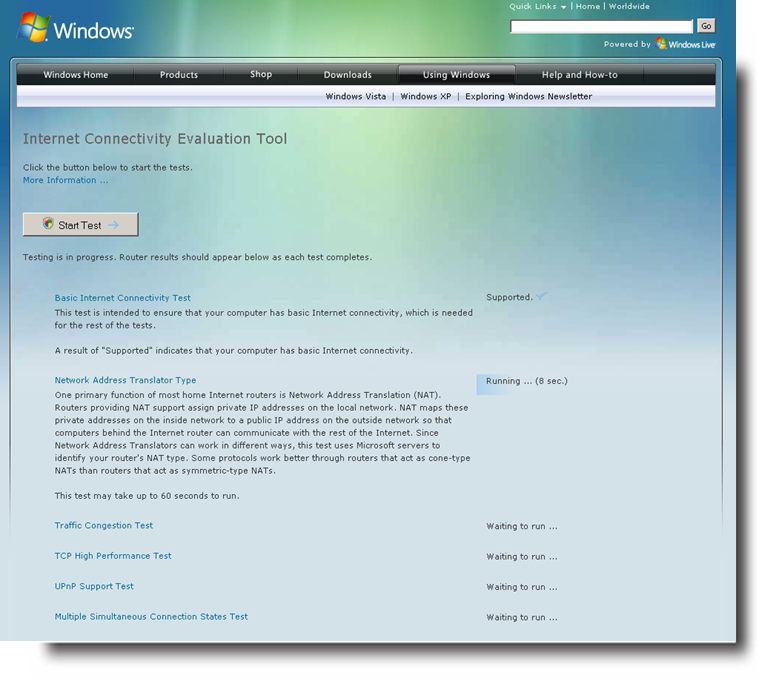
Internetconvers1283172377777Download: Internet Connectivity Evaluation Tool
Here’s a new free tool from Microsoft that will check your Internet router/NAT device to determine whether it supports advanced features such as face to face collaboration with Windows Meeting Space in Vista. The tool can be run on an XP or Vista computer. You can download it from the Microsoft web site here.

Is Vista a “slow pig” when it comes to copying files?
A number of users have complained that sometimes the Vista file copy process is slow or stops responding, and an article on Slashdot last week played up the problem.

I’ve not experienced the problem myself but apparently quite a few people have, and Microsoft has a hotfix to correct it, which you can get from Customer Support Services. There’s more info in KB article 931770.

CompUSA closing many stores
CompUSA was once “the” place to go to buy computers and computer accessories, but now many people buy at discounters such as Fry’s Electronics or over the Internet, where you can almost always find lower prices and good service from sources such as Newegg.com. Now CompUSA is closing about half of its stores. The process began in February and is still ongoing. You may still be able to get some good deals at the “going out of business sales.” Here’s a list of locations that are closing.

Court rules in favor of media server that copies DVDs
A company that makes a home media server that allows user to “rip” their DVDs to disk was sued by the DVD Copy Control Association for allegedly violating its licensing contract. A California judge ruled in favor of the defendant. Read more about it here.

Manage your digital photos in Vista
Many of us have amassed large collections of digital photos, and Vista makes it easier to manage and find them. One of the most useful new features is the ability to add “tags” to your pictures. These are keywords that can be used to sort and search. The tags are stored as metadata within the file, along with other details about the graphic.

To add a tag to a photo, right click the photo file and select Properties. Click the Details tab, and then click Tags. A field will appear that says “Add a tag.” You can type in the keyword(s) you want to associate with the picture here. Then, in the Tags column of Explorer (in a folder that contains pictures), you can click the down arrow to sort or stack by tags.

How to join a domain in Windows XP Professional
If you take your laptop to work with you, you may need to join it to the company domain in order to log onto your company network account. Here’s how:

  1. Click Start Control Panel.
  2. In Classic view, click System. In XP view, click Performance and Maintenance, then click System.
  3. Click the Computer Name tab, then click the Change button.
  4. In the Domain dialog box, enter the name of the company domain you want to join.
  5. A dialog box will ask for the username and password. If the domain administrator has already created a domain account for the computer, you can enter your own user name and password. If not, a domain administrator will need to enter his/her username and password here.
  6. You will receive a “welcome to the domain” message indicating the computer was successfully joined to the domain.
  7. Reboot the computer.

Note that Windows XP Home computers cannot join domains.

User Q&A: What happened to all that space on my hard disk?
“Hi there. I bought a new hard drive, got a great deal on what was supposed to be a 750 GB drive – BUT when I installed it in the computer, it says there’s only 686 GB. I could understand maybe a small difference but that’s a lot of gigabytes that got lost somewhere. This seems like false advertising to me, as I didn’t get all the space I paid for. I’ve seen the same thing every time I bought a hard drive. Can you explain? Thanks. – T.W.”

Well, the problem comes from the difference in the way computers and disk manufacturers calculate drive capacity. Computers “think” in binary math (base 2), where kilobytes, megabytes, gigabytes, terabytes, and so forth is an increment of 2 to the 10th power (1024).

Humans are used to thinking in base 10, where hundreds, thousands, millions, etc. are incremented by 1000. So hard drive manufacturers use a more familiar system in which they “round” a kilobyte to 1000 bytes, a megabyte to 1000 kilobytes, and a gigabyte to 1000 megabytes. So the drive manufacturer advertises a drive that has 750 billion bytes as a 750 GB drive, but that’s not how the computer sees it because it’s dividing by 1024 instead of by 1000.

Is it false advertising? Well, technically, maybe so. But since just about all hard drive makers do it this way, it has become the standard. On the other hand, just to confuse matters a little more, manufacturers don’t use this system for other storage media, such as flash memory cards. There, what you see is what you actually get: flash cards usually actually have the amount of space advertised, although formatting does reduce the amount of usable space on both hard drives and flash cards. For a more detailed discussion of all this, click here.

You get an error message when you sync offline files in XP
If you get an error message stating that files of this type cannot be made available offline when you try to synchronize offline files on an XP computer, this may be caused by a problem with client-side caching. There’s a hotfix available. To find out how to get it, see KB article 890671.

Poor video quality with interlaced mode on Vista computers
If you configure your video settings to use interlaced mode on a Windows Vista machine, you may find that the video is jerky and of poor quality. To fix this problem, you need to download a free update package. There are versions available for both 32 bit and 64 bit Vista. To get the download, see KB article 932649.

Until next week,

Deb Shinder

Glitch in CounterSpy’s Active protection

We have confirmed that with Friday’s definitions set #526, CounterSpy version 2.1 users may encounter problems opening a command prompt box or running programs that open command prompts.

Active Protection (AP) in CSC 2.1 with this definition set will erroneously report that CMD.EXE is a trojan (Trojan-Proxy.Agent.CL), then attempt (and fail) to quarantine the file. Although the quarantine action will fail, these AP prompts can become tiresome, especially if a program that is dependent on running a component from a command prompt fails.

This bug is fixed in today’s definition update, definition #527. To access the update, simply update your definitions in CounterSpy.

Please note that on-demand scans of the PC are unaffected by this glitch and CSC will not detect CMD.EXE during a Quick Scan or Full Scan. This glitch affects only CounterSpy 2.1’s Active Protection. Also, our testing indicates that CounterSpy 1.5 is completely unaffected by this glitch.

We sincerely regret the error.

Alex Eckelberry

Ethics and antispyware

I’ve written before about the “scan and scare” tactics used by antispyware companies (similar are the “scan and find errors” used by registry cleaners). And recently, Larry Jaffe, our outspoken editor of CounterSpy News, also wrote about this and received mail by the ton. It’s a burning hot topic in the minds of users.

Here’s how it works: You download a “free trial”, which scans your drive, finds a bunch of terrifying things on your PC, demands payment in order to clean your system. And it works even better when the antispyware product has false positives.

It’s even something that the reputable Robert Vamosi at CNET mentions in his antispyware roundup recently:

The free trial copy … will not remove any spyware found until you purchase the full product. We think this is wrong, and a crude way to force sales.

He’s absolutely right. It is wrong.

But this model is, in fact, implicitly driven by places like download.com, TuCows, etc., which base a large part of their revenue model by selling manufacturers higher visibility.

Here’s why: For every download, a developer will get a certain percentage of people actually buying the product. So, if you get 100 downloads, you might get 2 people who buy the product, a conversion rate of 2%. And that 2%, by the way, holds pretty standard throughout the industry.

But many companies in the antispyware space (and earlier, in the registry cleaner area) learned that by scanning the machine, but refusing to clean until paid, their conversion rates soared. I spoke with an antispyware vendor a while back who told me that by using the “scan and scare” tactics, they were able to get a conversion rate of almost 30%. Another conversation with a commissioned affiliate of an antispyware vendor said that their tests showed a 10x higher conversion rate when they moved to the scan-and-scare model.

And so there’s the reason why virtually the entire industry has moved to this model: the conversion rates are astounding — especially in security. It really pays to scare the crap out of people.

Our conversion rates? Maybe 2%, because we refuse to do the scan-and-scare thing — we provide a fully functional trial version. But that means that for every million downloads of CounterSpy, we get (maybe) 20,000 sales. If we were on the “scan-and-scare” model, that number would likely increase to something like 200,000 sales. The difference in math is staggering.

This puts companies like Sunbelt at a considerable disadvantage over the competition, for the reason that the competition can buy up vast amounts of ad space and pay-for-download programs on places like CNET and TuCows, virtually guaranteeing themselves a healthy return.

Look at the math — a pay-per-download program at a major download site might cost you as high as $1.00 per download, getting you listed in a premier location, driving huge download numbers. If you’re getting a 2% conversion rate on a $20 product, you’re losing money. But if you’re getting a 20% conversion rate, you’re making money hand over fist. By using these types of marketing practices, you win. So even highly reputable companies like WebRoot have moved to the scan-and-scare model, because of the sheer difference in numbers.

Another hidden secret of the antispyware business is that independent “review” sites rank products higher based on the commission paid. We had one major review site offer us a high spot in their review if we promised a higher commission — and then, he would only list us a “#2”, because our price point was too low ($19.95, vs. $29.95 for the “#1 player”). This is why for reviews, your best bet is to look at user reviews and reviews by reputable organizations, like PC Mag, PC World, CNET, etc. Sleazy? Yes. But it’s the nature of the business, and it’s something that very few people know about.

It has been rumored that a major state attorney general’s office was sniffing around the scan-and-scare practices in the registry cleaning business. Perhaps they need to look at it for the antispyware side of the business.

In the meantime, you can trust that we will always offer a fully-functional trial version. To hell with the money.

Alex Eckelberry

The ANI exploit and CounterSpy and Ninja

This exploit is something of concern.

Some updates:

CounterSpy: CounterSpy detects the Ani exploit as “Trojan-Exploit.Anicmoo.ax (v)” in definition set 526. Incidentally, VirusTotal coverage as of 1:30 CET today here.

Ninja: Since email is a potential attack vector, securing that area is important. The full version of our Ninja Email Security product includes two AV engines — Authentium and BitDefender. However, many customers only run the antispam portion of Ninja. So while the BitDefender AV engine in Ninja does detect these malformed .ani files, this will only be useful to customers if they’re using Ninja’s AV functionality.

However, Ninja does include intelligent attachment filtering, which looks past the extensions of many file formats to see what type of file is actualy bein sent. So we just posted an updated set of SMART definitions for anyone using Ninja 2.1.xxx which will allow you to create an attachment filtering rule to block .ani files regardless of what they have been named. In this way even if you’re not using Ninja’s AV functionality you can still block these files from getting to your users.

Alex Eckelberry

Oh Dear Lord: This man has actually named his product a “condom”

Condom2134287877I’ve talked about unfortunately-named products before, but this absolutely takes the cake.

There’s a new product out called a Browser Condom.

The description:

It’s and [sic] advanced technology that allow [sic] you to run any kind of software in your computer without a risk of be [sic] infected with any kindof [sic] virus, spyware, trojan and any kind of malware. (VTD) , Virtually Transmitted Diseases.

The icon of the product is, well, a condom wrapper.

Why the name? Was he inspired by the pictures of the Klik Revenue boys exuberantly playing with condoms? Or the picturesque city of Condom, France?

I’m being good, really: There’s so much room for so much humor here, it’s difficult to contain oneself.

But I run a respectable blog here, people. So I’ll let you do the dirty work: Comment away…

Alex Eckelberry
(A copious acknowledgment to Paperghost, who blogged first about this.)

Ani format exploit — reading in plain text may still be vulnerable

A surprising post at SANs this morning:

A short overview of how the different email clients (in the supported list of Microsoft) are reacting to the animated cursor vulnerability (CVE-2007-1765) depending on the actions and settings of the email client.

The surprising element is that read in plain text mode makes some of the clients more vulnerable and actually only offers real added value -for this vulnerability- for Outlook 2003.

More here (via Donna).

Alex Eckelberry

Preview of CounterSpy Enterprise 2.0

Cseentr19991238

Greg Kras and I will be giving a preview of our new CounterSpy Enterprise 2.0 next Tuesday. (This is the version of CounterSpy designed for business use.)

If you want to take a look, please join us:

A First Look at CounterSpy Enterprise 2.0

When: Tuesday, April 3, 2007 2:00 PM (EDT)
To join the day of the event please visit:

http://www.sunbelt-software.com/rd/rd.cfm?id=070330EB-CSE_Webcast
Meeting ID: 92SSQC
Attendee Meeting Key: XR*mw9Z
Audio: Toll free: +1 (800) 416-4956
Toll: +1 (978) 964-0050
Participant code: 104764

Alex Eckelberry

Brilliant!

I’m going to give you a sneak peek of a very cool skunkworks project going on over at Mayhemic Labs.

One thing that a lot of people have commented on (and particularly the good folks over at F-Secure) is that phishers register domains using words like “Chase”, “ebay”, etc. This makes it easier to foil their victims (such as having a URL like “chase-banking-center.com).

Of course, a great idea is to have the domain registrars simply refuse to register domains with these names (or at least trigger a review of a suspicious domain before allowing it to register). However, that’s not always easy to get done.

But what if new suspicious domain registrations were automatically tracked in a format that allows everyone to see what’s going on?

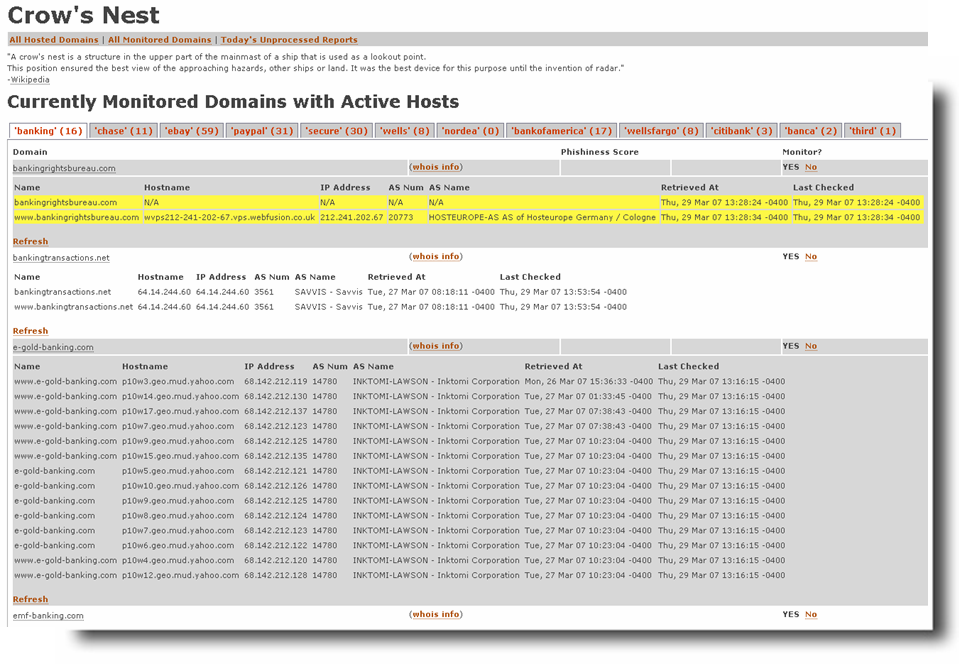
That’s just what Ben Jackson did over at Mayhemic Labs: He developed a “Domain Tracker System” to track domain registrations by using DomainTools’ Domain Mark reports.

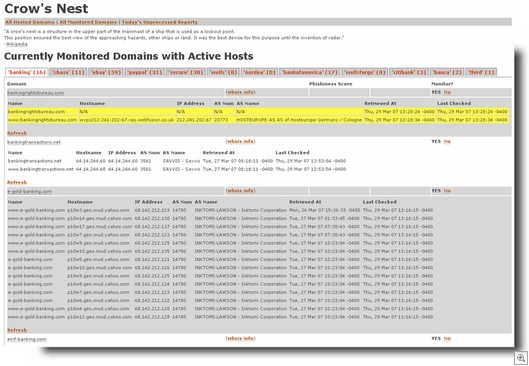
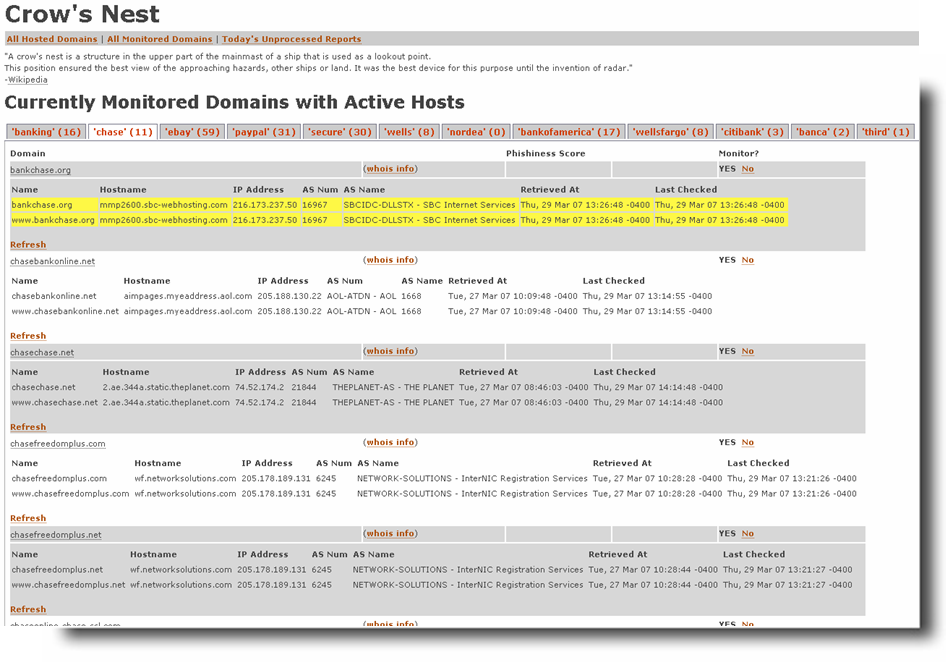
Called the Crow’s Nest, it aggregates submissions of domain mark reports containing keywords that would be likely used in a phishing domain. The system processes these reports and adds them into a database. The submitter (or other volunteers) can then flag domains that look suspicious. These domains are then monitored for activity. Every 6 hours registration and DNS records are checked to see if the domain is hosted and or still registered. If the site is hosted, the user can then check the site and see if something phishy is going on, and if so, notify the parties affected.

Phishtrack_2131231231

Phishtrack_2131231232

For now, this site is only being used by security researchers. There’s also lots of people who helped him in this, and when it goes public, I’m sure he’ll thank those that don’t mind being publlicly acknowledged.

Expect this site to be public in a few weeks. And then those Phishers will feel a whole lot of hurt.

Alex Eckelberry

Battle stations: New “ani” zero day being hunted

The folks over at McAfee have written today about a new zero day, and it doesn’t look pretty. Our team is on high alert for this exploit and we are actively hunting for any sites which are using it.

From McAfee:

Preliminary tests demonstrate that Internet Explorer 6 and 7 running on a
fully patched Windows XP SP2 are vulnerable to this attack. Windows XP SP0 and SP1 do not appear to be vulnerable, nor does Firefox 2.0. Exploitation happens completely silently.

The ani file format is an animated cursor format. We have exploit code and it’s not pretty

We’ll post more information as we get it.

Alex Eckelberry

Data Feeds from the Sunbelt Software Threat Center

Our advanced research provides us with a vast amount of new security research (URLs, malware samples, etc), and now it’s available to other companies and researchers. As a complement to our CWSandbox automated malware analysis suite, we provide to technology and business partners three data feeds from our Threat Center (feeds are only available to vetted professional security researchers and recognized security companies).

These feeds are an extraordinarily valuable resource to assist in analyzing, protecting and remediating malware threats.

Feed #1: Malware Sample sharing
Frequency: Daily
Provides: New samples downloaded each day, in a dated daily zipfile that is double-compressed and password-protected. Each sample is named its md5sum, followed by .EX$. This is not sent in email, as the file size is prohibitive. Only new samples (by md5) will be posted each day, all of which will be Microsoft Portable-Executable (PE) files.

Feed #2: XML Reports
Frequency: Immediate upon submission from any existing source to our CWSandbox database (i.e. very frequently).
XML reports are sent as email attachments. While the size of the attachments is small (typically 20K to 200K), the total volume of email is high (can be several thousand per day) so a specific email account or alias for receiving these should be used.
Provides: XML reports of every sample scanned through the CWsandbox. No frills email format with a text or an HTML result and XML report attached to it.

Feed #3: Distilled URLs and IPs
Frequency: Daily
Provides: New malware URLs in a daily text digest. URLs provided either come from our research center, from URLs that have been reported as malware that day, or that have been downloaded in the CWsandbox by Trojan downloaders. Vendors are responsible for sorting malware from other behavior (i.e. phish submissions, ad rotationals, potential false positives). We advise downloading EXE files first with tools like Wget and Grep, then sorting the list to fit the role.

If you’re interested in finding out more, contact Chad Loeven.

Alex Eckelberry