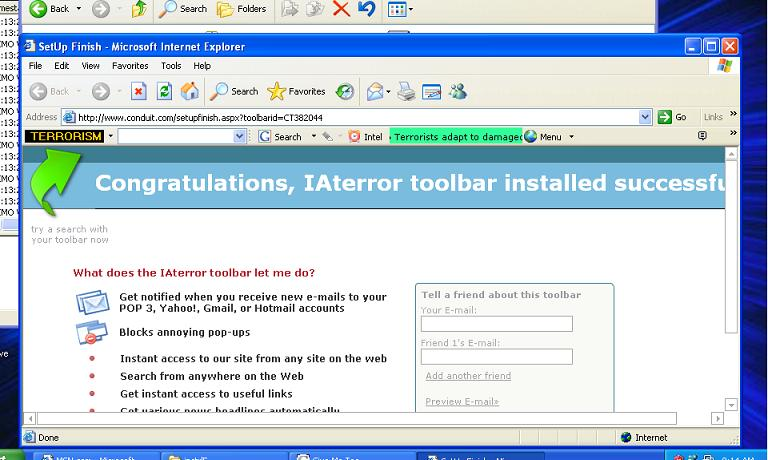
Warning: Seriously geeky security humor.
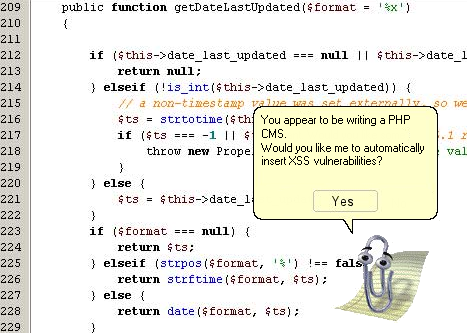
Link here via SecuriTeam.
And a bonus link here.
The Great Years: 2004-2010
Joe Wells, our chief scientist for security, is speaking at the Information Technology Security Awareness Day at the University of Florida.
The eighth University of Florida Information Technology Security Awareness Day will be held from 8 a.m. to 4:20 p.m. Nov. 8 in the University of Florida Reitz Student Union Auditorium. The event is sponsored by the office of the interim chief information officer and will be hosted by the UF IT Security Team.
ITSA Day is held annually to provide IT workers from UF, Gainesville and surrounding communities with exposure to current, upcoming and popular security trends. Esteemed experts in specific security fields are chosen as speakers so attendees are educated by a variety of peers and professionals. Bringing IT security awareness to campus IT workers and the community is a significant goal of the UF IT Security Team. ITSA Day will be streamed live and recorded for Internet viewers around the world.
“Each year presents new security challenges and improved ways to protect against them,” said Kathy Bergsma, UF information security manager. “ITSA Day helps keep IT workers informed about current challenges and ways to mitigate them.”
Security experts from the Sunbelt Software, Cisco Systems Inc., Cenzic Inc., Secure Ideas and Forensics Strategy Services LLC will present popular security issues such as Web application security, malware prevention and forensics. ITSA Day is targeted at professional IT workers and others who need to learn current security trends.
ITSA Day is free and open to the public. No advance registration is required. Information about speakers and other details will be updated periodically at www.itsa.ufl.edu.
An optional live stream will be available at http://video.ufl.edu/wmstream.html.
Link here.
I was sent this story by a couple of people here and wasn’t going to bother to say much, until I saw this:
We recently discovered that a small number – less than 1% – of the Video iPods available for purchase after September 12, 2006, left our contract manufacturer carrying the Windows RavMonE.exe virus. This known virus affects only Windows computers, and up to date anti-virus software which is included with most Windows computers should detect and remove it. So far we have seen less than 25 reports concerning this problem. The iPod nano, iPod shuffle and Mac OS X are not affected, and all Video iPods now shipping are virus free. As you might imagine, we are upset at Windows for not being more hardy against such viruses, and even more upset with ourselves for not catching it.
Careful Apple… remember that whole “stones, glass houses thing”.
And as the folks at F-Secure said this morning “Whom do you think the people that bought those iPods will be more upset with?”
Sunbelt writeup here on the Ravmone.exe trojan.
Alex Eckelberry
This is cool — a new website dedicated to all the agreements you “consent to”.
http://smallprint.netzoo.net/ via BoingBoing.
Alex Eckelberry
IE 7 readiness toolkit
Many of us have been using IE 7 in its various beta incarnations for many months, but it’s set to be released in final form within the next month, and if you create web sites, you’ll want to make sure they work properly with the new browser – especially since it’s planned to be an automatic update. You can get the IE 7 Readiness Toolkit to help you do that. For more info and the free download, click here.
Welcome to Windows Meeting Space in Vista
Windows Meeting Space is a cool new feature in Vista that replaces the old Microsoft NetMeeting application, with a spiffier and more professional- appearing interface. With WMS, you can have meetings with up to ten participants, where you can share your desktop or applications, connect to a network projector to view presentations, and pass notes privately to other participants. You can even distribute documents as handouts, and any participant can edit them with the changes automatically propagated to each particpant’s copy (while leaving the original unchanged). Unfortunately, it can’t be installed on pre-Vista operating systems, as it depends on Vista’s People Near Me peer-to-peer networking functionality and uses IPv6, which is installed and enabled by default in Vista. But it’s an easy, cost effective way to conduct small virtual meetings. For more about WMS, click here.
How to make XP launch Windows Explorer instead of IE from the Accessories menu
We’ve had a couple of instances where readers tell us that when they click Programs | Accessories | Windows Explorer, instead of launching Windows Explorer, Internet Explorer starts. That happens because the path in the program shortcut is incorrect. Here’s how you can fix it:
This also affects what program launches when you hit the Windows key + E.
What happened to the file names in Thumbnail view?
If you see thumbnails of pictures but not the file names when viewing the contents of a folder, you can do the following: Change to a different view, such as List or Details, and then hold down the Shift key while you click View | Thumbnails to switch to the Thumbnail view. Your file names should be back. You can toggle between displaying or not displaying them this way.
How to remove invalid entries from Add/Remove Programs
If you use the Add/Remove Programs applet in Control to remove a program, but there are still references to the program in the Currently Installed Programs dialog box, you can edit the registry to remove these invalid entries. As always, be careful when using the registry editor as incorrect use can render your computer unbootable. For step by step instructions on how to perform this registry edit, see KB article 310750.
Registry keys and values for System Restore
Want to know which registry keys and values contain information about the System Restore utility in Windows XP? Note that there are some values in these keys that should not be modified under any circumstances, but there are others you can change without harming your computer, including specifying how much disk space System Restore can use, the minimum amount of free space System Restore needs to function, and the amount of time System Restore waits before creating automatic computer checkpoints for elapsed time. To find out more, see KB article 295659.
How to turn on Remote Desktop automatic logon
By default, for security purposes Windows XP Pro asks users for a name and password when connecting to the Remote Desktop service to access its desktop from a remote computer. For convenience, you can allow automatic logon so that it’s not necessary to enter credentials, by editing the local Group Policy. For step by step instructions on how to do so, see KB article 281262.
Until next week,
Deb Shinder,
A reader recently suggested that I write an editorial about the psychology of returning emails. In other words, why is it that some people always seem to respond quickly to your email messages, while others wait a week or more to answer?
Most of us who send and receive a lot of email know plenty of people in both camps. For instance, one of the guys at Sunbelt I work with on the newsletter consistently answers my messages so instantaneously that I’ve accused him of being an “always on” artificial intelligence instead of a real person (Hi, Dan). No matter what time of the day or night I send a message, his response seems to pop up within a minute. On the other hand, there’s a guy I work with at another company who invariably takes days or weeks to write back. If I need info for an important matter, I often have to resend my message two or three times. While the “next moment” responders may be a little scary, the email procrastinators are downright frustrating, especially when you need their input to get your work done.
Of course, some folks have good reasons for their less-than-timely replies. They might have suddenly been taken ill or be on vacation, traveling on business, or having an Internet service outage. In today’s netcentric world, many of us have people we “know” only through the ‘net. We may work with them online on a frequent basis and even feel close to them, but we don’t even have phone numbers or physical addresses for them, may not know what state (or even what country) they live in, their race/ethnicity, how old or young they are, or in some cases even what gender they are if they have names that can be either male or female. I worked with an editor for one online publication for several years, all that time thinking I was dealing with a man, only to find out accidentally that “he” was actually a “she.” Oops. Because our online relationships are so compartmentalized, we don’t necessarily know what’s going on in a person’s “real life” that prevents him/her from answering the mail.
Another reason people sometimes don’t respond is because they never got our message in the first place. With unwanted commercial email posing such a big problem, almost every ISP or corporate mail server implements some type of spam filtering, and many computer users have their own client-side anti-spam software running, as well. Unfortunately, none of these spam filters are perfect, and there are always some “false positives” – email messages that get blocked by the spam filters even though they aren’t spam. If you don’t get an answer from someone you’ve emailed, you always have to consider the possibility that your message didn’t get through.
On the other hand, the spam filtering problem also presents a handy excuse for those who forgot or were too lazy or avoidant to answer messages. They can just claim to have never received the mail, and who can tell the difference? One solution to that problem is to request a receipt when the person receives or opens your message. Most mail clients make this easy to do.
Unfortunately, it’s not the greatest solution. In most cases, the recipient can choose not to send the receipt even though you’ve requested it, and many people find read receipts highly annoying. Even if you intend to answer, you may not have time to answer immediately, and you don’t necessarily want the sender to know that you read the message today at 8:00 a.m. if you may not get around to answering it until tomorrow afternoon.
And delaying a response isn’t the only way our email contacts can annoy us. Thinking about all this led me to the broader question of email etiquette in general. Sometimes the measures we take to try to avoid annoying others end up being annoyances themselves. For instance, if you’re going to be cut off from your email for a few days, should you set up an autoresponder to send a canned message telling those who write to you that you’re not in? Many people hate those “out of office” messages – especially when the recipient is on an email list and the autoresponder sends an OoO message to the list in response to every post. But is it more or less rude than just letting people think you’re ignoring their messages?
And just how long should you wait after getting no response until you try contacting the person again? A day? A week? Should you just resend the message as if it were the first time, or should you mention that this is the second (or third, or whatever) time you’ve sent it? Obviously, the correct answer may depend on your relationship with the recipient and the urgency (or lack thereof) of the message content.
Then there are those people who respond to your email message by calling you on the phone – without emailing back to say they’re going to call. That’s one of my pet peeves, but no doubt they believe they’re being especially responsive. And they probably think I’m rude for not answering the phone if I don’t recognize the number on Caller ID.
Which brings me to another issue. Many of us were conditioned, as we were growing up, to believe that if the phone rang, we had an obligation to answer it – even though we were the ones paying the phone bill, presumably to have a communications tool for our own use and convenience, not as a means for others to invade our homes when we didn’t want to be invaded. Answering machines came along and changed our attitudes somewhat; now we could “screen” our calls (although few would admit to doing so) and pick up only the ones we wanted to take. Caller ID took that even further – even if the caller chooses not to leave a message, we can see who’s calling (or at least, the number from which he/she is calling) before the call even goes to voicemail. With new technology, we can even program certain numbers to go directly to voicemail, or be blocked altogether, or to have a distinctive ringtone so we know instantly that it’s someone whose call we want to take.
I suspect it’s this relatively new “pick and choose” attitude that’s spilled over to email, and may explain why so many people respond slowly, or not at all. Just as they no longer feel an obligation to answer the phone just because it rings, they feel no obligation to send a reply just because they get an email message. And the sheer volume of email reinforces those feelings.
What do you think? Are you an email procrastinator or an instantaneous responder, or somewhere in between? Do you use OoO messages when you’re going to be out or just keep ’em guessing? Do you get annoyed when you get back an Out of Office notice, or do you like knowing why your message is going unanswered? Do you ever pretend a message was “eaten” by your spam filters when you just didn’t answer? Do you request read receipts? Do you click “Yes” or “No” when asked if you want to send a receipt? What are your pet email etiquette peeves?
Deb Shinder, MVP
The issue of PatchGuard is a vitally important one, and we’re as concerned as the rest of the security community about what exactly will be available from Microsoft.
My post yesterday on Symantec VP Rowan Trolloppe’s comments on PatchGuard garnered interesting responses (I also received an email from a CEO of another security company, quite confused).
Trollope responds as follows:
So the next question is WHAT security relies on patching the OS? The simplest example is a technology we call Tamper Protection.
So what is Tamper Protection, and why is it important? A couple of year ago, hackers realized that the best way to be effective on a system was to first shut down the security software, then go about business. Symantec created a feature called Tamper Protection to protect our application against attack from these retro-viral threats. Because there were (and are) no available APIs to do this sort of thing, we had to patch the Kernel. We have done so, and it is working very well.
However, Tamper Protection is just one example which is easy to explain. We presently have other technologies such as Behavior Blocking and HIPS which rely on patching the OS. The more general problem illustrated by the Tamper Protection example is as follows: Currently when a security company needs to provide security against a certain class of threat, we are able to do so even if Microsoft does not offer an API. With PatchGuard Microsoft is stepping in and changing the rules. Adding insult to injury, they haven’t even provided APIs for all the security that we have today.
Next, can Symantec get around Patchguard? Of course we can, in fact we have already published a whitepaper on the subject. Here is the problem: Microsoft has told us that IF we put in code to circumvent Patchguard, they will release a patch which will go out through Windows Update which will cause our workaround to bluescreen the computer.
We of course cannot pursue a path when Microsoft tells us that they will bluescreen our customers machines. Hackers on the other hand have no such issues. Once they workaround patchguard (which they already have), they don’t really care if the system becomes unstable or bluescreens or anything else. So in fact Patchguard works in favor of hackers in this case.
Folks, this is a real issue. Microsoft has created a PR coup by “agreeing” to give APIs to security companies. It’s a red herring.
The security industry needs full access to the kernel. Period.
Alex Eckelberry
Readers of this blog have no doubt heard about the battles between the security community (vocalized through the efforts of Symantec and McAfee) and Microsoft on the issue of PatchGuard.
Believe me: It’s a serious issue.
PatchGuard effectively locks out the kernel, ostensibly to hackers, but also to other vendors. As security vendors, it is absolutely vital that we have access to the kernel. And considering that the chances are high that hackers will break PatchGuard, security companies need access even more urgently.
Rowan Trollope, Symantec’s VP of Consumer Products and Solutions has strong words on this issue. Trollope is the guy in charge of all the development of products like Norton Antivirus, Norton Internet Security and the like.
If anyone has to deal with this problem, it’s him.
And he doesn’t mince words. I’ve had some email traffic with him, and he was kind enough to allow me to reprint some of his comments:
On PatchGuard:
“PatchGuard hamstrings security providers, and leaves customers exposed to many of today’s scariest threats. These threats, such as Infostealers, Backdoors and Trojans are built to disable security products.”
So, really, which threats specifically will customers potentially be exposed to with Microsoft’s Patchguard policy?
“Well, I have a list here of 25 recent malware samples just from the last few months. To name just a few: Infostealer.Wowcraft, Backdoor.Beasty.J and Trojan.Rootserv. Today, Norton Antivirus and Norton Internet Security protect customers against these types of threats with advanced protection technology. On Vista 64-bit, Patchguard disables this advanced technology, leaving customers exposed.”
Have you been working with Microsoft on this, and what do you want them to do about it?
“On behalf of our customers, we have made this clear to Microsoft for well over two years. While it has been made painfully clear that customers will be exposed to these nasty threats by Microsoft’s choices, they continue to dig in their heels and refuse to work with the security industry. We have proposed alternative, specifically, we do NOT want Patchguard removed or disabled; we have asked Microsoft to provide security vendors with a secure API which allows Patchguard to function as designed, but allows us to do our jobs as well. With this API, customers will be allowed to choose best of breed security technology, and continue to enjoy the same level of protection they have come to expect.”
But hasn’t Microsoft said that with Patchguard, they are simply asking for Security companies to use the supported security related APIs, and not undocumented system hooks?
“There has been a lot of confusion based on what Microsoft has said publicly.
First, to be clear, Symantec already uses all available security related APIs provided by Microsoft.
The key word here is “available”; there are no available APIs for these advanced protection technologies we offer today.
Second, Microsoft has said that this is not anti-competitive behavior since they themselves are also limited to the supported APIs. This is a convenient position since Microsoft themselves do not offer any of the advanced protection technologies which go above and beyond the available APIs.
If and when they get around to protecting customers against today’s threats, they alone can add the APIs necessary.”
So what happens when 64-bit Vista comes out?
“Unfortunately for customers, this will be too little too late. When Vista 64 gets released, we will not have the APIs we need, and Microsoft expects customers to stand-by, unprotected, waiting for “multiple upcoming Windows releases as we understand the exact requirements”.
In summary, this issue is simple and the facts speak for themselves; Patchguard hamstrings security providers, and leaves customers exposed.”
Believe me, this thing ain’t over.
Alex Eckelberry
Ryan Naraine at eWeek just wrote a story on botnets and spent some time with our research team as we purposely infected a machine to see a botnet in action.
In a bland cubicle on the 12th floor, Eric Sites stares at the screen of a “dirty box,” a Microsoft Windows machine infected with the self-replicating Wootbot network worm.
Within seconds, there is a significant spike in CPU usage as the infected computer starts scanning the network, looking for vulnerable hosts.
In a cubicle across the hall, Patrick Jordan’s unpatched test machine is hit by the worm, prompting a chuckle from the veteran spyware researcher.
Almost simultaneously, the contaminated machine connects to an IRC (Internet Relay Chat) server and joins a channel to receive commands, which resemble strings of gibberish, from an unknown attacker.
“Welcome to the world of botnets,” said Sites, vice president of research and development at Sunbelt, a company that sells anti-spam and anti-spyware software.
“Basically, this machine is now owned by a criminal. It’s now sitting there in the channel, saying ‘I’m here, ready to accept commands,'” Sites explained.
Alex Eckelberry

We’ve been doing a lot of work to our research center recently (http://research.sunbelt-software.com) and I encourage you to check out some of the newer things.
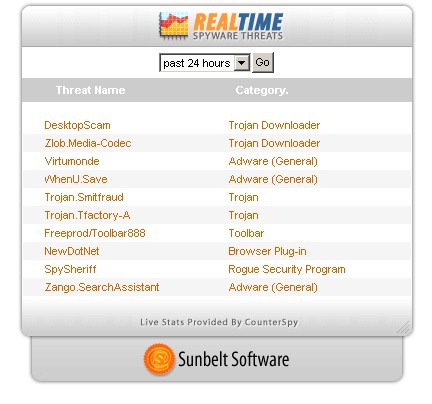
First off, there’s the real-time threat report. This is powered by Threatnet, our user community, and is a list of the top threats being removed from user’s computers.
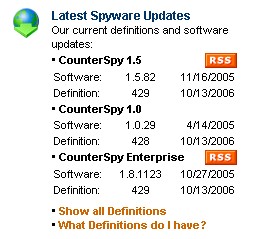
Then, there’s a section which provides the latest threat definition information for our antispyware products:
Under Submit a Threat, you can submit malware to our research team.
And an extraordinarily powerful tool is our automated malware sandbox. This tool will provide you with an exhaustive summary of what a piece of malware is doing, along with a brief listing showing what some other engines are detecting it as. It will also be accessible in the near future at http://sunbeltsandbox.com.
There’s more to check out, so feel free to browse the site.
Alex Eckelberry
Microsoft will allow security developers access to the kernel in Vista 64:
In another change, Microsoft had planned to lock down its Vista kernel in 64-bit systems, but will now allow other security developers to have access to the kernel via an API extension, Smith said. Additionally, Microsoft will make it possible for security companies to disable certain parts of the Windows Security Center when a third-party security console is installed, the company said.
Link here.
Microsoft’s attempt to lock the kernel through PatchGuard was very worrisome to the security community. It would have been a significant handicap to the security community against the battle against malware authors.
Alex Eckelberry
Zango under attack by none other than adult webmasters — for cookies, of all things…
More here at VitalSecurity (note, a lot of the links in this post are to adult webmaster forums with pornographic images — to avoid potential issues, simply turn off images in your browser.)
Alex Eckelberry
Our peripatetic creative director, Robert LaFollette, just got back from Portland, Maine for a photography workshop and took some beautiful photographs.




Link here. There’s lots of additional photos here and you can even pick up the blog post here where a few weeks back, Robert, his wife and I ventured out by boat to the beautiful desolation of Caladesi Island.
Enjoy.
Alex Eckelberry
Recently, WebRoot quietly released a beta of SpySweeper program which includes integrated antivirus functionality from Sophos. Now, it’s official: They will be bundling Sophos’ engine with SpySweeper. PC Tools moved into the virus space a while back by licensing Kasperksy’s antivirus engine, sold as a stand-alone product. And Aluria (now part of Earthlink) has had antivirus functionality for a while now, licensed from Authentium.
Obviously, these companies have all recognized that they need to have antivirus in order to have a solution to compete with the likes of Symantec, Trend and McAfee — and Microsoft. And with VCs (venture capitalists) behind WebRoot and PC Tools, the stakes are high.
It’s interesting to note that all the companies involved have gone the route of licensing the technology versus building it themselves. A year ago, WebRoot apparently was building their own AV engine, but the VCs behind the company reportedly canned development.
There are other issues which highlight the shifting sands of the business: The spyware market is still a good market, but leveling off for these players. WebRoot is seeing its sales peak at about $75 million in sales and PC Tools at about $40 million.
Each have their different strengths: WebRoot owns the retail channel (and importantly, the “tech bench” channel, like GeekSquad) and PC Tools is a powerhouse in online marketing (with their infamous “scan and scare” tactics — scan a machine, find a bunch of “spyware” — usually cookies — and require the user to pony up cash for removal). But WebRoot, no slouch in online marketing, is also getting into the more aggressive tactics, having also moved into the “scan and scare” methods to increase online sales.
Both have made efforts with various degrees of success into the enterprise channel — frankly, where the real money is made. WebRoot did it with big dollar techniques, hiring a field sales force, which they laid off after not seeing the returns expected. PC Tools has gone into the market with baby steps, hiring veteran enterprise sales guy Chris Mossing, and promptly (and inexplicably) removing him three months later and then giving away their enterprise product for free.
PC Tools raised about $20 million a few months back from an Australian private equity firm, part of which went to the founders. WebRoot raised over $100 million (at a high valuation), out of which the founders, Steve Thomas and his girlfriend, Kristen Talley, were given about $80 million. But WebRoot made a deal with some very powerful players, people like Technology Crossover Ventures. At the valuation they invested in, and assuming normal valuation targets, they need WebRoot to be worth well over $700 million to make their target return. That’s a tough play.
And the second tier players like Tenebril and Aluria have gone by the wayside. Both sold out at firesale prices: Aluria for $5 million to Earthlink and Tenebril at $3 million to Process Software.
So out of the triumvirate of antispyware players (WebRoot, PC Tools and Sunbelt) there are some interesting business issues. And in my next blog posting, I’ll discuss some of the technology aspects of the antispyware space.
Alex Eckelberry
Update: See comments section for PC Tools response.
Here’s a post from today:
So how does that qualify me to be one of the inaugural Intel bloggers? Perhaps because I’ve demonstrated that I’m a sucker for a challenge. I’ll be honest, I’m worried about these blogs being able to succeed. I’ve worked on many official IT@Intel briefs and white papers, and the process of authoring these things and taking them through legal, and political review is not for the faint of heart. Everything must be squeaky clean and very precisely aligned. These blogs are a much more open avenue of communication, and do not quite agree with some of the more conservative aspects of Intel’s nature. Some people inside Intel flat out don’t “get blogs”, and like the idea at all. That’s where I smelled a challenge, and I was hooked.
The site can be found here: http://blogs.intel.com/it
Alex Eckelberry
(thanks Dan)
It’s worth noting that after a hailstorm of patches yesterday by Microsoft, the daxctle.ocx vulnerability was not patched.
We have observed this exploit in action in the wild. However, it is not widely used (the two sites we saw it on are now dead) and it is a pretty crappy exploit (meaning, it doesn’t work all that well).
Nevertheless, it is an exploit, it has been observed in the wild, and it’s not patched.
Mitigation: The DirectAnimation Path control can be disabled by setting the kill bit for the following CLSID: {D7A7D7C3-D47F-11d0-89D3-00A0C90833E6} More information about how to set the kill bit is available in Microsoft Support Document 240797. More at CERT.
Alex Eckelberry
(and a hat tip to Altieres Rohr)
One of the most difficult aspects for many people to understand about TCP/IP networking is subnetting. Our friend George Ou wrote an outstanding piece on the subject a while back, and we highly recommend it if you’re looking to get a full understanding of this area.
IP subnetting is a fundamental subject that’s critical for any IP network engineer to understand, yet students have traditionally had a difficult time grasping it. Over the years, I’ve watched students needlessly struggle through school and in practice when dealing with subnetting because it was never explained to them in an easy-to-understand way. I’ve helped countless individuals learn what subnetting is all about using my own graphical approach and calculator shortcuts, and I’ve put all that experience into this article.
Link here.
A great man has died, a man of integrity, drive and intelligence who did a great service to our industry.
We regret his passing.
Alex Eckelberry
And it’s a big one.
Patch patch patch.
(This is supposed to be a G-rated blog, but my first response to this was: WTF?)
We see all kinds of stuff.
![Effectivetoolbar_1231231231123[1]](http://sunbeltblog.eckelberry.com/wp-content/ihs/alex/effectivetoolbar_1231231231123%5B1%5D.png)
It’s a “terrorism” toolbar made by Conduit (formerly EffectiveBrand) and distributed by an apparent security firm run by a fellow who advertises himself as “Internet Anthropologist”.
It promises to:
And
TOOLBAR Includes FREE: Arabic Keyboard, 1000 terrorist sites, “Al Qaeda” manual, steganography tools, translation Arabic to English, and a list of forums they use, Encrypted email and IM. Music Juke box, all FREE, to help in your Anti-terrorist surfing.
Free EASY VPN, Proxy tester, Intel updates, Investigative TOOLS, SECURITY systems, Terrorism SOURCES and a group to work with if you want. Knowledge Base, Gov. Sources, VIDEOS, posting tools, who owns site, location etc. Screen grabber, NAS AND CIA PHONE NUMBERS, CUSTOM RSS feeds, Also NBC survival FAQ. Radiation and Blast Caculators, Home made Fallout Meter, Rootkit Hunters.
A little moving ticker of “Terrorist Events” gets installed up at the top.
Choice phrases include:
North Korea claims nuclear test DONE
Now They Show Themselves
PEOPLE LEAVING ISLAM, CAUSE
Letter Casts Doubts on Iran’s Goal for Uranium
Armor Saves ‘Lucky’ Marine in Iraq
Pennsylvania: Man Accused of Qaeda Conspiracy
Blessed be al Qa’ida and Arab Mujahideen
“Prime Minister” of Jihadism
Terrorists adapt to damaged Al Qaeda
“Serri Lel-Ghaya” (top secret)
MUSLIM IDENTITY
Mr. Buffett’s ( BILLONAIR ) Excellent Idea
Allah’s reality
Allah’s fatwa against terrorists???
mockery of Islam
Each ticker is linked to an article like this one:
And the Intel button links to this page:

And check out the pull-down menu:
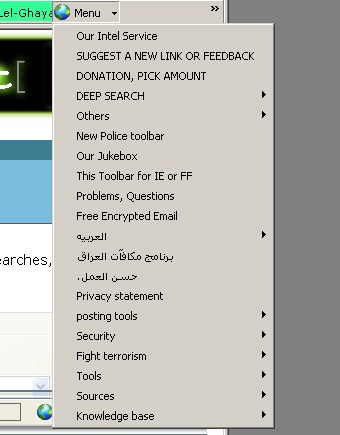
But serious antiterrorism folks need a rest, too, right? No problem! Notice “Our Jukebox”? It’s linked to a collection of YouTube music videos so you can “listen while you work”.
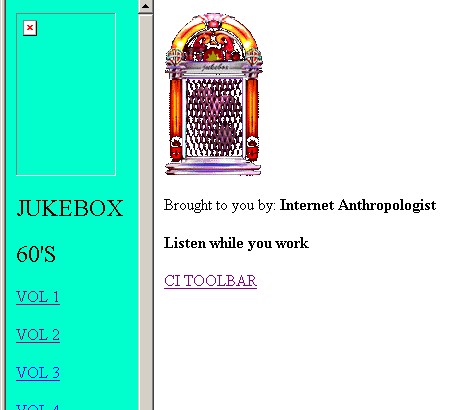
The toolbar can be downloaded from a site that is run by “Gerald”, who calls himself “Chief Forensics Computer Researcher (tracking & Research)”. His background is as an “ex-Private Investigator, former Stockbroker ( series 7 and 13 ), and Degreed Internet Anthropologist ( study of how Internet culture works).” There’s even a Powerpoint available on his company.
An example of some of the text on his site:
We have Contacts at all major news CNN, ABC, Fox, CBS, TIME, MAGS & NEWSPAPERS
Inputs to major US Intelligence services, Pentagon OASD/C3I/ITD (OSD-DOM) , and NIPR.mil and Air Force Sec, and Army signal command, and SSG/SWSN, and can serve as a untracable conduit for data from Information Brokers.
NOTE: We have chose not to use a Domain name/url for security reasons. A DOS (denial of service) attack takes several hours to set up, a NON-domain URL takes 10 min. to change, it takes weeks to change a Domain URL. Any questions, you can email US.
But what, there’s more! There’s even a link to another toolbar in the product, a police toolbar!
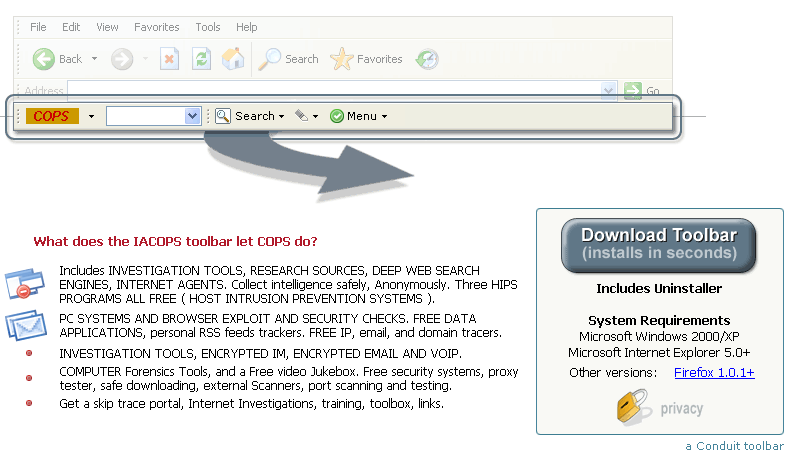
This terrorism toolbar looks harmless enough and is distributed by an apparently well-meaning fellow. In fact, there’s probably even some useful links in the toolbar if you’re really into this field.
Like I said, we see all kinds of stuff.
Alex Eckelberry
With copious thanks to Dude VanWinkle, Adam Thomas, Tom Robinson and Patrick Jordan