Sunbelt Weekly TechTips #32

Vista: Don’t let users write to removable media
USB flash memory drives can be a great convenience – but they can also pose a security threat. It’s awfully easy for someone to download data to one and make off with it. And if there’s a CD or DVD burner installed, that’s another way someone can take away data. Yet another option is to download data to an MP3 player or cell phone. Vista gives you a way to block the use of these devices through Group Policy. You can allow people to read data on their devices but not write to them, or you can block the use of the devices altogether. To find out how, see my blog post of February 11 titled “Block Removable Storage Access with Vista Group Policy” here.

How to enable print job notifications in XP
If you share printers on your home network, all the computers that use a printer may not be in the same room as the printer. It would be nice to know when your document has been printed. You can enable print job notification so users will know when their jobs have been printed. Here’s how:

  1. Click Start and then click Printers and Faxes.
  2. Click File and select Server Properties.
  3. Click the Advanced tab.
  4. Select “Show informational notifications for network printers.”
  5. Click OK.

Why partition disks, anyway?
Having a hard disk divided into more than one partition is important if you want to dual boot two or more operating systems (for example, XP and Vista). You can’t install them on the same partition without creating a lot of headaches, so you need to either have the disk partitioned or have more than one physical disk installed in the computer.

But even if you don’t dual boot, having multiple partitions allows you to install your operating system on one partition and your data on another. Then if you need to reformat and reinstall the OS, you don’t wipe out the data by doing so.

In addition, having more smaller partitions instead of one huge one can increase performance by effectively reducing access time to the disk. For an explanation of how that works, click here.

Slow performance when you use the Favorites menu in XP SP2
If you get slow performance on your Windows XP Service Pack 2 computer when you use the Favorites menu in Internet Explorer or Windows Explorer, it may be because you’ve redirected the My Documents folder to a network location and the desktop.ini cache is enabled. There’s a hotfix available to fix the problem. To find out how to get it, see KB article 898612.

Damaged profile causes problems in XP

If your user profile becomes damaged, Windows XP will create a new profile for ou. However, you may find that your My Documents folder is empty and the settings for your Outlook, IE and Passport accounts have to be reconfigured. Luckily, your documents are probably still on the hard drive. To find out how to get things back to normal, see KB article 326688.

You can’t install XP Pro and Home to separate folders or partitions
If you try to install XP Pro (or Vista) in a dual boot configuration with an existing installation of XP Home, you may find that you aren’t prompted for a location to install the second operating system. Instead, Setup wants to install in the same folder where Home Edition is installed. This happens because you’re using Express Setup. To install to a different location, you need to use Advanced Setup. For instructions on how to do that, see KB article 283236.

Deb Shinder, Microsoft MVP

Sunbelt TechTips #31

How to log onto XP if you forget your password
With all the information we have to remember these days, it’s not a surprise that sometimes folks forget their logon passwords. If you created a password reset disk, just follow the directions for using it in KB article 305478.

If you never quite got around to it, you can still log on as an administrator and change the password for your primary account. Once you’ve logged on with an admin account, just do the following:

  1. Click Start Run.
  2. In the Open field, type: control userpasswords2
  3. Click OK.
  4. Click the user account for which you’ve forgotten the password and click Reset Password.
  5. Type a new password and confirm it, then click OK again.

Note that if you’ve used a public key to encrypt email messages or encrypted files with EFS, you may not be able to access them after resetting the password this way. That’s why you should create a password reset disk – now!

Daylight Saving Time change: how will it affect your computer?
One aspect of a Energy Policy Act of 2005 mandated a big change in daylight saving time, which will be extended by four additional weeks starting in 2007. Well, 2007 is here and the change takes effect on March 11, when DST starts three weeks earlier than usual. Folks with older computers are wondering what problems, if any, the time change will cause. If your computer is relatively new and automatically updated, you probably don’t have anything to worry about. Older operating systems may require you to manually update. Microsoft is making update tools available for Windows, Outlook, Exchange and mobile products.

For more info about Microsoft products affected by the change and what you should do to make the transition easier, including links to update utilities, click here.

All versions of Windows can be updated using the procedure in KB article 914387 here.

OneNote 2007: Give it a Try
OneNote is Microsoft’s notetaking application. It really shines on Tablet PCs, but is also a useful way to organize your notes on any Windows computer. The latest version, OneNote 2007, includes some nice updates. The drawing tools are better, navigation is easier and you get full drag and drop functionality. You can also create multiple notebooks for different projects, and you can search for text within pictures and spoken words in audio and video recordings.

Other improvements include ability to print to OneNote, support for web links and links to other documents and files or other pages within the notebook, and the ability to embed files from other apps into notebook pages. You can even share notebooks when working with others. But you don’t have to take my word for it. You can download a 60 day trial version and see for yourself. Visit the web site here.

Preview files in Explorer without opening them
One of my favorite features in Vista is the ability to view files so much more easily in Explorer. How many times have you been searching for a document and not been able to tell whether you’ve found the right one by the name alone? XP gave us the ability to view thumbnails of picture files right there in Explorer, and Vista takes it a step further, allowing you to see thumbnails of all sorts of files and view the contents of documents in the preview pane (similar to the way you can preview email messages in Outlook) without opening the files. You can see the preview pane in Figure G of my article titled More Than Just a Pretty Interface: File Management with Vista Explorer, here.

Changing file names in Vista
Here’s one of those very little things that help to make an OS more usable: in XP, if you want to rename a file, you have to type the entire new name, including the file extension – even though in 99% of cases you want the extension to remain the same. If you forget and just type the name, you get a message warning: “If you change a filename extension, the file may become unusable. Are you sure you want to change it?” When you click No, you have to start all over again, renaming the file and remembering this time to type the extension, too. Vista is a little smarter, and by default when you select “Rename” from the right context menu, only the name itself (preceding the dot) is selected for renaming. I like that.

Zero Day Vulnerability in Microsoft Word
Last week, Microsoft confirmed that there’s an unpatched vulnerability in Word that’s being used by attackers in so-called “zero day” attacks. These are attacks that take advantage of software vulnerabilities for which there is no currently available fix. “Zero day” is the time between the release of the malicious code and the release of a patch to protect against it. Read more about the latest attack here.

Meanwhile, a new zero day attack was reported Sunday that exploits Microsoft Excel. Until a patch is available, you should avoid saving or opening Excel files and attachments unless you’re sure they’re safe. Read more here.

How to restore XP backups to Vista computer.
If you’re looking for a way to restore backups of your data that you made with the XP built in backup utility to a Vista computer, there is help. Just a little over a week ago, Microsoft released a new tool called the Windows NT Backup-Restore Utility. Although the name may confuse some folks into thinking it has something to do with Windows NT computers, it’s actually designed for the purpose of letting you restore backups made with the Windows XP and Server 2003 backup tool (the file name of which is NTBACKUP.EXE) to computers running Windows Vista or Longhorn Server.

It works with both the 32 and 64 bit editions of Vista and requires about 5 MB of disk space. You install it on the Vista machine and you can restore your XP backups (with the .BKF extension) to your new Vista machine.

It’s a free download from the Microsoft web site here.

“Explorer.exe has generated errors and will be closed by Windows”
If you have a Windows XP computer that was upgraded from a previous operating system, you might get an error message the first time you log on, along with a blank desktop or no desktop at all. What’s up with that? It’s usually due to the fact that Norton CleanSweep was installed in the previous OS. You’ll need to remove the CleanSweep program – but how do you do that with a blank desktop? There are a few different methods, which are described in KB article 314867.

You’re prompted to activate XP every time you start your computer
This is an annoying one. Even though you’ve successfully installed and activated Windows XP, you get prompted to activate Windows again every time you reboot. This is because a script is interfering with Windows activation. For both a Guided Help resolution and the manual solution, see KB article 312295.

“Access Denied” error when you try to encrypt My Documents in XP
If you try to use the cipher.exe command line program to encrypt the My Documents folder in Windows XP, you might get an Access Denied error message. What’s up with that? The latest service pack fixes the problem, but if you don’t want to install it for some reason, there’s a separate hot fix available from Microsoft. To find out how to get it, see KB article 839220.

Deb Shinder, Microsoft MVP

Fun at RSA

I’m currently at the RSA Conference and we’re having all sorts of fun. RSA is ground zero for the deal-making side of security (partnerships, licensing deals, etc.) and an extremely busy show from that aspect.

Of course, in between business meetings, we had to have some fun, so we started pwning the public terminals. Brian Krebs at the Washington Post was around and got on the story, and then Ryan Singel at Wired came over and took some pictures.

Later, Chad (our head of business development) put on his tux to represent us at the SC Magazine Reader’s Trust awards (where we were finalists for Best Anti-Malware Solution and Best Email Security Solution).

And… we WON Best Email Security Solution! Our Ninja Messaging Security solution beat out the email security products from Barracuda, Fortinet, Vircom and Sonicwall. I think many of us are still in shock, as this is a huge honor.

Alex Eckelberry

Sunbelt Software Holding Press Conference in Second Life

Today Sunbelt launched its presence in the virtual world Second Life, becoming one of the first antispyware providers to hold an ‘in-world’ press conference introducing the major upgrade release of CounterSpy Version 2.

The event will be held on Tuesday, February 6, 2007 at 4pm EST / 1pm PST and Linden time; hosted by Stu Sjouwerman, our founder and vice president of marketing for Sunbelt.

Stu, appearing in avatar form, will discuss the purpose and goal of Sunbelt Software’s venture into Second Life as well as deliver a brief tour of the Sunbelt Island and an overview on the new features of CounterSpy Version 2.

Teleport directly to Sunbelt Software Island
To go directly to the Sunbelt Software Island, paste the following URL into a web browser or simply click on the link: http://tinyurl.com/37opnu

Instructions for Attending Sunbelt Software’s Press Conference
To attend the press conference on Tuesday, February 6th beginning at 4pm EST/ 1pm PST and Linden time, you will need to have a Second Life avatar. If you do not have one, the registration is easy and free.

The next step is to download the software to your system . You might also want to ensure your computer meets Second Life’s minimum system requirements .

Once you’ve completed these steps, login with your avatar name and password, and visit the Sunbelt Software Island.

Introducing CounterSpy V2

Today, after 7 months of beta testing, we are launching CounterSpy V2, our next generation antispyware product. The launch is timed to coincide with the RSA conference (I’m currently at this show.)

There’s a lot to be said about this new version, but the key features are:

  • Hybrid engine — CounterSpy uses a new hybrid engine, which incorporates our traditional antispyware engine with VIPRE, our new antivirus technology. Why would we put an antivirus engine into CounterSpy? It’s simple: It allows us to do a better job of catching and removing spyware. These days, spyware is increasingly complex and blended, and VIPRE gives a “turbo boost” to the CounterSpy technology. The VIPRE(tm) version that’s in CounterSpy is 1.2, which is basic. In a few months, we’ll add VIPRE 2.0, which is even more evolved.

    VIPRE itself will ultimately branch out to become a stand-alone antivirus product, competing with the other major AV players (the philosophy of VIPRE and of our strategy is outlined in my earlier blog post here — and it’s worth reading if you want to understand our strategy.)

    Note that CounterSpy V2 is not a stand-alone antivirus product. For example, a full antivirus product scans incoming email, which CounterSpy does not. In addition, the VIPRE version that is in CounterSpy doesn’t support DOS viruses, macro viruses, and the like — which are more in the domain of a typical AV product. However, if you run CounterSpy alongside your traditional AV product, you’ll get an amazingly thorough coverage of all the possible threats that you might get. And yes, CounterSpy works fine running alongside any AV product.

  • It’s faster and more efficient — The underlying engine has been re-written for faster performance. I think you’ll find the performance improvements are quite remarkable. This thing is fast and unobtrusive.
  • Kernel-level Active Protection — Counterspy’s Active Protection(tm) now resides in the kernel — the core of the operating system. This means that we can stop threats before they have a chance to execute. This protection is both behavioral (meaning, it looks for potentially dangerous activities) as well as signature-based (meaning, it looks for threats based on unique signatures in our database). It’s very powerful and can be set to how aggressive you want it to be. For example, if you don’t want a lot of warnings about possible threats, you can set it to it at the “Trusting” setting. But if you want to know as much as possible as to what changes are occurring on your system, you can set it to a tighter security setting. It’s pretty cool.
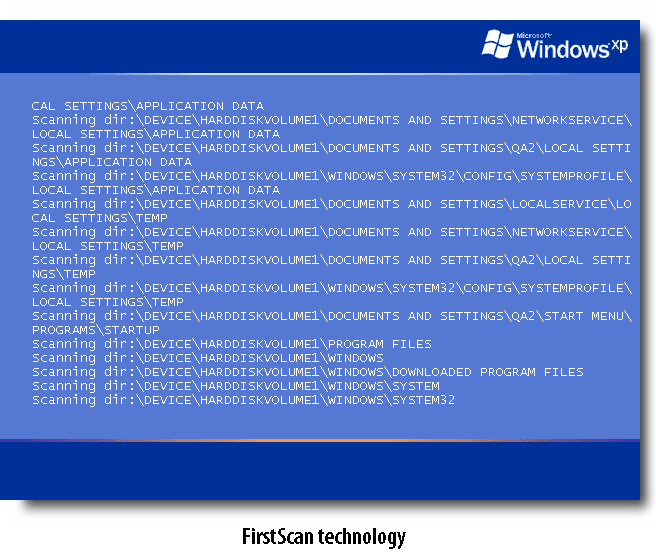
  • FirstScan — CounterSpy V2 also has FirstScan technology, which scans certain locations of the drive and removes malware prior to Windows launching. Triggered through a CounterSpy system scan, FirstScan(tm) does its work directly to the disk, bypassing Windows APIs, right about the time that chkdsk would run. (FirstScan will only run when CounterSpy finds suspicious files).
  • Vista support — CounterSpy V2 supports Vista 32 bit and integrates with the Vista Security Center. Also, if you are doing an upgrade from XP to Vista and have CounterSpy V2 installed on your system, CounterSpy will automatically work in the new environment without needing to download a new version. This release supports Vista 32–bit and in the forthcoming months, we’ll add support for 64–bit.

You can read more shameless propaganda here.

One final note: The effort to make CounterSpy V2 run on Windows 98SE and ME would have been herculean. In the end, we decided that V2 could not support Win 98SE and ME. Instead, users of these older platforms can run version 1.5, which is still available and will continue to be supported with definition updates.

So if you have a chance, give CounterSpy V2 a whirl and let me know your thoughts. I’m very curious to know what you think.

Alex Eckelberry

Recognizing Paul and Robin Laudanski

Last week, CastleCops celebrated its 5th anniversary. This was widely covered on the web, and the event even included a writeup in the Washington Post’s Security Fix blog.

I want to join everyone else in congratulating CastleCops on their anniversary. But I thought I would add a few comments on the people behind CastleCops: The husband and wife team of Paul and Robin Laudanski.

P1010112I first got to know them both a couple of years back when CastleCops took on the task of managing our consumer forums for Kerio and Counterspy. This was just around the time that Paul decided to quit his full-time job and do CastleCops with all of his energy.

I had many of the legendary “Paul and Robin” teleconferences, where Robin and Paul alternately finish each others thoughts. It’s something one has to experience, and it shows how extraordinarily well-matched this couple is. I have rarely met a couple more totally compatible with each other. And what parents they are — their son Peyton is lucky to have them (and another child is on the way!).

Later, Paul and I started PIRT, a volunteer group dedicated to taking down phishing sites. Paul later evolved PIRT to become MIRT — the Malware Incident Response and Termination group. MIRT broadens the activities of PIRT to the takedown of actual malware sites, along with sharing of malware samples with vetted security companies and researchers. (They also submit results to VirusTotal, and what they now have is a kind of running tally as to the effectiveness of antivirus engines against new threats.*)

Now here’s the truth: We may have started PIRT together, but the whole operation has been Paul and Robin’s and they ran with it with such incredible enthusiasm and gusto that they have both earned my life-long admiration.

CastleCops is the kind of organization that would make some web 2.0 MBA-type all atwitter with glowing palaver about community, etc. But Paul and Robin (while I’m sure they’d never reject having big bucks) aren’t in it for the money. They are passionate about security and helping people. The amount of personal time and energy Paul has put into PIRT’s back-end systems, without any compensation, is something to behold.

Paul and I have had some memorable experiences together, like the incident that got us talking about starting PIRT — a takedown of a phishing site hosted on a financial company’s website where the contact at the company (a mindless idiot) told both of us that she could not track the responsible person down (apparently, the responsible person had given her strict orders not to contact him when he was offsite). When I blogged the incident later, one of the partners of the company complained of defamation.

Or the memorable late-night incident where a truckdriver in Miami (who barely spoke English) had a phishing site on a server that he hosted in his home office (some local guy, “Ernie”, had set it up for him, the truckdriver himself was computer illiterate). This fellow, who was very nice and well meaning, believed that phones were objects that were yelled into at the highest possible decibel (“OK I GONNA GET ERNIE TO FIX IT RIGHT AWAY BUT CANNO REACH HIM!!). Hearing Paul patiently explain how to hack into the server (the fellow didn’t know the user name or password) was an object lesson in the art of patience. However, after endless aggravating instructions, we finally said “TURN OFF YOUR SERVER”. That fixed the problem at least for the night until “Ernie” could show up (and it was yet another example of a poorly maintained Apache configuration).

Paul, who majored in math, is the sharp engineer behind CastleCops. But Robin is the “iron fist in a velvet glove”. I remember Robin telling me matter-of-factly how she drove from Western Canada in the middle of winter to Pennsylvania, alone and with something like $25 to her name. And when she takes a stand, watch out. I really do feel sorry for those people who try to get away with things with Robin watching.

So to Paul and Robin: Congratulations. And to the rest of all the CastleCops volunteers, thank you for all your help. The work you do for the community is extraordinary and well worthy of praise in itself.

Alex Eckelberry
* Before I get complaints, I have to put in the disclaimer that VirusTotal results are not the be-all-and-end-all of judging effectiveness, as they do not take into account what a fully-fledged AV product would do. The results are merely one type of way to test AV engines.

Some odd stuff from BG

Bill Gates ranted recently about about Apple’s Jackanaping, Coxcombish, Arrogant and Supercilious (but Admittedly Funny) Advertising Campaign.

He has some good points.

But I found this quote a little odd:

Nowadays, security guys break the Mac every single day. Every single day, they come out with a total exploit, your machine can be taken over totally. I dare anybody to do that once a month on the Windows machine. [My emphasis.]

Huh?

Alex Eckelberry

Sleazy antispyware marketing

We see it all. “Review sites” that list the “top-performing” antispyware apps, but are funded entirely through sales commissions (also called affiliate commissions). You want to be #1? Pay a higher commission.

Or, the increasingly common scan-and-scare tactics — scan your machine, come up with a bunch of cookies or false positives (and sometimes, even actual spyware), and then demand payment to fix it. (Even though the payoffs are absolutely staggering with this type of marketing, we’ve refused to do it and always offer a full 2 week trial, which allows you to remove anything you want without making you pay a dime.)

And then there’s the outright fakes, which load fake spyware on your machine and then demand payment to remove it.

And so on.

But now, there’s a fellow who calls himself the AntispywareGod. He has a long rambling blog post about how well SpyZooka performs for him (SpyZooka used to be on the Rogue Antispyware list but was delisted back in 2005). Of course, you are directed toward a link that pays him an affiliate commission if you buy the program.

That’s fine, no problems there, and he has every right to make money off his “opinion”.

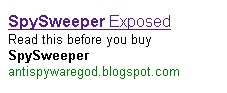
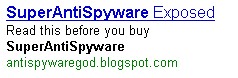
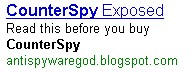
But it’s how he gets people to the site that will have a lot of antispyware companies atwitter. He’s using Google Adwords with the misleading title of (antispyware product name) exposed.

For example, do a Google search for SpySweeper, an entirely reputable antispyware product. You get this adword:

Spysweeperaffiliate0001

Or SuperAntispyware:

Superantispywareaffiliate

Or CounterSpy:

Counterspyaffiliate0001233

Whatever.

Alex Eckelberry

RIP the dash

This is a silly blog post, but a personal triumph of mine. For years, we’ve had the domain sunbelt-software as our primary domain. And it drove me mad.

I remember once not getting an email because the person had addressed it to alex@sunbeltdashsoftware.com. And typing it out was always a pain, because the dash is one of those “stretch” keys that you have to move or stretch your finger a wee bit to get. So you’d mistype.

Finally, the dash is gone. You can access Sunbelt Software by either going to http://www.sunbeltsoftware.com or the old http://www.sunbelt-software.com.

I’m so happy.

Alex Eckelberry

Sunbelt Weekly TechTips #30

Photoinfo_450x367New Add-on for Digital Photo Buffs
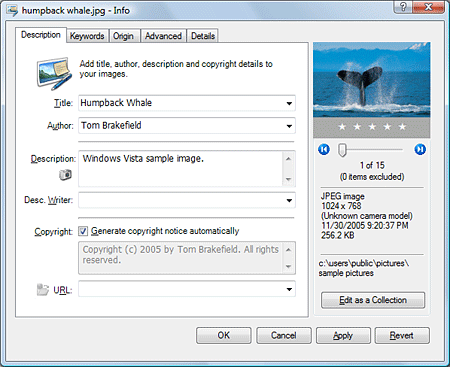
This week, Microsoft released a free add-on for Windows XP SP2 and Vista called Microsoft Photo Info. It lets you add, change or delete properties for digital photos from inside Windows Explorer. For instance, you can record information such as the author of the photo, descriptions, copyright notices and more (even technical info such as the aperature, shutter speed and lens focal length). It’s a 4 MB MSI file that you can download from the Microsoft web site here.

XP Support Life Cycle Extended
Last week Microsoft announced that they are extending the support life cycle for Windows XP Home and Media Center Editions to April 2009 for mainstream support (with extended support lasting five years beyond that, to 2014). Normally consumer products lasts for five years, meaning XP Home’s support would have ended December 31, 2006 under the normal procedure. Microsoft had already extended that. This is good news for consumers who don’t plan to upgrade to Vista anytime soon. Read more here.

Microsoft PowerShell fits the Bill for Command Line Lovers
The GUI is great, but some computer users never got over their first love: the command line interface. Sure, there are hundreds of tasks you can perform at the command line in Windows, but some want even more. For command line lovers, Microsoft has developed PowerShell (formerly known as Monad), which gives you a more power at the command line. It runs on XP, Vista, Server 2003 and Longhorn Server, and it’s a free download here.

XP Events and Errors Database
What does that error code mean? Unfortunately, sometimes they’re pretty cryptic, but you can search the Microsoft Errors and Events database to get more information and find out what your operating system is trying to tell you. Check it out here.

Free Wi-fi Access for Vista Users
T-Mobile has teamed up with Microsoft to offer three months of free wireless hotspot access for those with Vista on their laptops. The offers runs from January 30 to April 30, and includes the company’s hot spots in Starbucks, Borders and Kinko’s. There are thousands of T-Mobile wi-fi hotspots around the country. For more information, click here.

Vista Service Pack 1 is already in the works
We know many computer users whose rule of thumb is not to upgrade to a new operating system until the first service pack is released. Well, Vista goes on the market to consumers at the end of January (it’s been available to businesses for a couple of months), but Microsoft is already hard at work on Service Pack 1. Companies that have deployed Vista have been contacted, requesting that they volunteer as beta testers of SP1. Speculation is that the service pack will be released by the end of the year. Read more here.

Test Drive Vista without Installing It
Want to see all the new features in Vista before you make the decision about upgrading? Sure, you could go hang out at your favorite electronics store and play with the machines there, but if you’d prefer to do it in the comfort of your home, without eager salesfolk hanging over your shoulder, you can use Microsoft’s web-based Business Test Drive to log onto a virtual machine running Vista and explore the OS on your own.

How to Distribute a Custom Desktop Theme
If you create your own customized theme in Windows XP, you might want to share it with others or put it on another computer that you use so you’ll have a consistent desktop appearance. The theme contains information about your wallpaper, screen saver, icons, fonts, colors, mouse pointers and sounds. To create a theme:

  1. Click Start | Control Panel | Appearance and Themes.
  2. Click Display.
  3. Click the Themes tab and select an existing theme to modify.
  4. Through the Display Properties dialog box, make the changes you want. Then click the Themes tab and click the Apply button.
  5. Click Save As and type a name for the new theme.
  6. Click Save, then click OK.

Your theme is saved by default in the My Documents folder with the .theme extension. You can send this file to others via email or put it in a network share. To install it on another computer, once it’s on that computer’s hard disk:

  1. Right click the desktop and click Properties, then the Themes tab.
  2. Click the Browse button and navigate to the folder where the theme file is located.
  3. Double click the theme file and click OK to load the new theme.

How to force users to log off.
If you want to force users to log off (say, after an hour of no activity), you can use the Winexit.scr utility in the Windows 2000 Resource kit to do this (yes, it works with XP, too). It’s actually a screensaver file that logs the current user off after a specified time period. The resource kit tools can be downloaded here.

Locate the winexit.scr file on your hard disk, right click it and select Install. The Screen Saver tab of the Display Properties dialog box will appear. Click the Settings button and click Force Application Termination. In the Countdown For N Seconds field, type the number of seconds before the user is logged off. You can also type a message to appear during the logoff countdown. For more info, click here.

How to Prevent a Program from Being Displayed in Most Frequently Used Programs
The Most Frequently Used Programs list on the Start menu can be handy for quickly accessing your favorite programs, but if you share a computer with others, you may not wish for some of your programs to be displayed there. You can prevent a particular program from being displayed by editing the registry. For instructions on how to do it, see KB article 284198.

Remove User Account Name from Windows Messenger
If you log onto the .NET Passport service on an XP computer, your logon info is added to a list of user accounts that’s displayed when Windows Messenger starts. If you don’t want your account information stored here, you can remove your instant messaging account from Windows Messenger. Step by step instructions for both standalone/workgroup and domain computers can be found in KB article 310705.

Enable Automatic Completion for the Command Prompt
If you want to configure XP so it will automatically complete file and folder names when you’re typing at the command prompt, thus saving time and energy, you can do so in a single session by typing a control character, or you can activate it permanently by editing the registry. Find out how to do both in KB article 310530.

Deb Shinder, MVP

Are Our High Tech Gadgets Putting Us All in Danger?

We all know that technology can be used for both good and evil: the splitting of the atom led to both nuclear power plants and nuclear bombs; GPS can be used to find lost children or by dictatorial governments to keep tabs on their citizens; RFID can be used to improve the efficiency of stocking a store’s inventory or to invade our privacy, and so forth. The Internet can be used to keep in touch with faraway family members and expand our knowledge base, or it can be used by pedophiles to prey on children. These are all well-known dangers of technology.

But what about the more hidden dangers that come with the proliferation of technological gadgets that we enjoy in today’s world? You might not see that cell phone or MP3 player in your pocket as a threat to anyone, but can it be putting you – and even others – in danger every day?

We’re not talking about the long-debated question of whether radiation from mobile phones causes brain cancer, or whether the anti-social lyrics of some popular songs are influencing young people to engage in anti-social behavior, although those are worthy topics for the medical community and psychologists/sociologists to investigate. What we’re talking about today is the possibility that our tech toys may be placing us in imminent physical danger, by distracting us from the world around us.

A few weeks ago, in this newsletter we discussed the trend toward high tech automobiles. Many cars today have built-in GPS, audio systems that are fancier than ever, DVD players built into headrests, and there are even full fledged computer consoles available that go into the dashboard, and companies are gearing up to offer mobile wi-fi connections designed to keep you on the Internet while you’re driving. All of this is very cool – but several readers wrote to bring up safety concerns about having all this entertainment equipment in vehicles.

Peter K. put it this way: “Remember now, you’re driving a 3000 pound car at 60 mph. Put another way, that’s 88 feet every second! It has been measured; taking your eyes off the road to change the radio station and back again comes to almost 3 seconds. Doing the math, that’s 264 feet. More than the length of 3 1/2 semi’s. That’s a 24 lane intersection! For the GPS navigation display, even more. Try and scroll through your cell phone’s numbers looking for a name to call. You may end up never making that call. At that speed, no seatbelt or air bag will save you.”

Of course, manufacturers of in-car DVD players market them as being for the use of the passengers – but I’ve passed vehicles on the road at night in which you could see a movie playing, and the driver was the sole occupant. In many jurisdictions, having the screen visible to the driver’s seat is against the law, but if the screen is movable, that can be difficult to enforce unless the driver is caught in the act.

And it is possible to carry the concept of having no distractions available too far. How many of us have had the experience of using the car radio or even a cell phone conversation to keep us awake and alert during a long, dull drive?

No one deals with more distractions while driving than the police themselves. Back in my law enforcement days, I found one of the most challenging aspects of the job to be routine patrol, where you’re expected to talk on the radio, look for suspicious behavior on the streets and still somehow drive safely. These days, most police cars also include mobile display terminals (MDTs), for an added distraction. Yes, in some jurisdictions, police work in pairs and the officer in the passenger seat operates the equipment, but in most smaller departments and many large, budget-challenged ones, two-officer cars is a luxury that’s unaffordable. Multitasking while driving is a way of life.

A National Highway Traffic Safety Administration study a few years ago estimated that 25% of police-reported accidents involve some form of distraction. But interestingly, cell phones and other high tech devices accounted for only a small percentage of those accidents. Many of the distractions that cause accidents are very low tech: talking to passengers, tending to children, adjusting the controls (windshield wipers, lights, air conditioning, mirrors), eating, smoking, swatting insects, and so forth. Still, it makes sense that having more and more devices in the car, even those that aid in driving such as GPS units, provide more potential for distraction.

And it’s not just in the car that the distraction of tech toys can pose a danger. I see people all the time now, walking down the street, in the mall, on airplanes and in other public places, whose glazed eyes give away the fact that they’re oblivious to what’s going on around them even before you notice the tell-tale earbud. Whether listening to music, audio books or their Bluetooth phones, they obviously aren’t paying attention to anything but the “bug” in their ears. Sometimes I wonder how many folks have walked out in front of traffic because of this. And maybe it’s just my old cop training, but if a terrorist takes over my plane or someone is robbing the store, I don’t want to be the last to know.

What do you think? Is the proliferation of high tech toys making the roads and other public places more dangerous for us all? Or can we, with the proper training, learn to effectively multitask while driving without creating a safety hazard? Have you ever been guilty of making cell phone calls, watching DVDs or fiddling with the sound system while driving? Should there be laws against such activities? If so, should there also be laws against non-high-tech distractions, such as crying babies, chatty passengers and drive-through restaurants that encourage behind-the-wheel eating? Let us know your opinions and experiences.

Deb Shinder, Microsoft MVP